
WPThumbs
Themes Plugins By purpose By industry Best-of lists Fix it guides
Free Plugin by PickPlugins v2.3.25

Accordions

Create sleek accordions, tabs, FAQs, and image accordions with a React builder featuring advanced styling, animations, OpenAI support, and customizati …
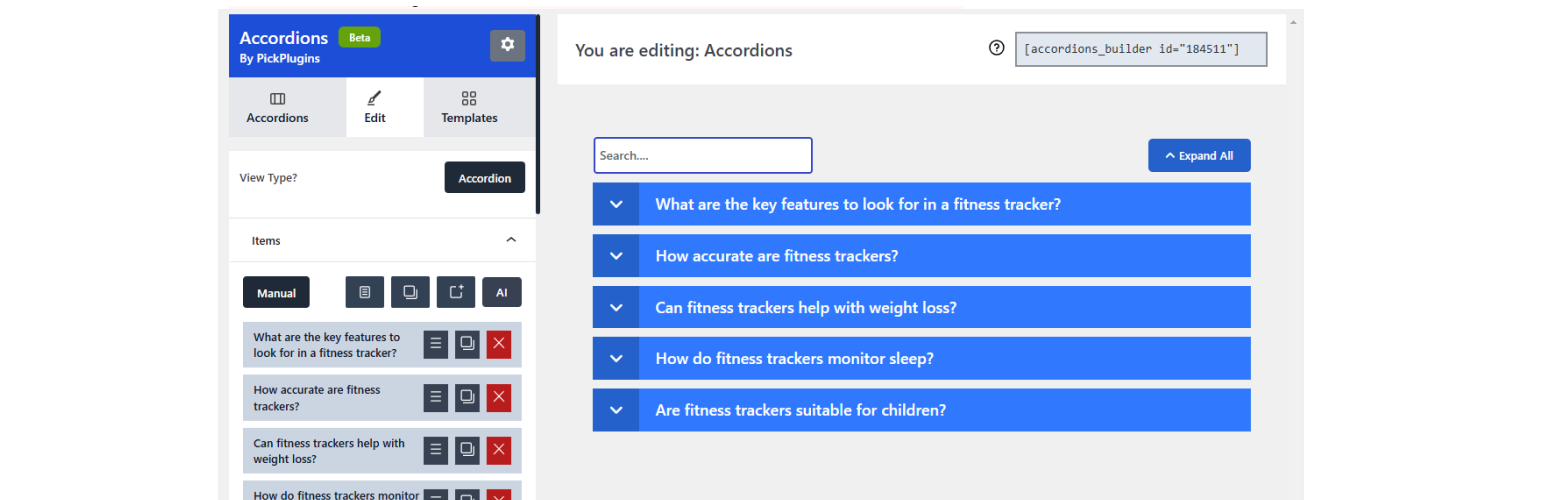
Accordions

The facts

Rating
4.5★ from 90
Active installs
20k+
Price
Free
Last updated
8 Jun 2026
Added
Oct 2014
Requires WP
5.0
Tested up to
WP 7.0.4
Downloads
1,356,889

Our analysis

AI-assisted

Accordions is a WordPress plugin that enables you to create interactive accordion elements, such as tabs, FAQs, and image accordions, using a React-based interface. It offers various features like auto play, search functionality, and customizable styles to enhance the presentation of content on your site.

This plugin is suitable for users looking to improve content engagement on their WordPress sites. It is particularly useful for creating structured content layouts that are visually appealing and easy to navigate.

Best for: This plugin suits WordPress users who want to create engaging and interactive content elements.

What it does well

  • Offers a versatile accordion builder for various content types
  • Includes advanced styling options for customization
  • Supports SEO through schema integration
  • Features AI tools for content generation
  • Allows lazy-loading for improved performance

Where it falls short

  • No pricing information provided for premium features
  • Limited details on specific compatibility with themes or other plugins

Verdict

Accordions provides a robust solution for enhancing content presentation on WordPress sites. Its range of features makes it a practical choice for users aiming to improve site interactivity.

From the developer

PickPlugins's own description of Accordions, lightly tidied.

Transform the way you present content on your WordPress site with our React-based Accordions Builder Plugin. This versatile tool empowers users to create visually engaging and highly functional accordion elements, including tabs, image accordions, FAQs, toggled content, and more, all within an intuitive interface.

Accordions by PickPlugins

Key Features

Accordion Functionalities

  • Auto Play: Automate the transition of accordion items for dynamic content display.
  • Click to Scroll Top: Automatically scroll to the top of the accordion upon interaction for enhanced user navigation.
  • Expand/Collapse All Button: Includes customizable text and icons with animations for seamless accordion management.
  • Search Feature: Easily find accordion content with an integrated search function.
  • Idle and Toggled Icons: Add animated in-out transitions for icons, enhancing visual appeal.
  • Accordion Label Icons: Decorate your labels with custom icons for a professional touch.
  • Schema Integration: Optimize your accordions for SEO with structured data support.
  • Keep Expand Other: Allow multiple sections to remain open simultaneously for flexible content display.
  • URL Hash Support: Link directly to specific accordion items for better navigation.
  • Label Counter: Display the number of items or entries dynamically for user clarity.
  • Content Animations: Smooth in-out animations make your accordion content more engaging.

Powerful Builder Tools

  • Advanced Style Options: Customize each accordion section with our powerful style component. Adjust fonts, colors, spacing, and more for a pixel-perfect design.
  • Content Editor: Effortlessly manage your accordion content with features like sortable items, duplication, and copy-paste between accordions.
  • OpenAI Integration: Generate FAQs and other content in seconds using AI-powered tools, streamlining the content creation process.

Tabs Features

  • Lazyload: Optimize page load times with lazy-loading tabs.
  • URL Hash Support: Link directly to specific tabs for easier navigation.
  • Auto Play: Cycle through tabs automatically.
  • Interactive Navigation: Customizable icons, counters, and animations for navigation labels.
  • Advanced Content Support: Embed media, use shortcodes, and add in-out animations for engaging tab content.
  • Content Editor: Sort, duplicate, copy-paste, and generate FAQs with OpenAI integration.

Image Accordion Features

  • Lazyload: Improve performance by lazy-loading images.
  • URL Hash Support: Link directly to specific image accordion items.
  • Auto Play: Enable automatic cycling through images.
  • Hover Effects: Add overlay animations for a modern, interactive experience.
  • Media Library Integration: Easily select images directly from the WordPress Media Library.

Why Choose the Accordions Builder Plugin?

This plugin is designed to help you create stunning, interactive content elements effortlessly. With advanced styling options, smooth animations, and built-in AI support, you can deliver a polished, professional user experience on your WordPress site.

Perfect for Every Use Case

Whether you’re creating FAQs, accordion content, toggled content, or tabbed layouts, the Accordions Builder Plugin is your go-to solution for an engaging and professional WordPress site.

Read the full description on the official page →

Tagged as

Alternatives

Other plugins for animations.

Sticky Header Effects for Elementor

Create advanced Elementor sticky headers with scroll effects: blur, shrink, hide on scroll, plus full responsi...

Free 300k+ installs 4.5★ (68)
Image Hover Effects

Add creative image hover effects to Elementor page builder. Easily customize title and content and effects wit...

Free 40k+ installs 4.9★ (83)
Advanced WordPress Backgrounds

Easy to use advanced Parallax, Image and Video backgrounds block plugin with parallax and video support.

Free 30k+ installs 4.8★ (44)
Bricksable for Bricks Builder

Elevate your website game with the Bricksable collection of premium elements for Bricks Builder. Designed to s...

Free 10k+ installs 5★ (61)
