
Checkout Field Editor (Checkout Manager) for WooCommerce – The best WooCommerce checkout manager plugin to man...
Free
400k+ installs 4.9★ (1,056)
Features offered: Add to cart redirect, Quick purchase button, Buy now button, Quick View product, option to change quantity on checkout page.
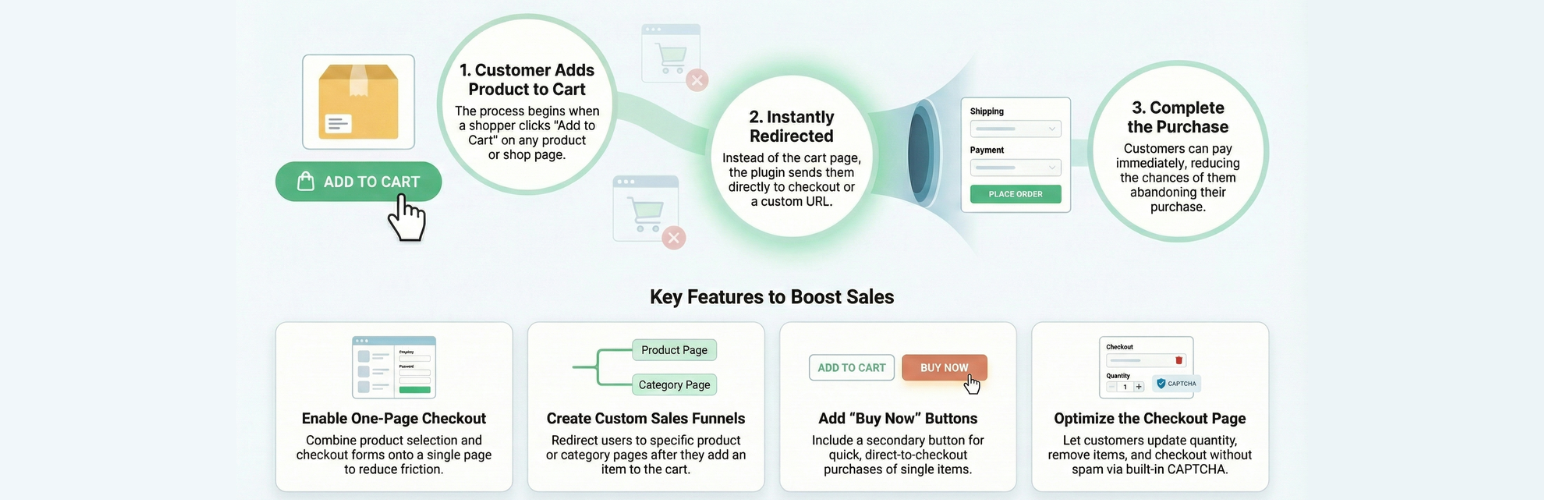
Add to Cart Redirect for WooCommerce is a plugin designed to streamline the shopping experience by redirecting customers directly to the checkout page after they add a product to their cart. It works with Ajax-based add-to-cart functionality on category and shop pages, allowing for a quicker purchasing process by minimizing unnecessary steps.
The plugin offers various customization options, such as redirecting to a custom URL, removing the 'Continue Shopping' link, and enabling a one-page checkout. It is suitable for WooCommerce store owners looking to enhance their checkout process and reduce cart abandonment by simplifying the buying experience.
Best for: WooCommerce store owners aiming to simplify their checkout process.
What it does well
Where it falls short
This plugin can help improve the purchasing experience for customers by reducing steps in the checkout process. It is a useful tool for those looking to enhance their WooCommerce store's efficiency.
PI Web Solution's own description of Add to Cart Redirect for WooCommerce, lightly tidied.
Streamline the shopping experience by sending customers straight to checkout after adding a product to their cart.
This plugin helps simplify the buying process by minimizing unnecessary steps and distractions.
WooCommerce Direct Checkout aims to simplify the checkout process, leading to an immediate increase in sales. This plugin for WooCommerce allows you to redirect users to the checkout instead of cart page.
Direct Checkout allows you to remove other unnecessary things in the checkout process like the order comments, shipping address (pro), coupon form.
One Page Checkout – Reduce cart abandonment with our One Page Checkout option. One Page Checkout makes it easier for customers to buy from custom checkout pages by displaying both the product selection and checkout forms on a single page.
The whole idea behind WooCommerce single page checkout is to reduce the lengthy checkout process.
Buy Now button for variable products on Category / Shop / Archive pages, so the buyer can directly add the product to the cart even without viewing its variations. **What it does is, it adds the first variation of the variable product to the cart.**
Let users quickly purchase a single product without affecting the rest of their cart. For example, if a user already has products X, Y, and Z in the cart and clicks “Buy Now” on product A, they’ll be taken to checkout with just product A. The other items (X, Y, Z) remain in the cart for future purchase.
Other plugins for improving checkout.
Checkout Field Editor (Checkout Manager) for WooCommerce – The best WooCommerce checkout manager plugin to man...

Every store loses sales to cart abandonment. But with Cart Abandonment Recovery for WooCommerce, you can win t...

1 WordPress funnel builder & WooCommerce checkout plugin. Boost AOV with one-click upsells, order bumps &a...

A powerful side cart designed to make shopping faster and easier. Give customers instant cart access and a sea...

Create high-converting WooCommerce checkout pages, WooCommerce thank you pages & sales funnels with the hi...

Frictionless Multistep Checkout for WooCommerce. Get up to 36% increase in conversion rates with a better purc...