Automatic Product Categories for WooCommerce
Automatically assign WooCommerce product categories and tags using smart, rule-based automation. Save time managing products at scale.
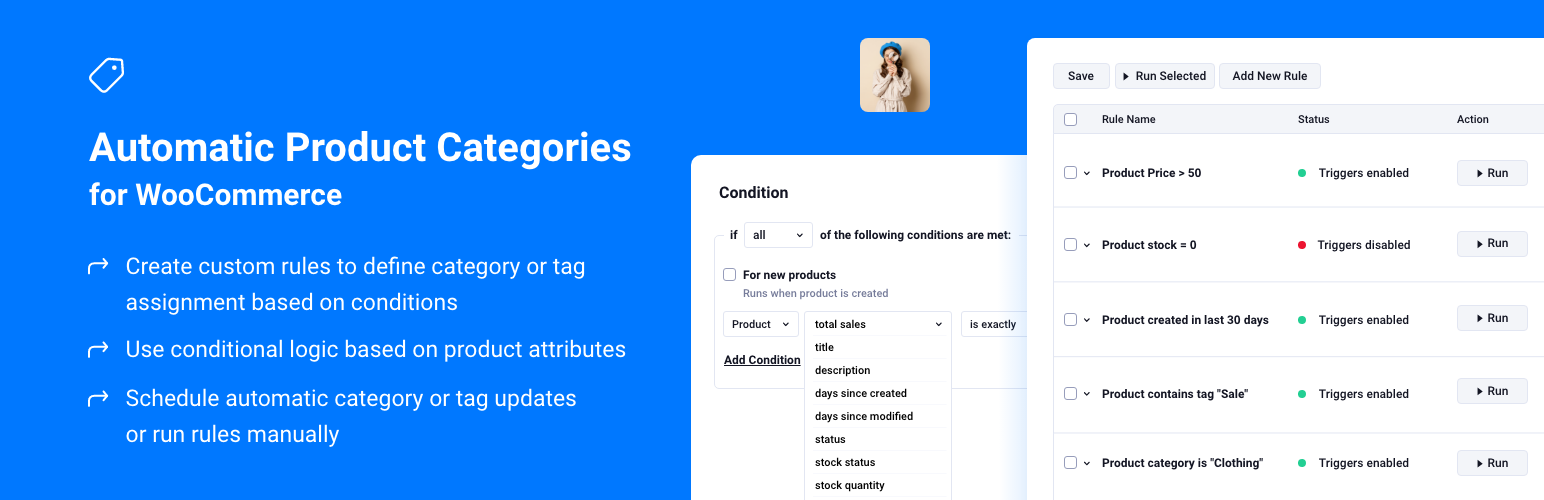
The facts
- Rating
- 5★ from 7
- Active installs
- 400+
- Price
- Free
- Last updated
- 8 Aug 2026
- Added
- Mar 2024
- Requires WP
- 6.2
- Tested up to
- WP 7.0.4
- Requires PHP
- 7.0
- Downloads
- 9,027
Our analysis
AI-assistedAutomatic Product Categories for WooCommerce is a WordPress plugin designed to automate the categorisation of products in your WooCommerce store. It allows you to define flexible rules that assign categories and tags based on various product data, events, or schedules without requiring coding skills.
This plugin is suitable for store owners managing a range of products, from small inventories to large catalogs. It can help streamline product management by ensuring that your store remains structured and searchable, making it easier to keep your product listings up to date.
Best for: WooCommerce store owners looking to simplify product management.
What it does well
- ✓Automates categorisation of WooCommerce products
- ✓No coding required to set up rules
- ✓Supports a wide range of rule conditions
- ✓Can handle variable, grouped, and simple products
- ✓Allows scheduled rule execution
Where it falls short
- •Limited information on the Pro version features
Verdict
This plugin offers practical automation for product categorisation, making it a useful tool for those with extensive product listings.
From the developer
BerryPress's own description of Automatic Product Categories for WooCommerce, lightly tidied.
Save hours of manual work by automating how your WooCommerce products are categorized.
Automatic Product Categories helps you keep your store structured, searchable, and up-to-date – whether you’re managing 30 or 3,000 products.
Define flexible rules to assign product categories and tags based on product data, events, or schedules – no coding required.
Build rules with many condition types (including stock status, whether stock is managed, attribute values, attribute term names, and category lists with is/is not matching), reorder conditions as needed, and use inline help where selections work as multiselects.
Example use cases
- After imports or migrations – bring large catalogs in line by assigning categories and tags from product data as you standardize.
- Parent and child categories – e.g. when a product is in a child category, automatically add a parent category too.
- Stock or sales-based merchandising – organize or highlight products using stock status, stock quantity, total sales, or sale state.
- “New” or “recently updated” collections – use days since created or modified to keep time-based categories or tags accurate.
- Seasonal or promotional groups – move products in or out of promo categories using titles, tags, attributes, or scheduled runs.
More context and ideas on the BerryPress blog.
Features
✅ Rule-based automation for WooCommerce products
✅ Automatically assign (add or remove) categories and tags based on product data
✅ Broad set of rule conditions – see the Available conditions section
✅ Reorder conditions in the rule editor
✅ Support for custom fields (product meta)
✅ Event triggers (on product creation or update)
✅ Scheduled rule execution (run daily)
✅ Works with variable, grouped, and simple products
Available conditions
These conditions are included in the free plugin (match types vary by condition – text, numeric, exact list, is/is not, and taxonomy-style rules where noted):
- Title – product title
- Description – product description
- Price – product price
- Total sales – lifetime sales amount
- Type – product type (simple, variable, etc.)
- Days since created / days since modified – time since product dates
- Status – post status (published, draft, etc.)
- Stock status – WooCommerce stock status (including products without manage stock)
- Manage stock enabled – yes/no
- Stock quantity – numeric quantity when stock is managed
- Is on sale – yes/no
- Attribute value – pick an attribute and match term(s); supports is/is not style matching
- Attribute term name – text comparison against attribute term names across all product attributes
- Meta field – value of a chosen product meta key
- Category value – pick categories from a list; match whether the product is / is not in those categories
- Category names – text matching against assigned category names (several match modes)
- Tag names – text matching against assigned tag names (several match modes)
Pro adds more conditions, extra match types for list-based conditions, custom-taxonomy actions, and the workflow features below. Details: Automatic Product Categories Pro.
🚀 Pro Features
Automatic Product Categories PRO extends the free plugin with stronger rule management, richer conditions, and safer testing.
Rule management & workflow