
Membership & community plugin with user profiles, registration & login, member directories, content re...
Free
200k+ installs 4.4★ (1,444)
Sort topic replies in ascending or descending order for each bbPress Topic.
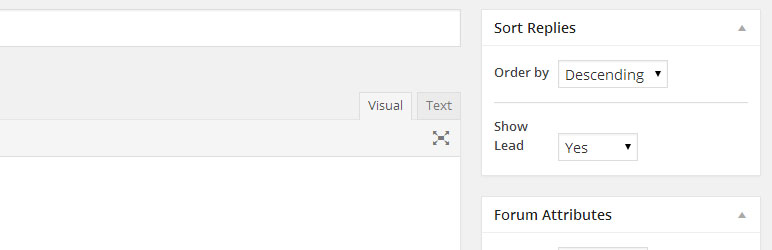
bbPress – Sort topic replies is a WordPress plugin that allows users to sort replies in ascending or descending order for each bbPress topic. You can set sorting preferences for individual topics, specific forums, or apply a global setting across all topics. This flexibility helps tailor the display of replies to meet user needs.
The plugin adds options to the forum and topic sidebar, enabling you to choose how replies are sorted. By default, bbPress displays the latest reply last, but this plugin allows you to show the latest replies first, which can enhance user engagement in discussions.
Best for: This plugin is suitable for forums using bbPress that require customizable reply sorting.
What it does well
Where it falls short
bbPress – Sort topic replies offers a straightforward solution for managing reply order in forums, making it useful for those looking to enhance user experience.
SandyRig's own description of bbPress, lightly tidied.
Sort topic replies in ascending or descending order for each bbPress Topic. You can choose to save setting for each topic, for the whole Forum or set globally for every Topic.
Adds a simple options on the Forum and Topic side bar to choose. If you want the replies to any topic, or all the topics in the selected Forum to be sorted in Ascending or Descending order.
bbPress default sorting order is Ascending order. This means the latest reply shows on the last page. Some people want the latest replies to show on the first pages. If that person is you, this plugin is for you.
Settings priority applies in following order: Topic>Forum>Global
Filter looks for the settings for each topic starting at the topic level. If settings not found at the Topic level, it looks for settings for the Forum the Topic belongs to. If nothing found there either, it applies the global settings. What this means is that you can fully customize sort setting for each forum and topic.
Other plugins for community building.
Membership & community plugin with user profiles, registration & login, member directories, content re...

One-click like buttons your visitors actually use, plus a built-in analytics dashboard that shows what your au...

Real-time messaging and chat rooms for WordPress ecosystem: private conversations, public and private chat roo...

Number one WordPress forum plugin with AI features. Full-fledged forum solution with modern forum design. Comm...

Your content is worth sharing. Let's makes it easier!

The most customizable profiles & community builder WordPress plugin with front-end login, registration, pr...