
WPForms
98The best WordPress contact form plugin. Drag & Drop form builder to create beautiful contact forms, paymen...
Free
5M+ installs 4.8★ (14,369)
Adds conditional logic to Contact Form 7.
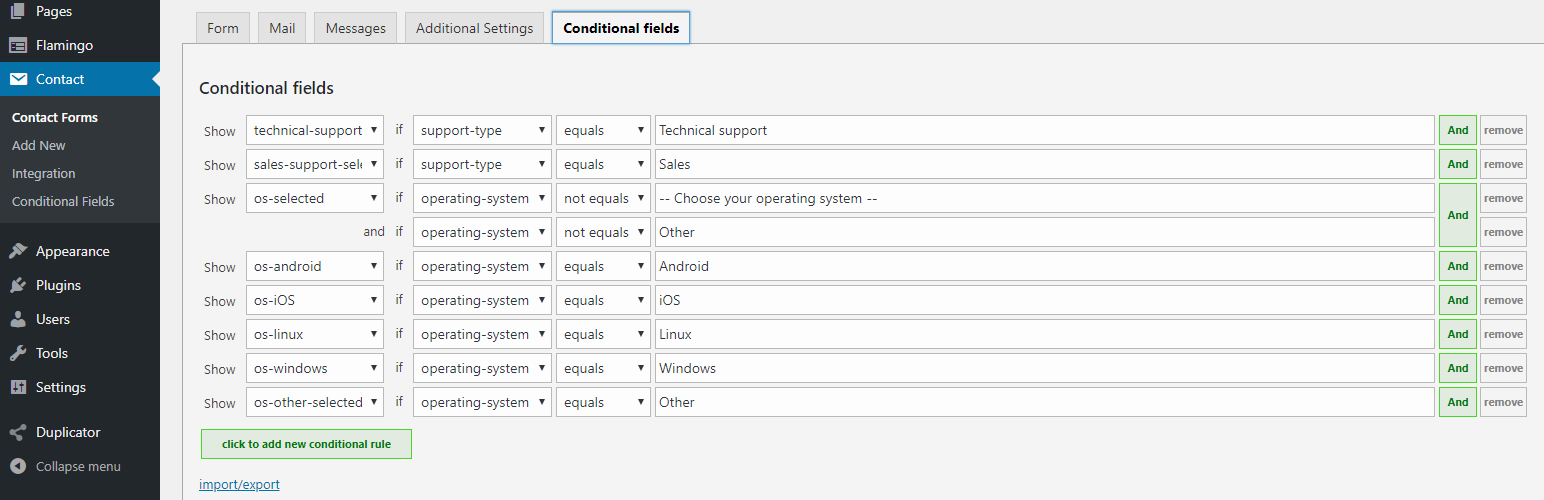
Conditional Fields for Contact Form 7 is a WordPress plugin that adds conditional logic to Contact Form 7 forms. It allows you to create groups of fields that can be shown or hidden based on specific conditions you set. This is particularly useful for creating dynamic forms that adapt to user input.
The plugin features support for required fields within hidden groups, ensuring that validation errors do not occur. You can also manage how information is displayed in emails based on the visibility of these groups, making it a versatile tool for form management.
Best for: This plugin is suitable for users who need advanced form functionality in Contact Form 7.
What it does well
Where it falls short
Conditional Fields for Contact Form 7 provides a straightforward way to enhance forms with conditional logic. It is a useful tool for those looking to create more interactive and user-friendly forms.
Jules Colle's own description of Conditional Fields for Contact Form 7, lightly tidied.
This plugin adds conditional logic to Contact Form 7.
If you edit your CF7 form, you will see an additional tag called “Conditional fields Group”. Everything you put between the start and end tag will be hidden by default.
After you have added the field group(s), go to the “Conditional fields” tab to create one or more conditions that will make the group(s) appear.
Conditional Fields for Contact Form 7 is an independent plugin. This plugin is not affiliated with or endorsed by the developers of Contact Form 7.
Required fields inside hidden groups will never trigger validation errors.
Conditional groups can now be added to the emails as well.
Just wrap the content with [group-name] ... [/group-name] tags.
To show content only when a group is hidden, invert the tag with an exclamation mark: [!group-name] ... [/!group-name].
Groups can be nested, both in the form and in the email
Example form:
[group group-1]
  [group group-inside-1]
    ...
  [/group]
[/group]
Example email:
[group-1]
  [group-inside-1]
    ...
  [/group-inside-1]
[/group-1]
Other plugins for building forms.
The best WordPress contact form plugin. Drag & Drop form builder to create beautiful contact forms, paymen...

The best anti-spam protection to block spam comments and spam in a contact form. The most trusted antispam sol...

Get a fast contact form plugin. Create advanced forms using drag and drop form builder with all smart features...

Best WordPress form builder plugin. Create contact forms, payment forms & order forms with 1000+ integrati...

Save and manage Contact Form 7 messages. Never lose important data. It is a lightweight contact form 7 databas...

Elementor forms builder to create WordPress forms like contact form, booking form, feedback form, survey form,...