
WooCommerce
94Everything you need to launch an online store in days and keep it growing for years. From your first sale to m...
Free
7M+ installs 4.5★ (4,820)
Add conditional cart fee / Payment processing fee / Extra cost / Extra fees plugin for WooCommerce / Additional fees / Service charge at checkout for …
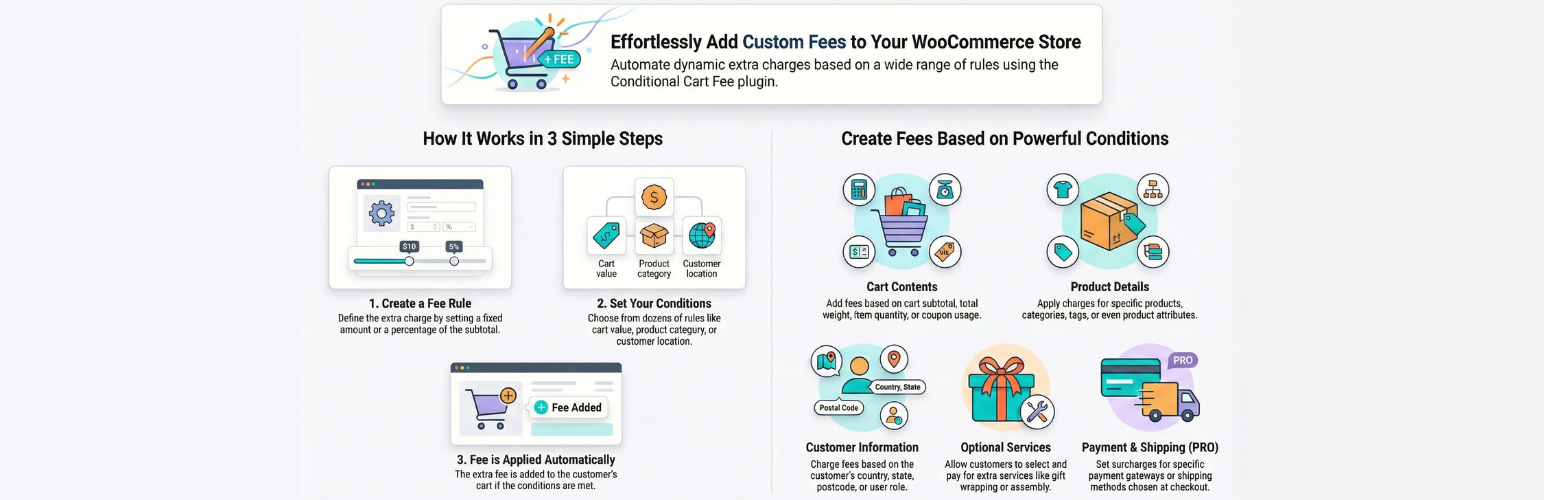
PiWeb Conditional Cart Fee is a WordPress plugin designed for WooCommerce that allows you to implement dynamic fees based on various conditions. You can create complex fee structures quickly, tailoring charges according to customer location, cart subtotal, product type, and more.
This plugin is suitable for WooCommerce store owners who wish to apply additional charges for services or products based on specific criteria. It offers flexibility in how and when these fees are applied, making it useful for businesses with varied pricing strategies.
Best for: WooCommerce store owners looking to implement flexible and conditional fee structures.
What it does well
Where it falls short
This plugin provides a comprehensive solution for managing extra fees in WooCommerce, suitable for those needing detailed control over pricing based on various conditions.
PI Web Solution's own description of PiWeb Conditional cart fee / Extra charge rule for WooCommer..., lightly tidied.
WooCommerce extra fees plugin helps you to create dynamic fees for your store based on various conditions
WooCommerce extra fees plugin is very simple to use, and you can create complex fees very quickly
Try Pro on demo website | Documentation
✅ WooCommerce extra fees based on the Customer Country
✅ Extra fees for WooCommerce based on the cart subtotal
✅ Product-based WooCommerce extra fees, even supports variable products
✅ Quantity-based WooCommerce additional fees
✅ User-based WooCommerce extra fees
✅ Extra fees based on fixed or percentage of subtotal.
✅ Set extra fees as taxable or not taxable
✅ Set a tax class for the extra fees
✅ Set extra fees as optional fees, so the user can decide if they want to have this service and pay the extra cost. E.g: Assembly charges for product—user can decide if they want to have assembly service and pay extra for that or not have that service
✅ Charge extra fees by fixed / percentage
✅ Schedule the extra cart fees to charge for a certain time period.
✅ Charge an extra fee based on state
✅ Charge an extra fee based on WooCommerce zone
✅ WooCommerce extra fee based on category
✅ Additional cart fees apply per quantity with cart-based
✅ Charge extra fee-based specific user
✅ Set coupons based extra fee
✅ Set minimum order amount based extra fee
✅ Set weight-based extra fee
✅ Set shipping class-based extra fee
✅ Postcode: You can apply an extra charge based on the specific postcode or a range of postcodes
✅ Charge extra fees by user role
✅ Apply charge based on the product quantity being a multiple of
✅ Apply charge if product quantity is not a multiple of
✅ Apply a $5 fee for every unit of product A in the cart (use shortcode [selected_product_qty] in the fee to achieve this: 5 * [selected_product_qty])
✅ Apply a $5 fee for every unit of product from category A in the cart (use shortcode [selected_product_qty] in the fee to achieve this: 5 * [selected_product_qty])
✅ Apply a $5 fee for every unit of product in the cart (use shortcode [qty] in the fee to achieve this: 5 * [qty])
✅ Apply a $5 fee for every different product from category A in the cart (use shortcode [selected_product_count] in the fee to achieve this: 5 * [selected_product_count])
✅ Charge fee based on the country of the user based on their IP address (GeoIP-based country); it will work even if the user is not logged in or the billing country is not set. You need to configure MaxMind GeoIP in WooCommerce > Settings > Integration tab for this to work or use the Cloudflare IP geolocation header if you are using Cloudflare CDN
Compatible with Order date and time plugin
✅ Set extra charge based on the selected delivery or pickup date
✅ Add extra charge based on the user opting for pickup/delivery
✅ Add extra charge based on the selected delivery/ pickup day of the week
✅ Multi-currency support for extra fees
✅ Charge different fees based on different quantities in the cart
✅ Charge different fees based on total weight in the cart
✅ Charge different fees based on subtotal in the cart
✅ Charge different fees based on the quantity of different products in the cart
✅ Quantity of product from specific category: When the quantity of product from a specific category is as per your comparison rule then you apply the extra charge
✅ Quantity of product from specific tag: When the quantity of product with a specific tag is as per your comparison rule then you apply the extra charge
✅ Charge extra fees based on the Product Attribute, so you can charge extra fees if the user purchases a Large size door and don’t charge extra fees when they purchase small size door
✅ Don’t charge extra WooCommerce checkout fees if the customer’s total purchase from your website over the last week is more than $1000
✅ You can add a fee description that will be shown to the customer on the checkout page in the form of a tooltip, so the customer will know what this fee is
✅ Checkout fees for WooCommerce based on the product attributes, so you can charge extra fees based on the product attributes selected by the customer
Other plugins for selling online.
Everything you need to launch an online store in days and keep it growing for years. From your first sale to m...

Top-rated antispam for contact forms, comments, WooCommerce, eCommerce, and login. No CAPTCHAs, no friction, j...

Weight based shipping methods for WooCommerce. Flexible shipping with table rate rules by cart weight and orde...

Every store loses sales to cart abandonment. But with Cart Abandonment Recovery for WooCommerce, you can win t...

Germanized extends WooCommerce to become a legally compliant shop for the german market. Must Have for every g...

🤩 Make popups & optin forms to get more email newsletter subscribers, leads, and sales - #1 most popular...