Conditional Widgets
Easily control the display of widgets based on pages or categories
The facts
- Rating
- 4.5★ from 24
- Active installs
- 7k+
- Price
- Free
- Last updated
- 13 Feb 2025
- Added
- Mar 2011
- Requires WP
- 3.0
- Tested up to
- WP 6.7.7
- Downloads
- 140,801
Our analysis
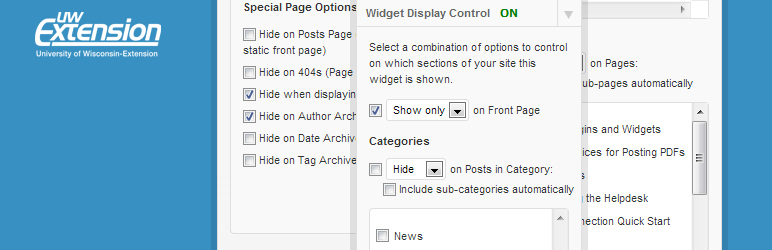
AI-assistedConditional Widgets is a WordPress plugin that allows you to control the visibility of widgets based on specific pages or categories. It adds a form to each widget in the Widgets panel, enabling you to set criteria for displaying or hiding widgets without needing any coding knowledge.
This plugin is suitable for users who want to customise their site’s sidebar or footer content based on the context of the page or category being viewed. However, it requires the Classic Widgets plugin to function properly with newer versions of WordPress.
Best for: This plugin is best for WordPress users looking to customise widget visibility on their site.
What it does well
- ✓Allows control over widget visibility based on pages or categories
- ✓User-friendly interface with no coding required
- ✓Maintained for users of Classic Widgets
Where it falls short
- •Does not function with the new block-based Widgets screen
- •Requires the Classic Widgets plugin for compatibility with WordPress 5.8 and above
Verdict
Conditional Widgets offers a straightforward solution for managing widget display based on content context, but its reliance on the Classic Widgets plugin limits its use with newer WordPress versions.
From the developer
Jason LeMahieu (MadtownLems)'s own description of Conditional Widgets, lightly tidied.
IMPORTANT: This plugin will NOT function after the Widgets screen overhaul that is part of WordPress 5.8 unless you use the Classic Widgets plugin (https://wordpress.org/plugins/classic-widgets/). The plugin will continue to be supported/maintained for those using Classic Widgets, but there are no plans to make Conditional Widgets work once Widgets are Blocks.
This plugin adds a form to each widget on the Widgets panel which allows users to choose which pages and/or categories the widget is either displayed on or hidden from.
For each widget, you can choose criteria to either SHOW or HIDE the widget, based on a number of categories. The interface is quite intuitive, and requires no knowledge of php or conditional tags.