CookieYes
93Cookie banner, cookie consent and cookie notice plugin for GDPR and CCPA. Auto cookie blocking, Consent Mode v...
Free
1M+ installs 4.8★ (3,228)
Simplify cookie consent with a customizable banner that helps you cover global privacy laws like GDPR and CCPA. Scan your site for cookies, block scri …
Cookie Consent is a WordPress plugin designed to help you manage cookie compliance for GDPR and CCPA regulations. It scans your website for cookies using a headless browser, categorising them automatically into different types, and allows you to configure a consent banner that aligns with legal requirements. The plugin is suitable for website owners who need to ensure compliance with cookie laws while providing visitors with clear options regarding their cookie preferences.
The plugin includes features such as script blocking until consent is given, a customizable consent banner, and logging of consent decisions. It provides an all-in-one admin area for managing cookies, consent logs, and banner design, making it straightforward for users to maintain compliance without needing external tools.
Best for: This plugin is best for website owners needing to comply with GDPR and CCPA cookie regulations.
What it does well
Where it falls short
Cookie Consent offers a comprehensive solution for managing cookie compliance, but users may need to consider support and compatibility aspects.
Elementor's own description of Cookie Consent, lightly tidied.
Cookie Consent detects cookies by loading your pages in a full headless browser (Chromium), the same way a real visitor experiences your site. This catches cookies set by JavaScript execution, third-party embeds, analytics snippets, and dynamically loaded content that simpler HTTP-based scanners often miss. Detected cookies are automatically categorized into Necessary, Analytics, Marketing, Functional, or Uncategorized. You can scan your homepage, crawl your full site, or specify custom URLs. Results merge into your cookie manager without overwriting any manual edits.
In GDPR (opt-in) mode, non-essential scripts don’t execute until the visitor consents to the relevant category. This applies to analytics scripts, advertising pixels, tracking tags, and any other third-party script that sets non-essential cookies. Cookie Consent intercepts both WordPress-enqueued scripts and inline scripts, modifying them to wait for consent before firing. Essential cookies, like those used for login sessions, shopping carts, and basic site functionality, are never blocked. In CCPA (opt-out) mode, scripts load by default and visitors can choose to opt out of specific categories.
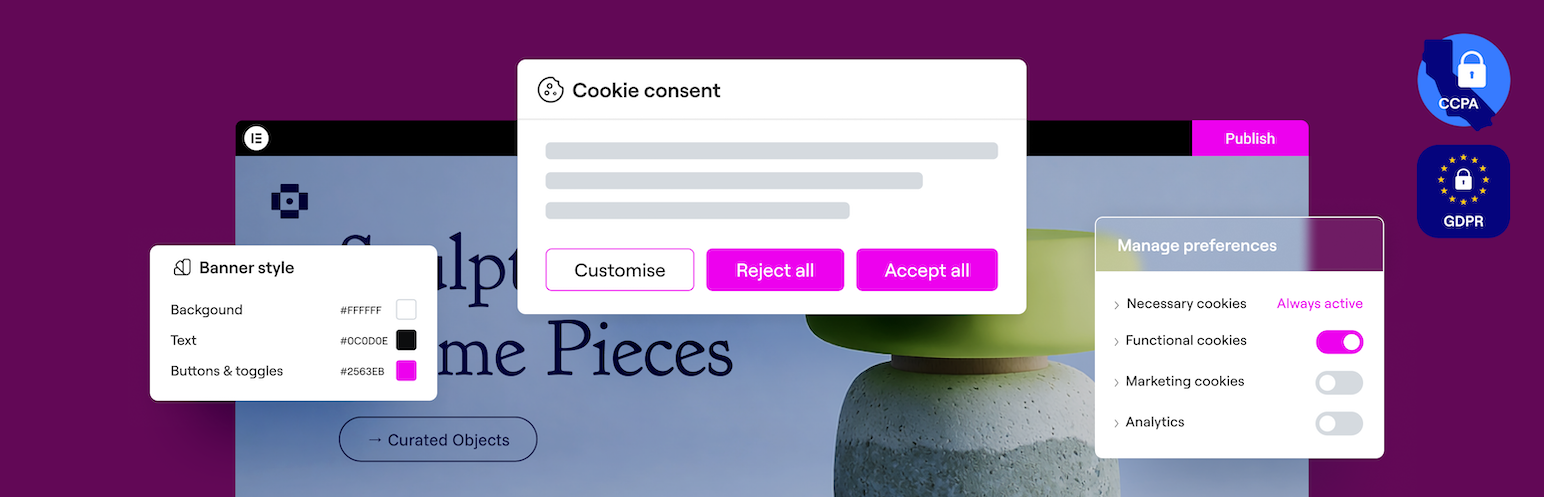
Visitors see a cookie banner with clear options to accept, reject, or manage preferences by category. The banner, preferences dialog, and revisit button are all customizable including layout, position, colors, text, button styles, and border radius. A live preview shows you what visitors will see as you make changes.
Each time a visitor makes a choice, Cookie Consent records the decision type (accept all, reject all, or custom), the specific category preferences, and a timestamp. These records create an audit trail you can reference if compliance questions arise.
Cookie list, scan results, script rules, consent logs, banner design, and compliance settings, all in one admin area. No separate platform to sign up for, no external app to connect, no additional accounts to manage.
A guided wizard gets your banner live in three steps:
1. Choose your compliance model – Select GDPR (opt-in) or CCPA (opt-out) based on your audience and the regulations that apply to your site.
2. Configure your banner – Pick a layout, adjust colors and text, and preview what visitors will see.
3. Scan your site – Cookie Consent visits your pages with a real browser, finds active cookies, and categorizes them. Your banner goes live with accurate cookie data from the start.
After setup, you can re-scan anytime, refine your design, recategorize cookies, and adjust script rules, all from the same dashboard.
Banner Templates: Start with a pre-configured template during setup, then customize to fit your site. Templates are tailored to your selected compliance model (GDPR or CCPA) so the default structure, buttons, and consent flow match your requirements from the start.
Layouts: Footer bar, slide-in, or center popup.
Positioning: Control where and how the banner appears on the page.
Styling: Background colors, text colors, button primary and secondary colors, border radius, and button sizing, enough control to match any brand or design.
Content: Editable title, description, and button labels for the banner, preferences dialog, and revisit button. Write in your own voice.
Preferences Dialog: When a visitor clicks Manage Preferences, they see a breakdown of each cookie category with descriptions and toggles. Necessary cookies are marked as always active. Visitors choose exactly which categories they\’re comfortable with.
Revisit Consent Button: A persistent button visitors can click anytime to reopen the preferences dialog and change their choices.
Responsive: Automatically adapts to desktop and mobile.
Live Preview: Desktop and mobile preview with a device toggle. Updates in real time as you edit — no publishing and refreshing the front end.
Elementor Editor Integration [Requires Elementor Pro]: Open the banner and preferences dialog in the Elementor visual editor. Drag-and-drop widgets, styling panels, and your full design system, the same workflow you use for the rest of your site.
Cloud Templates [Requires Elementor Pro]: Save a finished banner design to your cloud library and deploy it across other sites in one click. Useful for agencies and freelancers managing multiple client sites with consistent branding.
Other plugins for privacy compliance.
Cookie banner, cookie consent and cookie notice plugin for GDPR and CCPA. Auto cookie blocking, Consent Mode v...

Formerly "Instagram Feed". Display clean, customizable, and responsive Instagram feeds from multiple...
Consent management platform for WordPress — GDPR, CCPA & ePrivacy cookie consent, autoblocking, consent re...
Publish your cookie banner or notice in minutes. Automatically scan cookies, and create policies to align with...

Simple, lightweight WordPress analytics with privacy-friendly visitor tracking. Cookieless and GDPR-ready. Set...

Configure your own Terms and Conditions specific to your service or webshop.