CoolClock
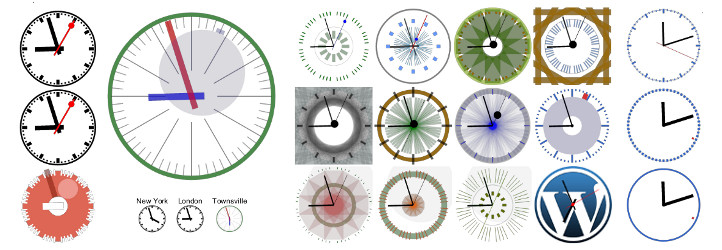
Show an analog clock on your WordPress site sidebar or in post and page content.
The facts
- Rating
- 4.7★ from 15
- Active installs
- 2k+
- Price
- Free
- Last updated
- 9 Jul 2026
- Added
- Dec 2012
- Requires WP
- 4.8.1
- Tested up to
- WP 7.0.4
- Requires PHP
- 5.6
- Downloads
- 88,650
Our analysis
AI-assistedCoolClock is a WordPress plugin that integrates a Javascript analog clock into your site. You can add the clock as a widget in your sidebar or use shortcodes to insert it into posts and pages. The plugin offers various customisation options, including different skins and advanced positioning settings.
This plugin is suitable for users looking to enhance their WordPress site with a functional and visually appealing clock. It does not collect user data, making it compliant with privacy policies.
Best for: This plugin is best for WordPress users wanting to display a clock on their site.
What it does well
- ✓Integrates a Javascript analog clock into WordPress
- ✓Can be added via widget or shortcode
- ✓Offers 22 different skins and a custom skin option
- ✓Compatible with tablets and mobile devices
- ✓Does not collect user data
Where it falls short
- •Known issues with IE 8 in Compatibility mode
- •Shortcode placement can cause validation errors
Verdict
CoolClock provides a straightforward solution for adding an analog clock to your WordPress site, with a variety of customisation options. However, be aware of its limitations in certain browsers.
From the developer
Rolf Allard van Hagen's own description of CoolClock, lightly tidied.
This plugin integrates CoolClock – The Javascript Analog Clock into your WordPress site. You can add it as a widget to your sidebar or insert it into your posts and pages with a shortcode. See the FAQ’s for available shortcode parameters and how to build the clock into your theme.
Features
- Can be added via a widget, shortcode or theme function
- No flash, meaning compatible with tablets and most other javascript enabled mobile devices
- 22 different skins to choose from or
- Custom skin option to create your own skin style
- Linear or logarithmic time scale
Read more on the CoolClock homepage or see the FAQ’s to learn how to configure your own skin settings.
Pro features
- Show date or 24h digital time
- Background image or color
- Border radius (rounded corners for background)
- Advanced positioning options (relative to background)
- Advanced shortcode parameters (including background image and custom skin)
- One extra clean skin for use with background image
- Support on the CoolClock Pro forum
Pro features come with the CoolClock – Advanced extension.
Translators
- Dutch * R.A. van Hagen https://status301.net/ (version 3.0)
- French * R.A. van Hagen https://status301.net/ (version 3.0)
- German * Manfred Mrak http://www.niftyfox.ch/ (version 3.2)
- Serbian * Borisa Djuraskovic – WebHostingHub http://www.webhostinghub.com/ (version 2.9.4)
- Slovenian * Adijan Dervišević – http://www.adijan.eu (version 3.2)
- Russian * Наталия Завьялова – http://time-impressions.ru (version 2.9.8)
Please contact me to submit your translation and get mentioned here 🙂
Privacy / GDPR
This plugin does not collect any user or visitor data nor set browser cookies. Using this plugin should not impact your site privacy policy in any way.
Known Issues
-
When IE 8 is manually put or forced (through X-UA-Compatibility meta tag or response header) into Compatibility mode, the Clock will –even though the canvas area is put in place– remain invisible.
-
When a shortcode is not placed on its own line but on the same line with text, image or even another shortcode, then the output (div with canvas tag) will be wrapped inside a paragraph tag. While most browsers do not have a problem displaying the clock, this will cause a validation error.
Please report any other issues on the Support page.