Duplicate Post
Duplicate post
The facts
- Rating
- 4.9★ from 1,613
- Active installs
- 300k+
- Price
- Free
- Last updated
- 18 Aug 2026
- Added
- Mar 2020
- Requires WP
- 4.6
- Tested up to
- WP 7.0.4
- Requires PHP
- 5.6
- Downloads
- 4,943,551
Our analysis
AI-assistedDuplicate Post is a WordPress plugin designed to help you easily duplicate pages and posts. It provides a simple interface to copy content, allowing for quick modifications and comparisons. This tool is particularly useful for users who frequently reuse content or need to create variations of existing pages for different projects or clients.
The plugin adds a copy button to various screens in the WordPress admin, enabling you to duplicate content with just a click. You can also bulk delete posts and pages, making it easier to manage your site’s content efficiently. This plugin is suitable for WordPress users looking to enhance their productivity by simplifying the process of content duplication.
Best for: This plugin is best for WordPress users who need to duplicate content frequently for various projects.
What it does well
- ✓Allows easy duplication of pages and posts
- ✓Provides bulk delete functionality
- ✓Includes options for naming cloned content
- ✓Compatible with Gutenberg editor
- ✓Active installation base of 300,000
Where it falls short
- •Limited feature information provided
Verdict
Duplicate Post offers a straightforward solution for content duplication in WordPress, making it a practical tool for many users. However, the limited feature details may leave some potential users wanting more information.
From the developer
Inisev's own description of Duplicate Post, lightly tidied.
Try it out on your free dummy site: Click here => https://tastewp.com/plugins/copy-delete-posts.
(this trick works for all plugins in the WP repo – just replace “wordpress” with “tastewp” in the URL)
Massively increase your WordPress productivity!
Copy Page plugin makes it super-easy to duplicate pages or copy posts – and delete them again!
And why is it handy to duplicate pages? Here are just some of the use cases:
- Duplicate pages to make short work of using again the same elements you repeatedly use (e.g. text paragraphs, images, video, featured image, etc.)
- Create a variation of a page or post fast to modify it and compare side by side (for yourself, your client or company)
- Create one perfect set of page templates and then re-use them for different projects, clients or products
- Apply a facelift to a specific page but keep the older version in case you want to switch back to it anytime
- Make a “holiday special” page template and use it for different holidays with respective adjustments
- Create duplicates for pages used in page builders with their custom settings
You can as well run a load-test on your server by duplicating as much as 1,000 pages, and track how the server behaves. Copy Page plugin also makes it super-easy for you to bulk-delete pages and posts whenever you feel it’s time for a clean-up!
How to use it
Two-minute video tutorial and you are ready to use it, that’s how simple Copy Page is!
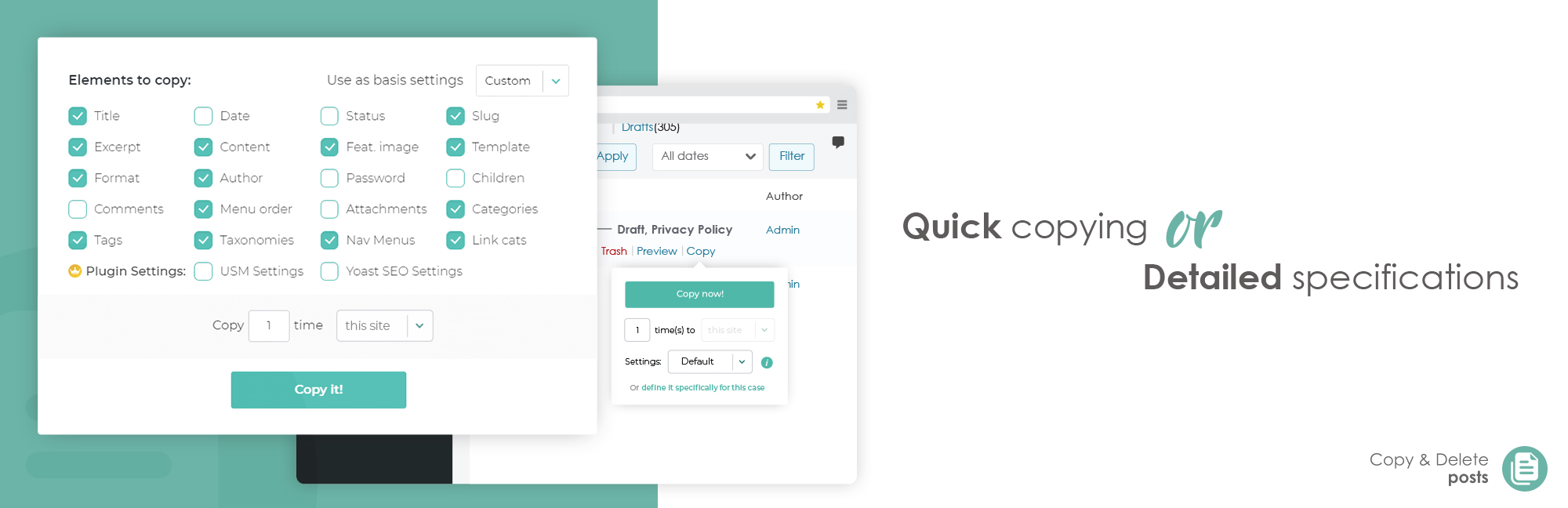
After installation you’ll see a new copy page button which, on mouse-over, displays a tooltip (see screenshot) which allows you to copy pages or copy posts with various options:
- Copy page or duplicate post instantly with a single click
- Expand to see additional copy page options and specify which elements should be copied for the current copy page or copy post action
The new copy page button will be available on:
- All Pages and All Posts screens
- Edit screens (duplicate page or duplicate post on the respective edit page/post screens)
- Admin bar (at the top)
- Bulk-option to copy pages or copy posts on All Pages and All Posts screens
- Gutenberg editor
You can hide copy page or copy post button on any of these places from the Copy Page plugin menu (Section: Other options). Copy page function on the editor screens allows fast and easy multiplying of pages you are working on at the moment (and open it in the new browser tab immediately, too), so you can quickly make a couple of variations, pick whichever you like better, and afterward use the Delete duplicate posts/pages tool of Copy Page plugin to remove duplicate(s) that you dislike.
Copy Page plugin also provides an intuitive naming tool to define how the cloned pages or posts will be named (e.g. you can add the time and date of copying, or incremental counter, etc.). This way you can multiply page that will have a short name, e.g. “ExamplePage – #4” – where the number at the end will increase with each copy made; or you can duplicate page with much more detailed name of the copy, such as: “ExamplePage copied at 14:22:58 on Sunday, December 1st, 2021” – thankfully to PHP date/time shortcodes being supported in the custom date settings. Long names often make it easy to differentiate the clone post, either to remove duplicate or to e.g. edit it.
Want to duplicate page but also it’s child-page(s)? You can multiply pages altogether with child-pages with all the copy settings currently applied to the parent page copy.
Other options available when you copy pages: