CSS JS Manager, Async JavaScript, Defer Render Blocking CSS
CSS JS Manager, Async JavaScript, Defer Render Blocking CSS, Remove javascript, Remove CSS, Defer Render Blocking CSS, Both CSS and JS can be loaded A …
The facts
- Rating
- 4.8★ from 90
- Active installs
- 1k+
- Price
- Free
- Last updated
- 22 Aug 2026
- Added
- Jan 2019
- Requires WP
- 3.0.1
- Tested up to
- WP 7.1
- Downloads
- 178,821
Our analysis
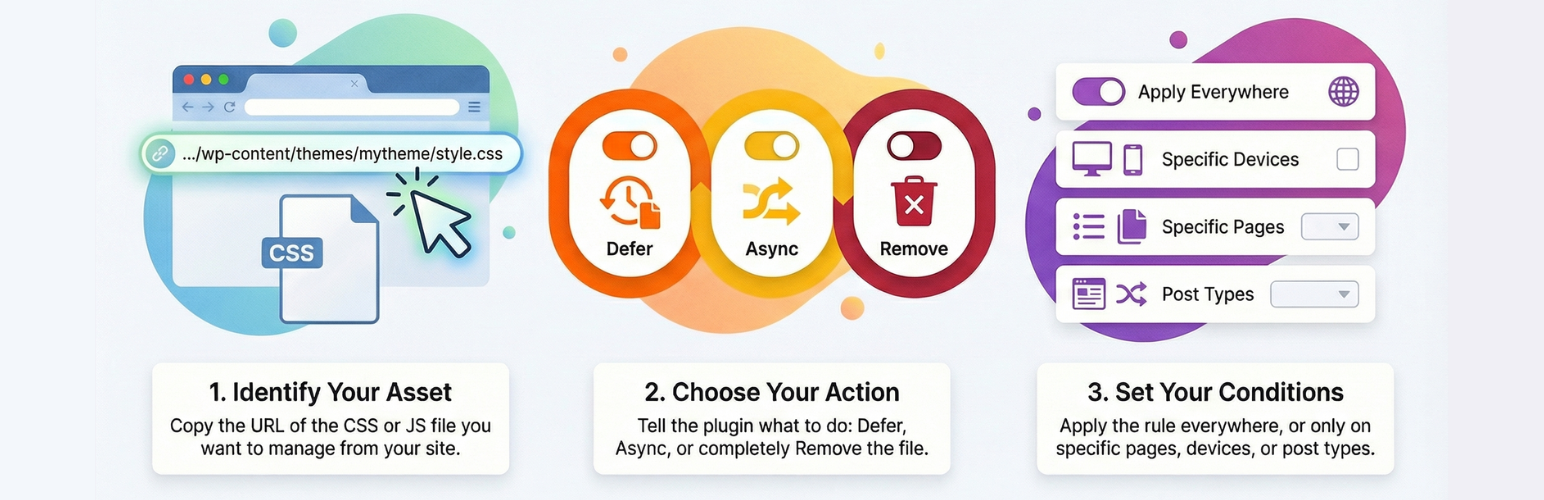
AI-assistedCSS JS Manager, Async JavaScript, Defer Render Blocking CSS is a WordPress plugin designed to help you manage CSS and JavaScript files on your site. It allows you to load or remove these files based on device type, page ID, or post type, and offers options to defer loading of CSS files and load JavaScript files asynchronously.
This plugin is suitable for users looking to optimise their website's speed and performance by controlling how CSS and JavaScript are loaded. It includes features for managing critical CSS, enabling you to specify different critical CSS for various pages or post types.
Best for: This plugin suits website owners who want to enhance site speed and performance through effective management of CSS and JavaScript files.
What it does well
- ✓Allows loading/removing CSS or JS based on device type
- ✓Supports deferring loading of CSS files
- ✓Enables asynchronous loading of JavaScript files
- ✓Can manage critical CSS for different pages or post types
- ✓Free to use from the WordPress.org directory
Where it falls short
- •Limited information on specific user experiences or case studies
Verdict
CSS JS Manager, Async JavaScript, Defer Render Blocking CSS offers useful features for optimising website performance. It may be beneficial for those familiar with managing web assets.
From the developer
PI Web Solution's own description of CSS JS Manager, Async JavaScript, Defer Render Blocking CSS, lightly tidied.
- Load / remove css or js if the request is from a mobile device
- Load / remove css or js if the request is from a desktop device
- Defer Loading of CSS file
- Load any JS file Async or Defer
- Remove any JS from all the pages, or on some pages based on various conditional rules
- Remove any CSS file from all the pages, or on some pages based on various conditional rules
- Async any JS file on all the pages or on selective pages
- You can remove or add JS file based on post type
- You can remove or add CSS file based on post type
- You can remove or add JS file based on page id
- You can remove or add CSS file based on page id
Manage critical css
Now you can load different critical css for different pages or post or custom post type and optimize your site for speed
Step 1: Go to CSS JS Manager >> Critical CSS setting
select the post type where you want to use the Critical CSS,
Say you want to use it on Post, ProductStep 2: go to Critical CSS >> Add New Critical css
you can add as many critical css as you want
Say you want to have Different critical css for home page, and post, and product
so you will create 3 different critical css and load the critical css ThereUse this to generate critical css https://www.sitelocity.com/critical-path-css-generator
Step 3: Go to respective post or page where you will like to use those critical css and select them