
LocoAI
89LocoAI - Auto Translate For Loco Translate is a powerful tool for developers looking to quickly translate thei...
Free
70k+ installs 4.9★ (637)
Connect WordPress with External APIs and create no-code custom WordPress REST API endpoints to interact with the WordPress database to perform SQL ope …
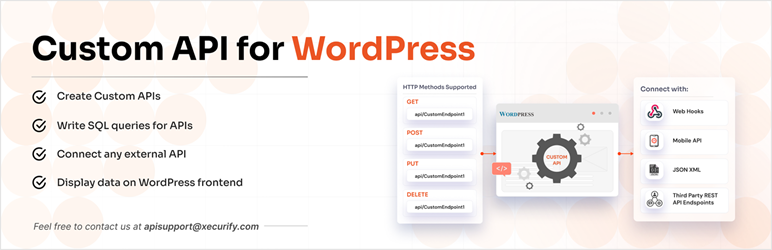
Custom API for WP is a WordPress plugin that enables you to create custom REST endpoints without coding. It features a graphical user interface that allows you to fetch data from WordPress database tables, including users and posts, and perform CRUD operations using various HTTP request methods.
This plugin is suitable for users who need to connect external APIs to their WordPress site and want to display or manipulate data on the frontend. It simplifies the process of generating custom APIs and managing data interactions.
Best for: This plugin is best for WordPress users looking to integrate custom APIs and manage data without extensive coding knowledge.
What it does well
Where it falls short
Custom API for WP provides a straightforward solution for creating and managing custom APIs in WordPress. While the free version has limitations, it offers essential features for basic API needs.
miniOrange's own description of Custom API for WP, lightly tidied.
Custom API for WP plugin plugin allows you to create no code custom REST endpoints / Custom APIs in WordPress. With interactive Graphical User Interface (GUI) fetch any data from WordPress database tables like users, posts, custom tables or any 3rd-party plugin’s table. You can also use HTTP request methods like POST, PUT, DELETE (Insert, Update, Delete) data with these created Custom endpoint / Custom REST routes.
You can also connect any external APIs and platforms to fetch the data and display data on WordPress frontend . You can use your design (custom HTML, CSS and JS), post data on third-party platforms on any WordPress events (user creation, Woocommerce events, form submission, membership purchase etc) via WordPress hooks.
You can easily interact with the WordPress database to perform CRUD operations on data using the custom endpoints created (generated) using Connect to external APIs | Custom endpoints for WP.
Custom API for WP plugin takes care of writing the complex SQL queries to fetch/update data and provide you with a very simple User Interface to create or generate custom REST endpoints.
This plugin also provides the filter operations in which you can filter the data you want to show in the API endpoint response.
Unlimited RESTful APIs: Create APIs with all HTTP methods – GET, POST, PUT, DELETE.
Unlimited Advanced APIs with SQL: Build complex and fully customized APIs using SQL queries to perform CRUD (GET, POST, PUT, DELETE) operations.
Unlimited External API Integrations: Connect to as many third-party APIs as needed that return JSON, XML, GRAPHQL or SOAP responses.
This plugin allows you to integrate any external or third-party REST API endpoints into WordPress very easily with the help of our interactive and simple GUI within seconds. With this function of our plugin, you can fetch data to your WordPress (WooCommerce) site or you can use it to fetch data and process it according to your needs.
These integrations can also be done on third-party plugin events like form submission using Elementor, Wpforms, Gravityforms etc. and also payment status or subscription status based on transactions done via payment gateways like that provided by WooCommerce, Wpforms, Gravityforms or any other services.
External API integrations can be done on any event of WordPress like user registration, user membership level change or any other using plugin hooks.
WooCommerce product data can be synced with any external/third-party API provider(Supplier) on a real-time basis with our plugin.
This feature also provides the capability to register or login users to third-party platforms by making an API request to the third-party platforms.
Data display on front end using shortcode or template tag fetched from external API endpoints.
Any kind of external APIs supporting JSON, XML, SOAP, GraphQL can be connected with authentication methods like OAuth, JWT, Bearer, API Key or even custom API authentication.
Other plugins for integrating services.
LocoAI - Auto Translate For Loco Translate is a powerful tool for developers looking to quickly translate thei...

The AI + Automation plugin for WordPress. Automate workflows across all your plugins and apps, add an AI agent...

Create custom interactive maps with free Leaflet-based styles, no Google Maps API key, frontend marker submiss...

Monitor every change on your WordPress site — who did what, when, and where it came from — for a complete audi...

No API key required. Display Yelp and Google reviews for any business in a clean, customizable feed on your si...

Contact Form, Google Sheet, MailChimp, Brevo, Webhook, Zoho CRM Automation and Integration plugin that Connect...