
Translate WordPress with Google Translate multilanguage plugin using AI translation. Complete multilingual SEO...
Free
900k+ installs 4.9★ (4,950)
This plugin enables you to edit and display Content Blocks in a sidebar widget or using a shortcode.
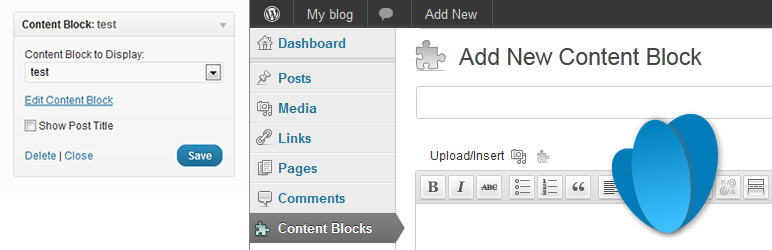
Content Blocks (Custom Post Widget) is a WordPress plugin that allows you to display the contents of specific custom posts in widget areas or within the content using shortcodes. It provides a WYSIWYG editor for easier content editing, enabling users without administrator access to modify widget content.
The plugin creates a custom post type called 'content_block' and allows the use of featured images. It is compatible with the WPML Multi-Language plugin, ensuring that the correct language is displayed in the widget area. This plugin is suitable for users who want to enhance their site's content management without requiring extensive technical knowledge.
Best for: This plugin suits users looking to manage custom post content easily in their WordPress site.
What it does well
Where it falls short
Content Blocks offers a straightforward solution for displaying custom post content in widgets, making it a practical choice for site owners who need flexible content management options.
Johan van der Wijk's own description of Content Blocks, lightly tidied.
The Content Blocks allows you to display the contents of a specific custom post in a widget on in the content area using a shortcode.
Even though you could use the text widget that comes with the default WordPress install, this plugin has some major benefits:
This plugin creates a ‘content_block’ custom post type. You can choose to either display the title on the page or use it to describe the contents and widget position of the content block. Note that these content blocks can only be displayed in the context of the page. I have added ‘public’ => false to the custom post type which means that it is not accessible outside the page context.
To add content to a widget, drag it to the required position in the sidebar and select the title of the custom post in the widget configuration.
Includes the following translations:
Other plugins for running multilingual.
Translate WordPress with Google Translate multilanguage plugin using AI translation. Complete multilingual SEO...

Translate WordPress plugins and themes directly in your browser. Versatile PO file editor with integrated AI t...

Translate your site visually, directly from the front-end. Go multilingual in minutes using automatic AI trans...

Convert Non-Latin characters in post, page and term slugs to Latin characters.

Integrate WhatsApp experience directly into your WordPress website.

OneTap is a multilingual WordPress plugin designed for seamless website accessibility.