Customize Submit Button for Gravity Forms
Lets you customize the submit button in Gravity Forms by switching it to a button element and changing its CSS classes
The facts
- Rating
- 3.7★ from 3
- Active installs
- 600+
- Price
- Free
- Last updated
- 24 Dec 2015
- Added
- Nov 2015
- Requires WP
- 4.0
- Tested up to
- WP 4.4.34
- Downloads
- 29,370
Our analysis
AI-assistedCustomize Submit Button for Gravity Forms is a WordPress plugin that allows you to enhance the submit button of forms created with Gravity Forms. It enables you to use a <button> tag instead of the default <input> or <img> elements, allowing for HTML content within the button text. You can also change the CSS classes applied to the submit button, which can be useful for styling purposes, especially when using frameworks like Twitter Bootstrap.
This plugin is suitable for users who want to add more customisation options to their Gravity Forms submit buttons, particularly those who need to include HTML for formatting or require specific CSS classes for design consistency.
Best for: This plugin is best for users of Gravity Forms who need more control over the submit button's appearance and functionality.
What it does well
- ✓Allows use of tag for submit buttons
- ✓Enables embedding HTML in button text
- ✓Customisable CSS classes for the submit button
- ✓Works on a per form basis
- ✓Free to use from WordPress.org
Where it falls short
- •Requires Gravity Forms to be installed and activated
- •Customization is limited to individual forms, not globally
- •Last updated in December 2015
Verdict
Customize Submit Button for Gravity Forms offers useful enhancements for form submit buttons, but its limitations in global settings and the outdated update may be a concern for some users.
From the developer
Ollie Murphy's own description of Customize Submit Button for Gravity Forms, lightly tidied.
Gravity Forms already lets you customize the Submit Button under its Form Settings for each form; you can change the button’s text and you can select whether the button should be an <input> or an <img> element. However, you can’t add html as part of the button text and you’re restricted to using either an input or image element for the button. With this plugin you can choose to use a <button> tag element instead, which also lets you embed HTML inside it. Moreover, this plugin also lets you conveniently change the CSS classes of the submit button.
There are plenty of use cases for adding HTML into the submit button text. For instance, if your button text is multiple words long and you’d like to bold or italicize some of them by wrapping certain words in strong or em tags.
Likewise, there are many reasons to change the button’s default CSS class. For example, GravityForms automatically adds the ‘button’ class, but, if you’re using the Twitter Bootstrap framework, ‘btn’ would actually be more helpful.
Gravity Forms requires at least: 1.9.12.16
Gravity Forms tested up to: 1.9.15.11
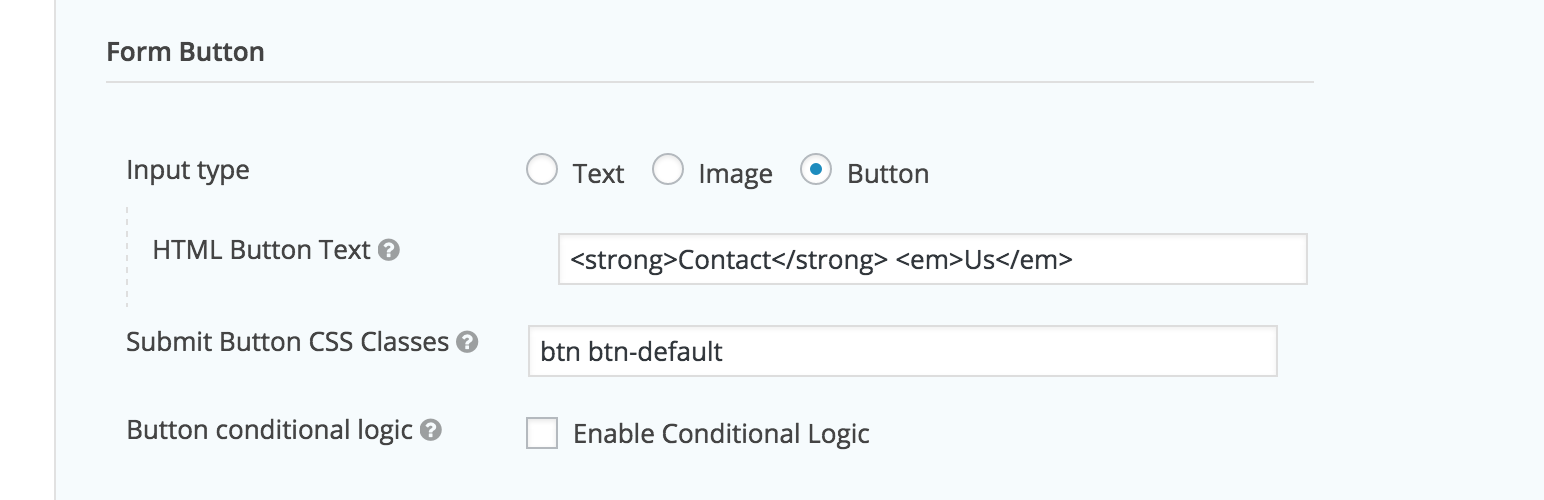
After activating the plugin, please navigate to the form settings of the form that you wish to customize. Scroll down to the ‘form button’ section where, in addition to ‘text’ and ‘image’, you’ll also be given ‘button’ as an input type option. Selecting the ‘button’ option will change the submit button’s markup to a <button> element. You will also be able to embed html in the ‘HTML Button Text’ field.
In the same ‘form button’ section under form settings, there’s an input called ‘Submit Button CSS Classes’. This is where you can change the CSS classes being currently used by the submit button.
Currently you are only able to customize the submit buttons on a per form basis within the form settings and not globally.