
WPThumbs
Themes Plugins By purpose By industry Best-of lists Fix it guides
Free Plugin by Bowo v2.5.2

Debug Log Manager

Log PHP, database and JavaScript errors via WP_DEBUG with one click. Conveniently create, view, filter and clear the debug.log file.
Debug Log Manager

The facts

Rating
5★ from 25
Active installs
10k+
Price
Free
Last updated
26 Jun 2026
Added
Sep 2022
Requires WP
4.6
Tested up to
WP 7.0.4
Requires PHP
5.6
Downloads
158,443

Our analysis

AI-assisted

Debug Log Manager is a WordPress plugin designed to help you monitor and inspect errors on your site. It allows you to enable and disable error logging with a single click, without needing to edit the wp-config.php file. The plugin creates a custom debug.log file for enhanced security and offers features to parse and filter errors for easier debugging.

This plugin is suitable for developers and site administrators who need to track PHP, database, and JavaScript errors efficiently. It provides tools to view error sources, auto-refresh log entries, and manage log file size, making it a practical choice for those who frequently troubleshoot issues.

Best for: This plugin suits developers and site administrators who need to manage and inspect error logs effectively.

What it does well

  • Enables WP_DEBUG with one click
  • Creates a custom debug.log file for security
  • Parses log files for distinct error viewing
  • Auto-refreshes log entries
  • Allows easy error filtering and management

Where it falls short

  • Limited information on user feedback
  • No details on compatibility with other plugins

Verdict

Debug Log Manager offers a straightforward solution for error logging in WordPress, particularly beneficial for those involved in development and debugging tasks.

From the developer

Bowo's own description of Debug Log Manager, lightly tidied.

Debug Log Manager allows you to:

  • Enable WP_DEBUG with one click to log PHP, database and JavaScript errors when you need to, and disable it when you’re done. No need to manually edit wp-config.php file.
  • Create the debug.log file for you in a non-default location with a custom file name for enhanced security.
  • Copy the content of the default / existing debug.log file into the custom debug.log file, and delete the default / existing debug.log file. So there is continuation in logging and enhanced security going forward.
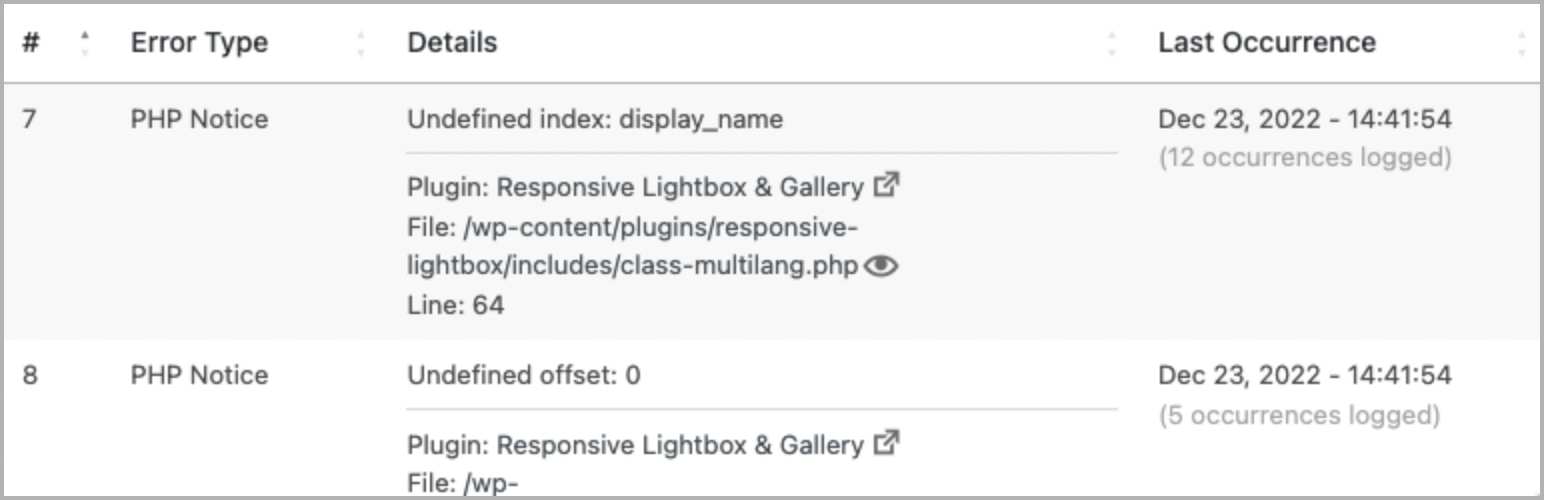
  • Parse the debug.log file and view distinct errors and when they last occurred, which is better than looking at the raw log file (potentially) full of repetitive errors.
  • Quickly find and filter more specific errors for your debugging work.
  • Make error details easier to read by identifying error source (core / plugin / theme) and separating file path and line number.
  • Easily view files where PHP errors occurred. This includes WordPress core, plugin and theme files.
  • Enable auto-refresh to automatically load new log entries. No need to manually reload the browser tab, or to tail -f the log file on the command line.
  • Easily clear the debug.log file to save disk space and more easily observe newly occurring errors on your site.
  • Show an indicator on the admin bar when error logging is enabled.
  • Add a dashboard widget showing the latest errors logged.
  • Use error_log() to output error info into your debug log. e.g. error_log( $error_message ) for simple, string-based error message, or error_log( json_encode( $error ) ) when inspecting a more complex error info, e.g. array or object.
  • Auto-trim debug.log file size so it does not grow larger than the available memory. This prevents out-of-memory error when trying to parse and view the debug.log file.

A simpler and more compact version of Debug Log Manager is included as part of the System Dashboard plugin, should you prefer a single plugin that does more.

What Users Say

“This is a great plugin for dev especially for people who tinker in the code.” ~PK Son

“I have used a couple of other logger plugins and this is by far the best one.” ~Brian Henry

Another massive time-saving tool. ~Jeff Starr

Give Back

Check These Out Too

  • System Dashboard: Central dashboard to monitor various WordPress components, processes and data, including the server.
  • Variable Inspector: Inspect PHP variables on a central dashboard in wp-admin for convenient debugging.
  • Admin and Site Enhancements helps you to easily enhance various admin workflows and site aspects while replacing multiple plugins doing it.
  • WordPress Newsboard: The latest news, articles, podcasts and videos from 100+ WordPress-focused sources.

Read the full description on the official page →

Tagged as

Alternatives

Other plugins for developer tooling.

WPCode

WPCode

93

Easily add code snippets in WordPress. Insert header & footer scripts, add PHP code snippets with conditio...

Free 3M+ installs 4.9★ (1,873)
Header Footer Code Manager

Easily add tracking code snippets, conversion pixels, or other scripts required by third party services for an...

Free 600k+ installs 4.9★ (309)
Admin and Site Enhancements

Duplicate post, post order, image resize, email via SMTP, admin menu editor, custom css / code, disable gutenb...

Free 200k+ installs 5★ (421)
Shortcoder

Create custom "Shortcodes" easily for HTML, JavaScript, CSS code snippets and use the shortcodes wit...

Free 100k+ installs 4.9★ (227)
Insert PHP Code Snippet

Add PHP code to your pages and posts easily using shortcodes.

Free 90k+ installs 4.9★ (705)
Code Snippets

An easy, clean, and simple way to enhance your site with code snippets.

Free 1M+ installs 4.7★ (509)