
WPCode
93Easily add code snippets in WordPress. Insert header & footer scripts, add PHP code snippets with conditio...
Free
3M+ installs 4.9★ (1,873)
Peek under the hood with sixty debugging reports just one click away.
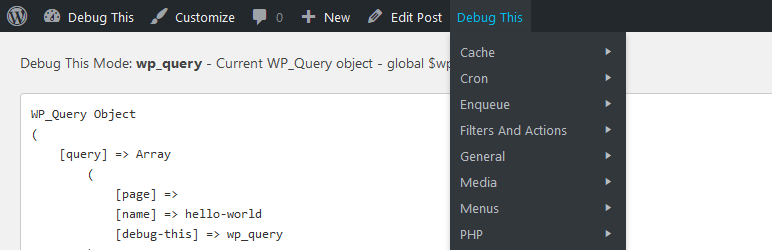
Debug This is a WordPress plugin designed for admins, developers, and support staff to provide detailed information about a WordPress installation directly from the front-end admin bar. It displays various data, such as the current WP_Query object, blog options, files in rendered HTML, and server information, among others.
The plugin allows users to quickly access essential debugging information without the need for hardcoding or complex tests. It also supports the creation of custom debug modes, enabling further extension and personalisation of the debugging process.
Best for: This plugin is suitable for WordPress developers and site administrators who need detailed debugging information.
What it does well
Where it falls short
Debug This offers a comprehensive set of debugging tools for WordPress users. It is particularly beneficial for those looking to streamline their debugging process.
Razvan Aldea's own description of Debug This, lightly tidied.
For admins, developers, and support staff, Debug This provides a ton of information about your WordPress installation, all from the front-end admin bar.
Debug This helps you save time and effort when trying to figure out what’s going on. Instead of hardcoding debug snippets or writing complex unit
tests for small functionality, you can simply bring to the surface what you need right from the admin bar.
For example, when viewing a single post, you can see:
New debug modes can be created easily:
add_debug_extension(
    $mode,
    $menu_label,
    $description,
    $callback,
    $group = 'General'
);
Example
add_debug_extension(
    'actions',
    __('Actions', 'debug-this'),
    __('$wp_actions contains all active registered actions', 'debug-this'),
    'foo_callback',
    'Filters And Actions'
);
function foo_callback($buffer, $template){
    global $wp_actions;
    $debug = print_r($wp_actions, true);
    return $debug;
}
You can add links to the header of a debug mode page. Place this code within your debug callback function.
add_debug_header_link('http://urltolink', 'Link Label');
Extensions can be removed as well using remove_debug_extension($mode);
No PRE Tags
If you don’t want your debug output to be enclosed in PRE tags, simply set the following in your extension:
Other plugins for developer tooling.
Easily add code snippets in WordPress. Insert header & footer scripts, add PHP code snippets with conditio...

Easily add tracking code snippets, conversion pixels, or other scripts required by third party services for an...

Duplicate post, post order, image resize, email via SMTP, admin menu editor, custom css / code, disable gutenb...

Create custom "Shortcodes" easily for HTML, JavaScript, CSS code snippets and use the shortcodes wit...

Add PHP code to your pages and posts easily using shortcodes.

An easy, clean, and simple way to enhance your site with code snippets.