WP Frontend Admin
Show Gutenberg Editor in the Frontend. Display WP Admin Pages in the Frontend. Create custom dashboards in the front end, Allow to Edit in the Fronten …
The facts
- Rating
- 4.9★ from 54
- Active installs
- 400+
- Price
- Free
- Last updated
- 22 Aug 2026
- Added
- Mar 2018
- Requires WP
- 3.6
- Tested up to
- WP 7.1
- Downloads
- 40,791
Our analysis
AI-assistedWP Frontend Admin is a WordPress plugin that allows you to manage your site from the front end by displaying WP admin pages. With a simple click, you can view admin pages as a normal user, making it easier to share links with clients or users.
The plugin supports various use cases, including viewing and editing posts, categories, and tags from the front end. It also enables users to submit posts using the Gutenberg editor and create custom dashboards, although the free version is limited to blog-related pages only.
Best for: This plugin is suitable for bloggers and site managers who want to simplify front-end management.
What it does well
- ✓Displays WP admin pages in the front end
- ✓Allows users to submit posts using the Gutenberg editor
- ✓Supports viewing and editing blog posts, categories, and tags
- ✓Enables creation of custom dashboards
- ✓Free to use from the WordPress.org directory
Where it falls short
- •Free version is limited to blog-related pages only
- •Premium version required for full functionality
Verdict
WP Frontend Admin provides a straightforward solution for managing blog-related content from the front end, but its full potential is unlocked only with the premium version.
From the developer
Jose Vega's own description of WP Frontend Admin, lightly tidied.
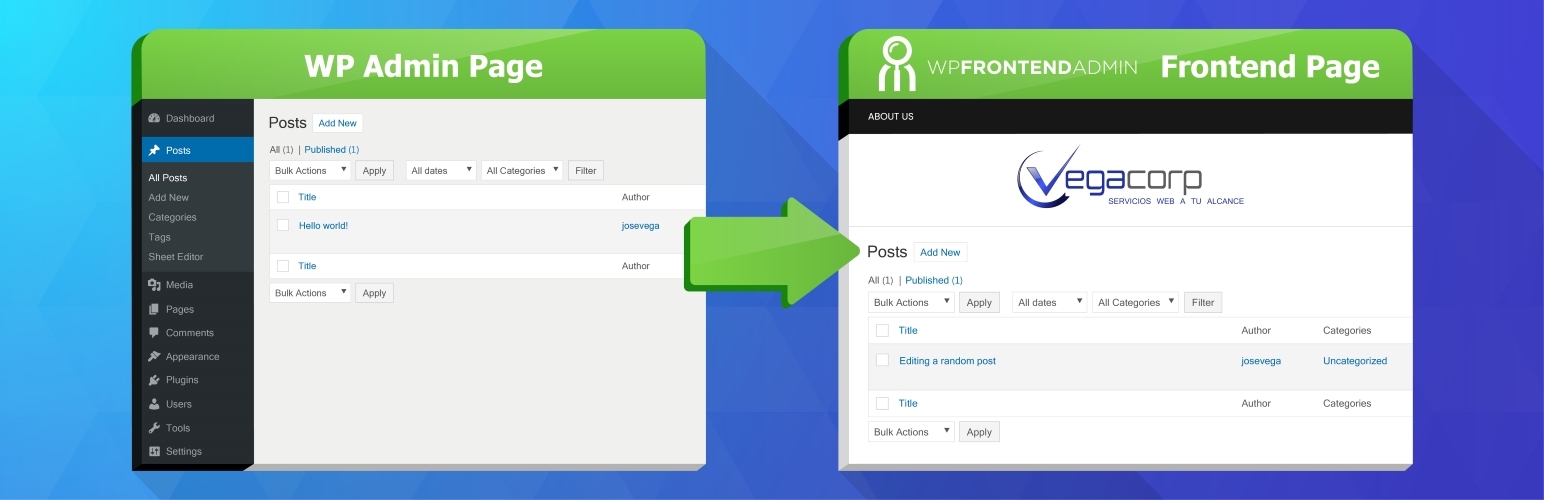
WP Frontend Admin is a plugin for managing your site from the front end, Display WP Admin Pages in the Frontend, and Create custom dashboards in the frontend.
When you are in wp-admin you will see a “View in the frontend” option in the toolbar.
When you click the option you can automatically see the same page in the frontend as a normal user.
Yes. It´s that easy.
One click is all you need to display an admin page in the frontend and share the link with your clients, employees, or users.
Show Gutenberg in the Frontend
You can allow your users to submit posts in the frontend using the Gutenberg editor. So they can create beautiful posts easily.
Use cases
-
View and edit posts from the frontend
-
View and edit blog categories from the frontend
-
View and edit blog tags from the frontend
-
Publish and edit posts from the frontend
-
Create custom dashboards for your clients
-
Create apps using WordPress. Just display the admin pages required by your app.
-
Hide the fact that you use WordPress
-
Change the CSS of the admin pages , so they look the same as your theme design.
Limitation
The free plugin is for blogs, it lets you view these pages in the frontend only:
-
The list of blog posts
-
The blog post editor
-
The list of blog categories
-
The list of blog tags
Go Premium
The premium version lets you display ANY admin page in the frontend:
-
View settings pages in the frontend.
-
View theme settings in the frontend
-
View WooCommerce settings in the frontend
-
View WooCommerce sales stats in the frontend
-
Allow your users to Edit WooCommerce Products in the Frontend
-
Allow your users to publish Events from the Frontend
-
Allow to Manage your WooCommerce Store in the Frontend
-
Basically you can display the pages of ANY PLUGIN in the frontend. For example, Jetpack, WooCommerce, etc.
Try Premium Version for FREE – 7 Days
Try the plugin without worries.