
WPForms
98The best WordPress contact form plugin. Drag & Drop form builder to create beautiful contact forms, paymen...
Free
5M+ installs 4.8★ (14,369)
This simple plugin create Drag & Drop or choose Multiple File upload in your Confact Form 7 Forms.
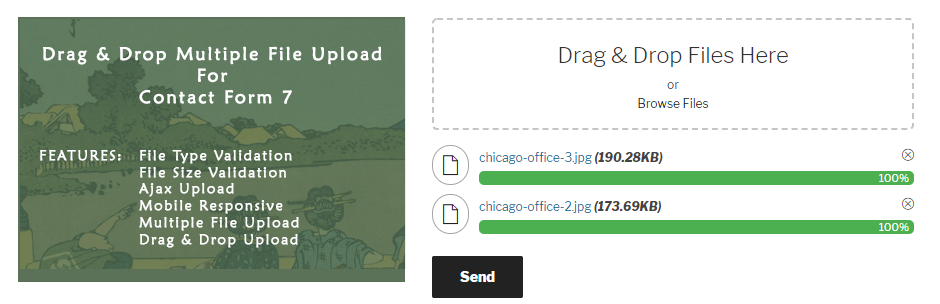
Drag and Drop Multiple File Upload for Contact Form 7 is a WordPress plugin that extends the functionality of Contact Form 7 by allowing users to upload multiple files using a drag-and-drop interface or a traditional file browse option. It includes features such as file type and size validation, an Ajax uploader, and the ability to manage text and error messages in the admin settings.
This plugin is suitable for users who need to collect multiple file uploads through their forms. It is designed for those who want a straightforward solution for file uploads without needing extensive technical knowledge.
Best for: This plugin is best for WordPress users who require multiple file uploads in their contact forms.
What it does well
Where it falls short
Drag and Drop Multiple File Upload for Contact Form 7 provides essential file upload features for users of Contact Form 7, making it a practical choice for those needing straightforward file collection.
Glen Don Mongaya's own description of Drag and Drop Multiple File Upload for Contact Form 7, lightly tidied.
Drag and Drop Multiple File Upload is a simple, straightforward WordPress plugin extension for Contact Form 7, which allows the user to upload multiple files using the drag-and-drop feature or the common browse-file of your webform.
Drag and Drop Multiple File Upload for Contact Form 7 is an independent plugin, not affiliated with or endorsed by the developers of Contact Form 7.
Here’s a little DEMO.
PLUGIN GUIDE – FREE VERSION
Note: On Free version, all uploaded files moves to a temporary folder (“/wp-content/uploads/wp_dndcf7_uploads”) then attaches the file to the mail and sends it. After that “Drag & Drop File Upload” removes the file from the temporary folder 1 hour after the submission. ( same process with the default “file” upload of Contact Form 7 – See here )
To adjust or disable the auto-deletion feature, we suggest upgrading to the PRO version for more options (see below).
Check out the available features in the PRO version.
Pro version is also compatible with:
You can get PRO Version here!
PRO VERSION – PLUGIN OVERVIEW
Other plugins for building forms.
The best WordPress contact form plugin. Drag & Drop form builder to create beautiful contact forms, paymen...

The best anti-spam protection to block spam comments and spam in a contact form. The most trusted antispam sol...

Get a fast contact form plugin. Create advanced forms using drag and drop form builder with all smart features...

Best WordPress form builder plugin. Create contact forms, payment forms & order forms with 1000+ integrati...

Save and manage Contact Form 7 messages. Never lose important data. It is a lightweight contact form 7 databas...

Elementor forms builder to create WordPress forms like contact form, booking form, feedback form, survey form,...