Drop Shadow Boxes
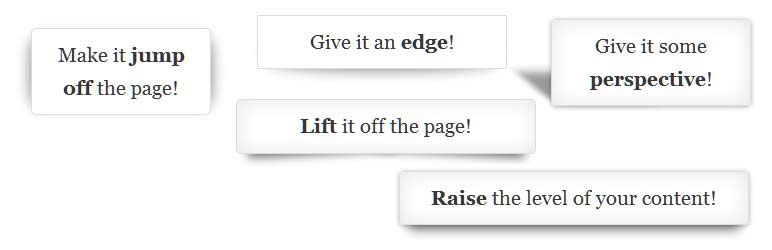
Highlight important content on your posts and pages inside a box with a drop shadow.
The facts
- Rating
- 5★ from 77
- Active installs
- 4k+
- Price
- Free
- Last updated
- 29 Nov 2024
- Added
- Jul 2012
- Requires WP
- 3.0
- Tested up to
- WP 6.7.7
- Downloads
- 197,454
Our analysis
AI-assistedDrop Shadow Boxes is a WordPress plugin designed to enhance the visual appeal of content by adding drop shadow effects to boxes on posts, pages, and widget areas. You can personalise these boxes with various shadow styles, including raised and perspective effects, as well as options for inside and outside shadows and rounded corners.
The plugin includes a widget and shortcode builder that allows you to preview your boxes before adding them to your site. It is straightforward to use, with no configuration required, making it suitable for users looking to improve their site’s aesthetics without needing extensive technical knowledge.
Best for: This plugin is suitable for WordPress users looking to highlight content visually on their sites.
What it does well
- ✓Free to use from the WordPress.org directory
- ✓Includes a widget and shortcode builder for easy integration
- ✓Allows personalisation with various drop shadow effects
- ✓No configuration required for setup
- ✓Compatible with the Gutenberg block editor
Where it falls short
- •Some older versions of Internet Explorer may not display shadows correctly
- •Limited information on specific features or settings
Verdict
Drop Shadow Boxes offers a simple way to enhance content presentation with visual effects. It is a practical choice for users wanting to add stylistic elements to their WordPress sites.
From the developer
Steve Henty's own description of Drop Shadow Boxes, lightly tidied.
Drop Shadow Boxes highlight important content on your posts, pages and widget areas. Personalise the box with drop shadow effects like raised, lifted and perspective and choose whether the box has an inside shadow, outside shadow and rounded corners. The plugin includes a widget and shortcode builder with a preview so you can test your box before adding it. The shadows will display correctly on most browsers – some older versions of Internet Explorer may not display the shadows – but they will display the box with the content so nothing will be missing on the page.
See the examples of drop shadow boxes to see how the plugin performs on your browser:
I’m offering this plugin free of charge. If you use it and like it please consider giving it a rating.
Stay in touch by following me on facebook: Steven Henty
Instructions
The plugin itself doesn’t require any configuration. There isn’t a setting page.
You can access the widget from the Widgets dashboard page – drag, drop and configure as you would any other widget.
Look for the Drop Shadow Box block in the new block editor (Gutenberg).
The shortcode builder in the classic editor allows you to add Drop Shadow Boxes to posts and pages. You can access it from the media toolbar while you’re editing the post/page by clicking on the box icon next to the upload/insert media button.
Shortcode Reference
If you prefer not to use the shortcode builder, or if you’d like to modify an existing drop shadow box here’s the shortcode reference guide.
Example usage:
[dropshadowbox]your content[/dropshadowbox]
[dropshadowbox align=”left”]your content[/dropshadowbox]
[dropshadowbox effect=”raised”]your content[/dropshadowbox]
[dropshadowbox effect=”horizontal-curve-bottom” rounded_corners=”false”]your content[/dropshadowbox]