
Create advanced Elementor sticky headers with scroll effects: blur, shrink, hide on scroll, plus full responsi...
Free
300k+ installs 4.5★ (68)
Interactive 3D model viewer with hotspots/markers, tooltips, animations, environment maps and realistic lighting.
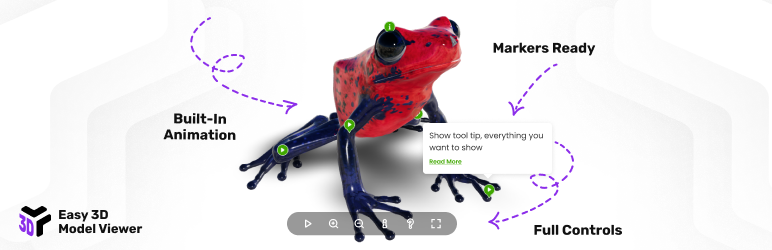
Easy 3D Model Viewer is a WordPress plugin designed to showcase 3D models with realistic rendering, including lights, environment maps, and shadows. It allows you to add interactive markers that can display tooltips and control animations, enhancing the user experience. This plugin is suitable for websites that require a visually engaging way to present 3D content, such as portfolios or product showcases.
The plugin is fully responsive and can be configured for various devices, including desktops and mobile. It offers features like customizable size, lightbox support, lazy loading, and orbital controls for navigating 3D models. The documentation and video tutorials provided by the author facilitate easy installation and configuration for users.
Best for: Websites that need to present 3D models interactively, such as portfolios or product displays.
What it does well
Where it falls short
Easy 3D Model Viewer offers a range of features for displaying 3D content effectively. However, the lack of user ratings may be a consideration for potential users.
FWD's own description of Easy 3d Model Viewer, lightly tidied.
Showcase authentic 3D models with realistic rendering (lights, environment maps and shadows). Add markers with tooltips and info windows, control animations, and tween the camera to predefined positions.
Realistic 3D Models – Realistic rendering with lights, environment maps and shadows.
Hotspots/Markers – 3D markers and 2D markers can be added anywhere on the model. They can display tooltips/info windows, control built-in animations, and tween the camera to specific positions.
Easy To Configure And Install – Includes documentation, video tutorials, demo pages, updates and support from the developer – Tibi @ FWD.
After activation, open the plugin settings in the WordPress admin area and create a new viewer preset. Then use the shortcode below in any post/page.
Embedding 3D models in posts or pages
Product visualization with 3D previews
Showcasing GLTF/GLB models interactively
Creating 3D hotspots and annotations
Displaying 3D assets in portfolios or documentation
Basic example:
Other plugins for animations.
Create advanced Elementor sticky headers with scroll effects: blur, shrink, hide on scroll, plus full responsi...

Add CSS animations and scroll effects to any Gutenberg block. Choose from fade, slide, zoom & more, with d...

Create WordPress websites with free forms, Gutenberg blocks, popups, sliders, countdowns, animations, pre-buil...

Add creative image hover effects to Elementor page builder. Easily customize title and content and effects wit...

Easy to use advanced Parallax, Image and Video backgrounds block plugin with parallax and video support.

Elevate your website game with the Bricksable collection of premium elements for Bricks Builder. Designed to s...