Featured Image Column
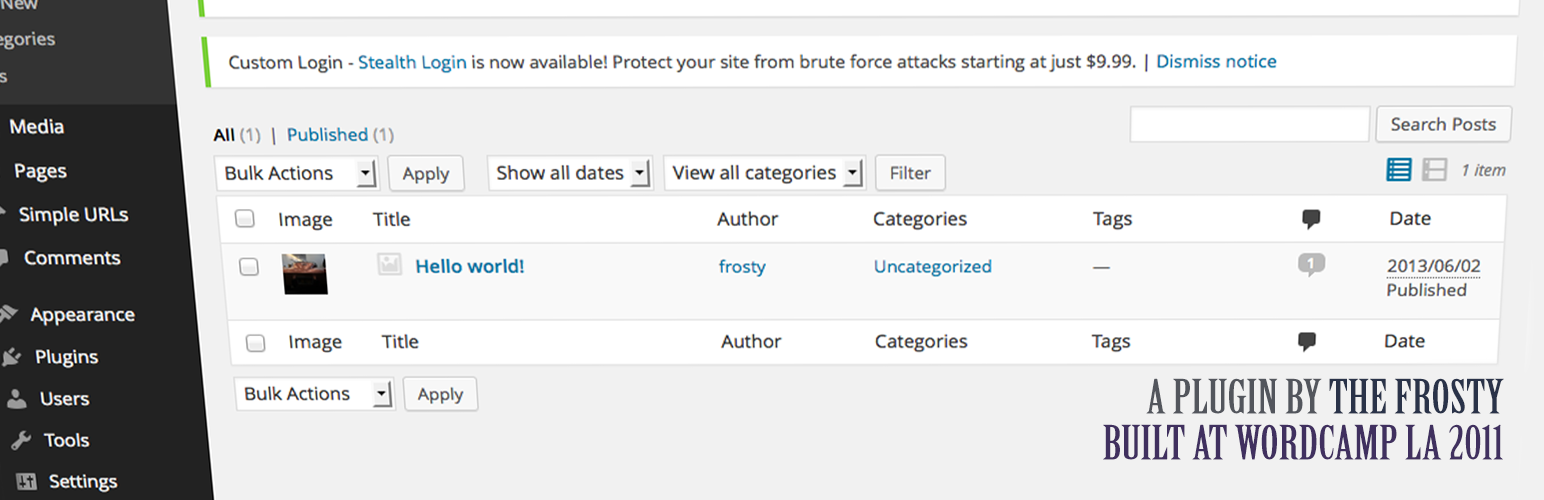
Adds a column to any post type edit screen with the featured image if it exists.
The facts
- Rating
- 4.5★ from 12
- Active installs
- 2k+
- Price
- Free
- Last updated
- 14 Aug 2026
- Added
- Sep 2011
- Requires WP
- 6.2
- Tested up to
- WP 7.1.0
- Requires PHP
- 8.0
- Downloads
- 47,485
Our analysis
AI-assistedFeatured Image Column is a WordPress plugin that adds a column to the post list in the admin area, displaying the featured image of each post if available. You can select which post types to include and customise the default image or CSS through filters. This plugin is suitable for users who want to enhance their post management by visually identifying featured images at a glance.
It is particularly useful for those managing multiple post types and looking for a straightforward way to display featured images without extensive configuration. The plugin is free and can be found in the WordPress.org directory.
Best for: This plugin suits WordPress users who manage multiple post types and want to display featured images in the admin area.
What it does well
- ✓Adds a featured image column in the admin post list
- ✓Supports customisation of default images and CSS
- ✓Allows selection of post types for the image column
- ✓Free to use from the WordPress.org directory
- ✓Good rating of 4.5 out of 5 from users
Where it falls short
- •Limited information on additional features or support
- •Requires PHP 8.0 and tested up to WordPress 7.1.0
Verdict
Featured Image Column provides a simple solution for displaying featured images in the post list, with customisation options available. It is a practical tool for enhancing post management.
From the developer
Austin's own description of Featured Image Column, lightly tidied.
As of version 0.2.2 you can select which post types you’d like to have the image column.
It simply adds a column before the title (far left) the show’s the posts featured image if it’s supported and exists.
Want to change the default image? Simply filter you own image by using featured_image_column_default_image
or filter your own CSS by using the featured_image_column_css filter hook.
Example actions/filters
Change thumbnail size
function my_custom_featured_image_size(mixed $size, int $post_id): mixed {
    if (in_array($post_id, [1, 5, 23], true)) {
        return [65. 65];
    }

    return $size;
}
add_filter('featured_image_post_thumbnail_size', 'my_custom_featured_image_size', 10, 2);
Add support for a custom default image
function my_custom_featured_image_column_image(string $image, int $post_id): string {
    if (in_array($post_id, [1, 5, 23], true)) {
        return trailingslashit( get_stylesheet_directory_uri() ) . 'images/featured-image.png';
    }

    return $image;
}
add_filter('featured_image_column_default_image', 'my_custom_featured_image_column_image', 10, 2);
Remove support for post types Use the featured_image_column_init action hook for your filter.
function frosty_featured_image_column_init_func() {
    add_filter('featured_image_column_post_types', 'frosty_featured_image_column_remove_post_types', 11); // Remove
}
add_action('featured_image_column_init', 'frosty_featured_image_column_init_func');

function frosty_featured_image_column_remove_post_types($post_types) {
    foreach($post_types as $key => $post_type) {
        if ($post_type === 'post-type') // Post type you'd like removed. Ex: 'post' or 'page'
            unset($post_types[$key]);
    }
    return $post_types;
}
For more question please visit https://austin.passy.co