Filter Page by Template
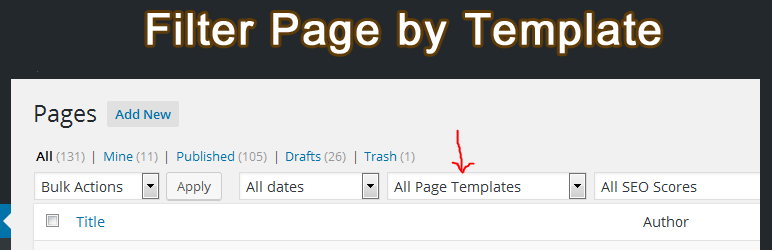
Filter the list of pages, posts and custom post-type based on the used page template. A dropdown and a column to show page template names.
The facts
- Rating
- 5★ from 48
- Active installs
- 2k+
- Price
- Free
- Last updated
- 23 May 2024
- Added
- Mar 2016
- Requires WP
- 3.8.0
- Tested up to
- WP 6.5.10
- Downloads
- 62,871
Our analysis
AI-assistedFilter Page by Template is a WordPress plugin designed to help you manage and filter pages based on their templates. It adds a dropdown menu in the admin area, allowing you to select a specific template and view all associated pages. This is particularly useful for websites with numerous pages and templates, as it provides a clearer overview of your site's structure.
The plugin displays a new column in the page list table that shows the name of the template used for each page. If a template file is missing, it will be highlighted in red. Additionally, you can hover over the template name to see the corresponding PHP file name. This tool is suitable for site administrators who need to organise and track page templates efficiently.
Best for: Site administrators managing complex WordPress sites with multiple templates.
What it does well
- ✓Allows filtering of pages by template
- ✓Displays which pages are using specific templates
- ✓Indicates missing templates in red
- ✓Shows PHP file names on hover
- ✓Works with custom post types
Where it falls short
- •Limited information on additional features or settings
Verdict
This plugin provides a straightforward solution for filtering pages by template, making it easier to manage large sites. Its functionality is focused and useful for those needing to track template usage.
From the developer
Md Jahidul Islam's own description of Filter Page by Template, lightly tidied.
If your WordPress website has hundreds of pages and your theme has many page templates then sometimes you want to see the pages that are using a specific template. But by default, there is no way in WordPress admin to search posts or pages associated with a template. “Filter Page by Template” plugin helps you to do this. It adds a dropdown list of page templates above the post/page list. You can filter posts/pages by selecting a template from the dropdown. Also, you can filter and see pages that are using missing templates. There is a new column Template in the page list table. This Template column shows the name of the page template that is being used for a particular page. If a template file is not exist then that will be shown in red color. On the Template column you will see the template’s display name. To see the php file name mouse over on the template name.
Using this plugin you can do:
- Filter page list according to page template.
- See which page is using which template.
- See which page template is being used by which pages.
- See which pages are using missing templates.
- Know the PHP file name of templates.
- You can do the same things above for posts and any custom post-type posts.