Git it Write
Publish markdown files present in a GitHub repository as posts to WordPress automatically
The facts
- Rating
- 4.7★ from 7
- Active installs
- 100+
- Price
- Free
- Last updated
- 3 Aug 2024
- Added
- Aug 2020
- Requires WP
- 4.4
- Tested up to
- WP 6.6.7
- Requires PHP
- 5.3
- Downloads
- 7,676
Our analysis
AI-assistedGit it Write is a WordPress plugin that allows you to publish posts directly from markdown files stored in a GitHub repository. It updates your WordPress site automatically whenever files are added or changed in the repository, making it suitable for collaborative content creation.
This plugin is designed for users who prefer writing in markdown format and want to leverage GitHub's version control for their WordPress posts. It can be particularly useful for documentation, FAQs, wikis, and blog posts that require community involvement.
Best for: This plugin suits users who manage documentation or collaborative content on GitHub and want to publish it on WordPress.
What it does well
- ✓Automatically updates WordPress posts from GitHub markdown files
- ✓Supports hierarchical post structure based on folder organization
- ✓Allows collaboration through GitHub for content editing
- ✓Processes markdown into HTML for WordPress
- ✓Supports post metadata such as categories and tags
Where it falls short
- •Limited information on user support or documentation
- •May require technical knowledge of GitHub and markdown
Verdict
Git it Write provides a straightforward way to integrate GitHub content into WordPress, although it may not be suitable for users unfamiliar with markdown or Git.
From the developer
vaakash's own description of Git it Write, lightly tidied.
Git it Write allows to publish the markdown files present in a GitHub repository to your WordPress site. So with this plugin, whenever the files are added, updated in the repository the WordPress post will be added, updated accordingly.
This plugin is inspired from static site generators like Jekyll, Next.js, Gatsby.js on how content is written is markdown. This is a similar idea for WordPress where markdown files are parsed from GitHub and published as posts.
👓 Live example: Source github repository (/docs/ folder) to Posts published
⚡ Getting started: Get started with Git it write. Learn how to write .md files and publish posts on WordPress.
This allows people to collaborate with the post, share edits and suggestions in GitHub which when pulled the WordPress post will be updated automatically.
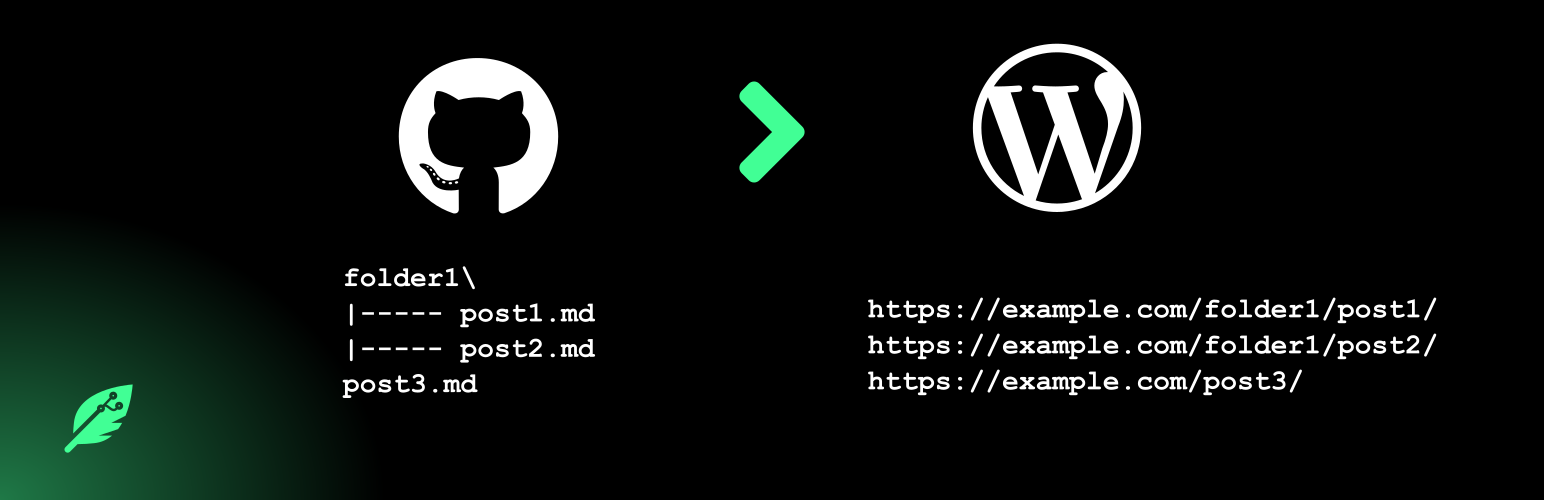
If a repository has files in the below structure,
docs/
    guide/
        introduction.md
        getting-started.md
help/
    faq.md
Then below posts will be created like below (if permalinks are configured and the post type supports “hierarchy” i.e creating posts level by level (example: pages))
https://example.com/docs/guide/introduction/
https://example.com/docs/guide/getting-started/
https://example.com/help/faq/
🎲 What is the use of this plugin ?
- Publish posts using the files in your GitHub repository.
- Write your posts in Markdown format.
- Write your posts on your desktop application (Notepad++, Sublime Text, Visual studio code).
- Collaborate, involve communities on the files in GitHub and publish them on WordPress.
- All the advantages of Git and it’s version management system.
🚀 Some use cases
- Can be used for documentation posts, FAQs, Wikis etc.
- Write blog posts.
- Any articles which may need community involvement.
✨ Features
- Markdown will be processed and post will be published as HTML.
- Images used in the source file will be uploaded to WordPress.
- Relative links are supported.
- Set post properties like post status, title, order, category, tags etc, in the source file itself.
- Webhook support (whenever repository is changed, it updates the plugin to pull the latest changes and publish the posts)
- Add multiple repositories.
- Publish to any post type.
- Posts are published in hierarchial manner if they are under folders. Example: a file
dir1/hello.mdwill be posted asdir1/hello/in WordPress if the post type supports hierarchy. - Support for post metadata like setting tags, categories, custom fields.