
GetGenie
91AI powered SEO assistant & content writer with 40+ templates, chatbot, NLP keyword research, AEO, GEO, SEO...
Free
80k+ installs 4.8★ (118)
This plugin adds a graphical shortcode creator for the List Category Posts plugin, accessible via the "LCP" button in WordPress editor.
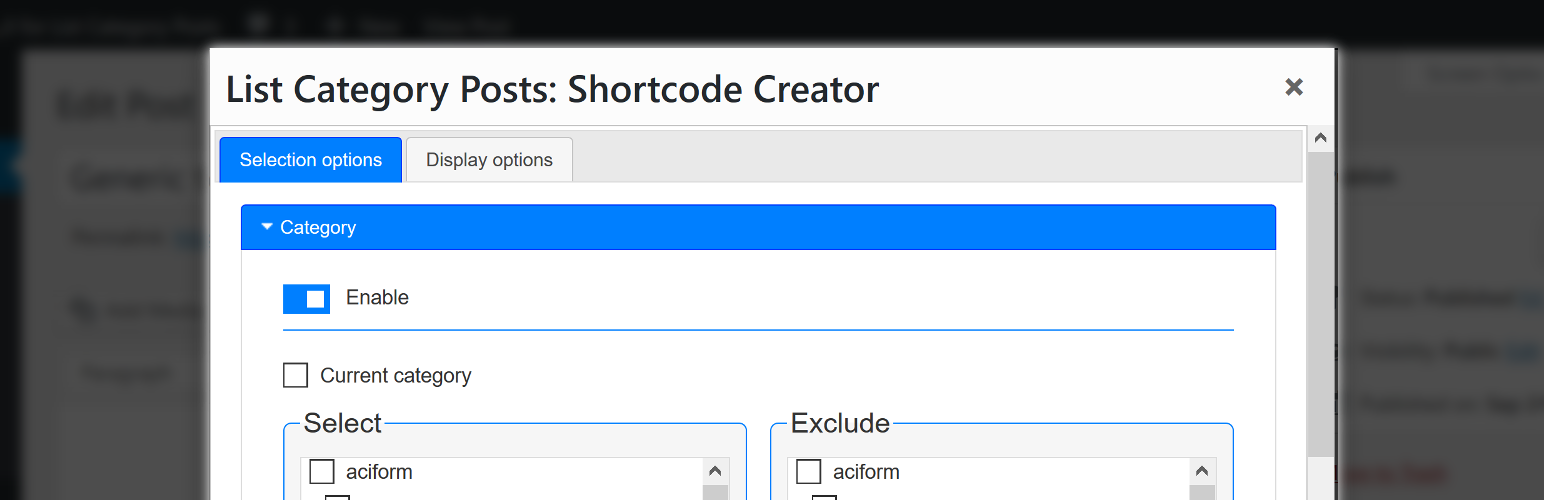
GUI for List Category Posts is a WordPress plugin that provides a graphical shortcode creator for the List Category Posts plugin. It allows you to create shortcodes easily through a modal window that appears in the WordPress editor when you click the ‘LCP’ button. You can select which posts to include and manage how they are displayed using various options in two tabs: Selection options and Display options.
This plugin is suitable for users who want to enhance their use of the List Category Posts plugin without needing to manually input shortcodes. It is particularly useful for those who prefer a visual interface for shortcode creation in their posts, widgets, or other areas where the WYSIWYG editor is available.
Best for: This plugin is best for WordPress users looking to simplify shortcode creation for categorised posts.
What it does well
Where it falls short
GUI for List Category Posts offers a straightforward way to create shortcodes, but users should be familiar with the List Category Posts plugin to fully utilise its features.
zymeth25's own description of GUI for List Category Posts, lightly tidied.
This plugin adds a graphical shortcode creator for the List Category Posts plugin by Fernando Briano. The creator is available in WordPress editor by clicking the ‘LCP’ button of the editor’s toolbar.
This means you can use the shortcode creator in:
Make sure you have read the LCP plugin’s detailed documentation as well as its readme to understand its features and potential. This is important because even though the GUI provided here tries to make things easily understandable on the front-end, it does not explain all features of the base plugin in detail.
Clicking the ‘LCP’ button opens a modal window with a form.
The shortcode creator has two sections, divided in two tabs:
‘Selection options’ allow you to choose which posts to include while ‘Display options’ manage what information about selected posts is displayed and what HTML & CSS customizations are applied.
Once you are happy with your selected options, just click the ‘Insert into editor’ button located at the bottom of the modal window. It will automatically insert a properly formated List Category Posts shortcode into WordPress editor. You can change the position at which the shortcode is inserted by moving the cursor in the editor.
Below is a list of shortcode creator’s sections together with corresponding shortcode parameters. This is intended to help you navigate List Category Post’s documentation.
id, categorypage, child_categoriestags, exclude_tags, current_tagstaxonomy, terms, taxonomies_and, taxonomies_orpost_type, post_statuscustomfield_name, customfield_valueexclude_postsauthor_postsmonthnum, year, after, beforesearchstarting_withoffsetpost_parentpagination, numberposts, order, orderbyconditional_title, catlink, catname, category_description, morelink, classauthor, comments, content, customfield_display, customfield_display_separately, customfield_display_glue, customfield_display_name, customfield_display_name_glue, date, date_modified, excerpt, excerpt_overwrite, excerpt_strip, excerpt_size, display_id, post_suffix, posts_morelink, tags_as_class, title_limit, link_titles, no_post_titles, thumbnail, force_thumbnail, thumbnail_sizetemplateOther plugins for bookstores and publishers.
AI powered SEO assistant & content writer with 40+ templates, chatbot, NLP keyword research, AEO, GEO, SEO...

List the most recent posts with post titles, thumbnails, excerpts, authors, categories, dates and more!

Very customizable plugin to list posts by category (or tag, author and more) in a post, page or widget. Uses t...

A Customizable Testimonial plugin to Automate Collecting, Filtering, and Publishing Customer Reviews. Testimon...

PublishPress Authors is the best plugin for adding authors, co-authors, multiple authors and guest authors to...

Import your demo content, widgets and theme settings with one click. Theme authors! Enable simple theme demo i...