HTML Editor Syntax Highlighter
Add syntax highlighting to WordPress code editors using CodeMirror.js
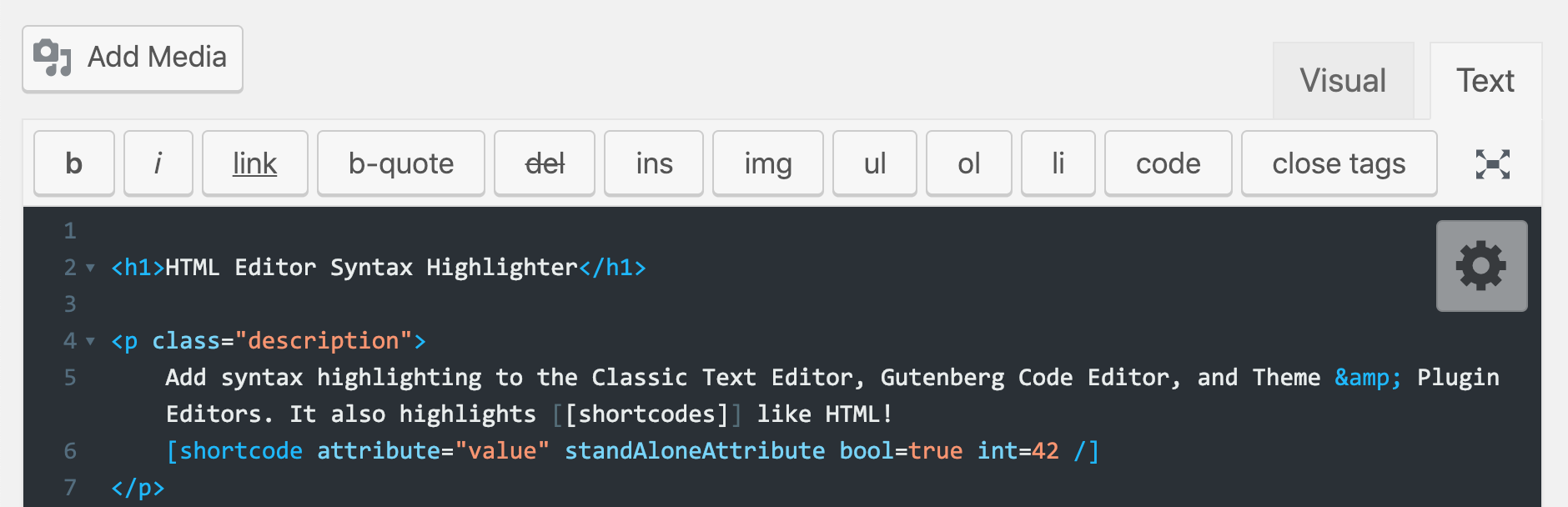
The facts
- Rating
- 4.4★ from 110
- Active installs
- 50k+
- Price
- Free
- Last updated
- 16 Mar 2024
- Added
- Apr 2012
- Requires WP
- 4.0
- Tested up to
- WP 6.5.0
- Downloads
- 595,611
Our analysis
AI-assistedHTML Editor Syntax Highlighter is a WordPress plugin that adds syntax highlighting to various HTML editors within WordPress, including the Classic Post & Page HTML editor, the Gutenberg Code Editor, and the Theme & Plugin editors. It uses CodeMirror.js to enhance the editing experience by providing visual cues for code structure.
This plugin is suitable for users who work with code in WordPress and need a clearer view of their syntax. It includes features like a wide selection of themes, customization options, and the ability to save posts using keyboard shortcuts.
Best for: This plugin is best for WordPress users who frequently edit code and require syntax highlighting.
What it does well
- ✓Adds syntax highlighting to multiple WordPress editors
- ✓Supports Gutenberg Code Editor and Classic Editor
- ✓Includes a variety of themes and customization options
- ✓Allows saving of posts with keyboard shortcuts
- ✓Restores cursor position after reloading
Where it falls short
- •Limited information on specific themes and customization options
Verdict
HTML Editor Syntax Highlighter provides useful enhancements for code editing in WordPress. It is a practical tool for developers and content creators who need better visibility of their code syntax.
From the developer
Peter Mukhortov's own description of HTML Editor Syntax Highlighter, lightly tidied.
Add syntax highlighting in the Classic Post & Page HTML text editor, Gutenberg Code Editor, and Theme & Plugin editors using CodeMirror.js
Features
- Syntax highlighting in the Post/Page HTML editor
- NEW: Syntax highlighting in the Gutenberg Code Editor (not Visual Editor)
- Syntax highlighting in the Theme & Plugin editors
- Syntax highlighting for WordPress
[shortcodes/] - Save your posts and pages pressing
Ctrl+S(Cmd+Son Mac) - Restore cursor position after page is reloaded
- Huge selection of themes and other customization options
- Fullscreen mode: toggle with
F11/Eschotkeys
If you would like to contribute to this plugin, view the github repo.
If you’re a regular user of this plugin, please consider taking a short User Experience Survey to provide feedback that will help shape the new version 3.0.