Instant CSS
Write your styles beautifully with the power of Visual Studio Code
The facts
- Rating
- 4.9★ from 15
- Active installs
- 3k+
- Price
- Free
- Last updated
- 21 Sep 2023
- Added
- Mar 2019
- Tested up to
- WP 6.3.10
- Downloads
- 16,154
Our analysis
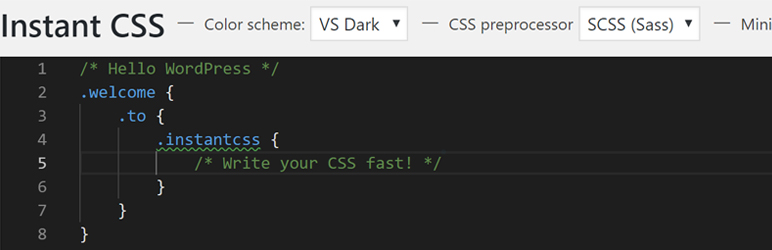
AI-assistedInstant CSS is a WordPress plugin that enables you to write CSS or SCSS directly within the WordPress environment, utilising features from Visual Studio Code. It compiles your stylesheets using autoprefixer, ensuring compatibility with older browsers without the need for manual prefixes. The plugin also supports live editing, allowing you to see changes in real-time as you save your work.
This plugin is suitable for users who want to enhance their site's styling with custom CSS or SCSS while benefiting from advanced features like minification and live updates. It's particularly useful for developers looking for a more efficient way to manage stylesheets within WordPress.
Best for: Web developers or designers looking to manage custom styles efficiently in WordPress.
What it does well
- ✓Supports CSS and SCSS for flexible styling options
- ✓Uses autoprefixer for compatibility with older browsers
- ✓Minification option to reduce loading times
- ✓Live editor updates styles on save
- ✓Integrates features from Visual Studio Code
Where it falls short
- •Limited information on specific user experience or support
- •No detailed insights on performance metrics
Verdict
Instant CSS offers a practical solution for writing and managing styles within WordPress, particularly for those familiar with coding. Its focus on live editing and browser compatibility makes it a useful tool for developers.
From the developer
dylanblokhuis's own description of Instant CSS, lightly tidied.
Use the power of Visual Studio Code in WordPress to write your CSS or SCSS
The plugin uses autoprefixer to parse your CSS/SCSS into CSS that will work on older browsers, no need to write -webkit, -moz or -o.
You can also choose to use SCSS, more info about SCSS here: https://sass-lang.com/guide
Features
- Use all the powerful features from Visual Studio Code
- Your CSS gets compiled with autoprefixer to work on older browsers
- Use SCSS to create efficient stylesheets with variables, mixins, etc.
- Option to minify your CSS to reduce loading times
- No refreshing on saving
- Live editor updating styles on save and have the browser update simultaneously