WordPress Playground Block
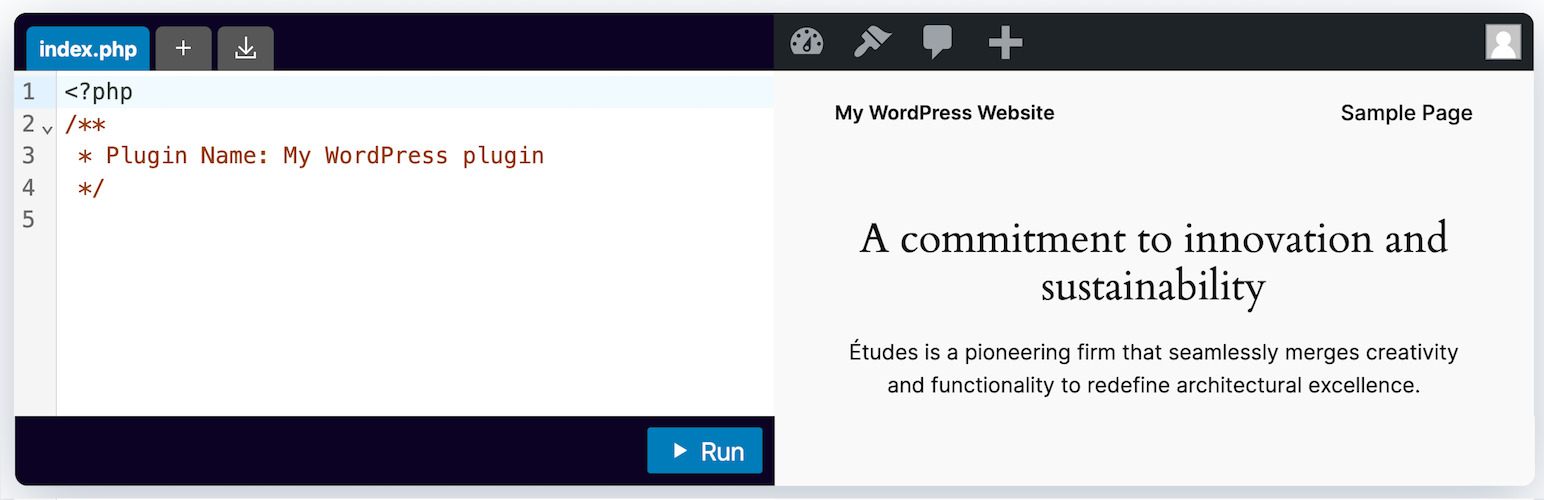
This WordPress block embeds WordPress Playground in your posts and pages. An optional interactive code editor allows readers to learn and explore.
The facts
- Rating
- 5★ from 2
- Active installs
- 200+
- Price
- Free
- Last updated
- 28 Aug 2026
- Added
- Jun 2023
- Requires WP
- 6.1
- Tested up to
- WP 6.9.7
- Requires PHP
- 7.0
- Downloads
- 16,036
Our analysis
AI-assistedThe WordPress Playground Block is a plugin that allows you to embed WordPress Playground within your posts and pages. It includes an interactive code editor that can be used to demonstrate how WordPress plugins are built by allowing you to type and run PHP code directly in the block.
This plugin is suitable for educators or developers who want to teach or showcase WordPress plugin development interactively. It is designed for use within the Gutenberg block editor and offers features such as automatic login, the ability to specify landing pages, and options for code editor functionality.
Best for: This plugin suits educators and developers looking to teach WordPress plugin development interactively.
What it does well
- ✓Embeds WordPress Playground in posts and pages
- ✓Includes an interactive code editor for PHP code
- ✓Allows for automatic login and landing page specification
- ✓Supports multiple files in the code editor
- ✓Free to use from the WordPress.org directory
Where it falls short
- •Still in an early preview stage, not feature-complete
- •Limited information available about its overall capabilities
Verdict
The WordPress Playground Block provides a unique way to embed interactive coding experiences in WordPress content. However, its early development stage may limit its current usability.
From the developer
WordPress.org's own description of WordPress Playground Block, lightly tidied.
This WordPress block embeds WordPress Playground in your posts and pages. You can also include an interactive code editor to demonstrate and teach your readers how WordPress plugins are built.
Usage
- Navigate to any post or page editing screen in WordPress.
- Click the ‘+’ button to add a new block and search for ‘WordPress Playground Block’.
- Select the WordPress Playground Block from the list of available blocks.
- A new WordPress Playground Block will be inserted into your post or page. You can start typing PHP code directly into the block.
- Click the ‘Run’ button to execute the code and see the results in the output area below the code block.
All features
- Embed WordPress Playground
- Log in automatically
- Specify landing page
- Create new post or page
- Redirect to newly created post or page
- Specify blueprint to apply on init
- Enable/disable code editor
- Make code editor read-only
- Allow multiple files in code editor
Resources
Support
For any issues or questions about the WordPress Playground Block, please open a GitHub issue in the playground-tools repository.
This is an early preview to gather feedback and apply polish. This plugin isn’t yet a well-rounded and feature-complete solution.
License
The WordPress Playground Block Plugin is licensed under the GNU General Public License v2.0. This is a free software license that allows you to use, modify, and distribute the software, provided you adhere to its terms and conditions.