
Boost your sales with a free WooCommerce Wishlist feature. Let your customers save and share their favorite p...
Free
100k+ installs 4.7★ (499)
Track active, abandoned, and converted WooCommerce carts and Shopper Lists (Wishlist, Save for Later) in real time from the WordPress admin dashboard.
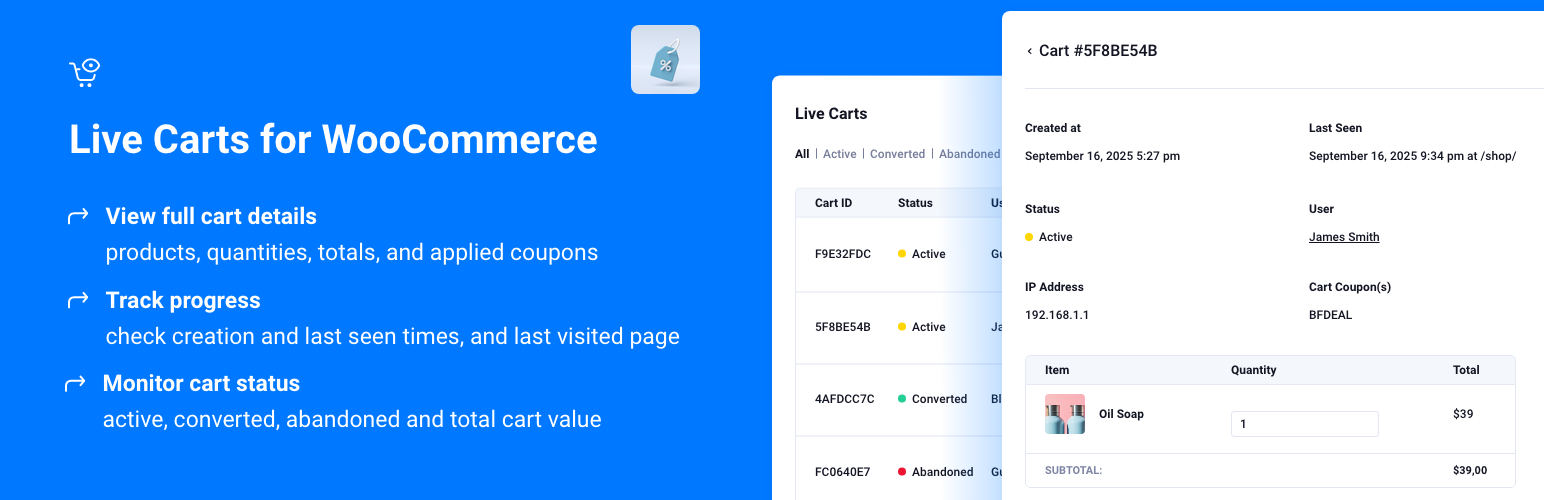
Live Carts for WooCommerce is a WordPress plugin that enables real-time tracking of customer shopping carts within the WordPress admin. It provides detailed information on cart status (active, abandoned, or converted) and total value, allowing store administrators to monitor customer activity effectively.
The plugin also tracks WooCommerce's built-in Wishlist and Save for Later features, offering insights into logged-in customers' lists. It includes various analytics features, such as cart conversion rates and abandonment rates, making it suitable for eCommerce sites looking to enhance their customer engagement and sales recovery strategies.
Best for: This plugin is best suited for eCommerce sites using WooCommerce that want to track customer shopping behaviour and improve cart recovery.
What it does well
Where it falls short
Live Carts for WooCommerce offers useful tracking and analytics features for online stores. It can help store owners understand customer behaviour and potentially reduce cart abandonment.
BerryPress's own description of Live Carts for WooCommerce: Track Active, Abandoned, and Con..., lightly tidied.
The Live Carts plugin by BerryPress extends WooCommerce by adding real-time tracking of all customer shopping carts within your WordPress admin. It provides a complete list of customer carts, including their status (active, abandoned, or converted) and total value. Clicking a cart ID reveals more details, including all products and quantities in the cart.
Optionally, the plugin can display a cart ID on the frontend, visible to the customer. The admin interface supports searching for carts based on this ID. This allows store support to look up a customer cart if the customer provides their cart ID.
The plugin also calculates some basic cart statistics at Analytics > Carts, with date filtering based on the cart creation date.
Version 1.3.0 adds admin visibility into WooCommerce Shopper Lists — the built-in Wishlist and Save for Later features in WooCommerce 10.9. When you enable those features in WooCommerce, Live Carts tracks each logged-in customer’s lists alongside active carts. Open the Shopper Lists tab in the Live Carts admin to browse lists by customer, list type, value, and last seen. Shopper Lists in WooCommerce core are currently experimental and require Gutenberg Blocks.
Requirements: WooCommerce 10.9 or higher, with at least one Shopper List feature enabled under WooCommerce → Settings → Advanced → Features (Wishlist and/or Save for Later). This feature only monitors lists that WooCommerce core stores when its Shopper List features are turned on.
[berrypress_live_cart_id] shortcode to display the visitor’s cart ID anywhere on your site – ideal for Contact Us or Support pages, so customers can easily share their cart ID with your support teamUpgrade to Live Carts Pro here and unlock powerful tools to manage and recover customer carts more effectively:
Core Pro Features:
Additional Pro Settings:
Take full control of your WooCommerce carts with BerryPress Live Carts Pro.
Other plugins for wishlists and comparisons.
Boost your sales with a free WooCommerce Wishlist feature. Let your customers save and share their favorite p...

WPC Smart Wishlist is a simple but powerful tool that can help your customer save products for buying later.

WooCommerce builder for Elementor & Gutenberg, offering product templates, product sliders, shopping cart,...
ShopLentor – More than a WooCommerce builder. A complete growth plugin to boost conversions, UX, and sales for...

It helps customers compare products with mighty AJAX, doesn't require opening a new page or iframe, and a...

YITH WooCommerce Wishlist add all Wishlist features to your website. Needs WooCommerce to work. WooCommerce 11...