
WP-Optimize
95Get caching and more with this powerful cache plugin. Cache, optimize images, clean your database and minify f...
Free
1M+ installs 4.8★ (2,606)
Marquee image crawler is a continuous scrolling image plugin. This plugin crawls the images left or right.
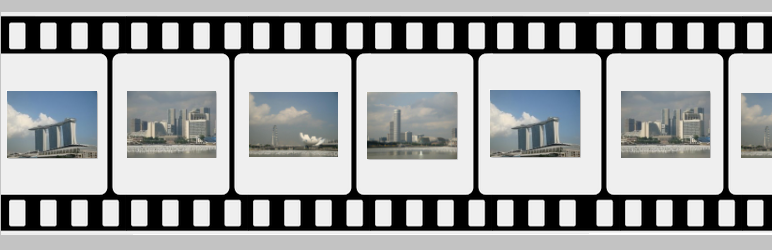
Marquee image crawler is a WordPress plugin that enables continuous scrolling of images on your site. It allows images to crawl left or right, with optional mouse-driven control for scrolling direction and speed. You can easily add and configure images through the plugin's admin settings.
This plugin is suitable for users who want to enhance their website's visual appeal with scrolling images. It is lightweight and offers a simple installation process, making it accessible for those with basic WordPress knowledge.
Best for: This plugin is best for websites looking to display images in a dynamic, scrolling format.
What it does well
Where it falls short
Marquee image crawler provides a straightforward way to implement scrolling images, but lacks detailed feature information for more complex needs.
gopiplus's own description of Marquee image crawler, lightly tidied.
Marquee image crawler is a continuous scrolling image plugin. This plugin crawls the images left or right. Instead of automatic scrolling, image can optionally be mouse driven, so the location of the mouse cursor dictates which direction for the image crawl to go and at what speed of the crawl. In the plugin admin, we have the option to add and upload the images. In the short code we have the option to configure the crawler speed and image crawler gallery size.
Check official website for live demo http://www.gopiplus.com/work/2020/12/18/marquee-image-crawler-wordpress-plugin/
Plugin features
Simple and easy installation.
Light weight JavaScript
Crawls the images left or right
Control scrolling direction and speed on mouse over
How to configure
Install and activate the Marquee image crawler plugin.
During activation it create 4 default records in the plugin admin.
Go to Settings >> Marquee image >> Add New in your WordPress admin to add and update the details.
To add the Marquee image crawler plugin in the page or post, copy the below given plugin short and use it in your post.
If you want to add in the widget, you can drag and drop the Marquee image widget in to your sidebar.
Other plugins for making sites fast.
Get caching and more with this powerful cache plugin. Cache, optimize images, clean your database and minify f...

All-in-one unbeatable acceleration & PageSpeed improvement: caching, image/CSS/JS optimization...

Comprehensive image optimization with WebP, AVIF, Lazy Load, and more. Optimize images automatically for Faste...

Easy to use Under Construction Page & Coming Soon Page. Enable Under Construction Mode in seconds & sh...

Compress and optimize images, enable lazy load, serve WebP & AVIF, and speed up your site with a global im...

Speed up your website by using our WebP & AVIF Converter. Optimize images and serve WebP and AVIF images i...