Modern Footnotes
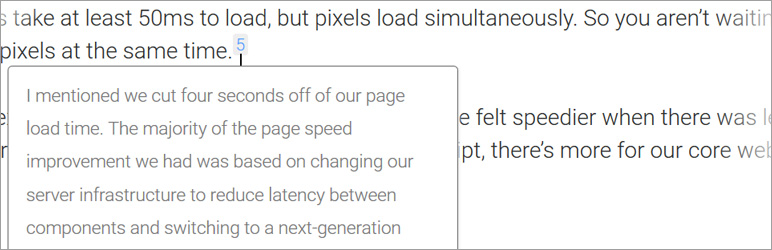
Add inline footnotes to your posts. On desktop, the footnotes will appear as tooltips. On mobile, the footnote will expand beneath the text.
The facts
- Rating
- 4.8★ from 32
- Active installs
- 6k+
- Price
- Free
- Last updated
- 24 Aug 2026
- Added
- Apr 2017
- Requires WP
- 4.6
- Tested up to
- WP 7.1
- Downloads
- 127,505
Our analysis
AI-assistedModern Footnotes is a WordPress plugin designed to enhance the presentation of footnotes in posts. It allows you to easily add footnotes using a dedicated icon in the WordPress editor or a shortcode, with automatic numbering for each footnote. The plugin is optimised for both desktop and mobile viewing, displaying footnotes as tooltips on desktop and expanding sections on mobile devices.
This plugin is suitable for bloggers and content creators who want to include footnotes in their articles, particularly those who appreciate a clean and modern design inspired by popular media outlets. It offers additional shortcode options for customisation, allowing for unique styling and numbering of footnotes.
Best for: This plugin suits bloggers and content creators who want to incorporate footnotes in their posts.
What it does well
- ✓Optimised for both desktop and mobile viewing
- ✓Easy to use with a dedicated icon or shortcode
- ✓Automatically numbers footnotes sequentially
- ✓Customisable through shortcode options
- ✓Free to use from the WordPress.org directory
Where it falls short
- •Limited information on advanced features
- •No detailed documentation provided in the input
Verdict
Modern Footnotes provides a straightforward solution for adding footnotes to WordPress posts. Its mobile and desktop optimisation makes it a practical choice for enhancing content readability.
From the developer
prismtechstudios's own description of Modern Footnotes, lightly tidied.
Footnotes optimized for desktop and mobile, inspired by the styles of Grantland and FiveThirtyEight.
Use a footnote in your post by using the footnote icon in the WordPress editor or by using the shortcode: [mfn]this will be a footnote[/mfn] The plugin will automatically associate sequential numbers with each plugin.
On desktop, footnotes will appear as a tooltip when the user clicks on the number. On mobile, footnotes will expand as a section below the current text.
You can also use the [mfn_list] shortcode to display a list of footnotes used in the article.
The official GitHub repository is at https://github.com/seankwilliams/modern-footnotes
Shortcode options
You can modify some behaviours or styles of your footnotes by using the following options within our shortcode.
[mfn referencenumber=3]This footnote will have the number 3[/mfn]
[mfn class=’my-pretty-class’]This footnote will have ‘my-pretty-class’ as additional class, allowing for custom styling of individual footnotes.[/mfn]
[mfn referencereset=’true’]This footnote will reset the footnote counter and therfore receive 1 as its number. Following footnotes will also receive their number according to this new start.[/mfn]