
Backup, restore or migrate your WordPress website to another host or domain. Schedule backups or run manually....
Free
3M+ installs 4.8★ (8,631)
Backup the Theme Mods in your Customizer with either a click or by triggering a function.
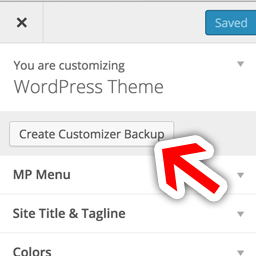
MP Customizer Backups is a WordPress plugin designed to help you manage and safeguard your theme modifications made through the Customizer. It allows you to create backups of your settings, which you can download for safekeeping, and revert to later if needed.
This plugin is suitable for both individual users who want to experiment with their site's appearance and developers looking to implement various pre-set styles within a single theme. It facilitates sharing Customizer settings with others and ensures that user modifications are not lost during updates or changes.
Best for: This plugin suits WordPress users and developers who frequently modify theme settings and need a reliable way to manage those changes.
What it does well
Where it falls short
MP Customizer Backups provides a straightforward solution for backing up and managing Customizer settings, but its age may raise concerns about ongoing support and compatibility.
Phil Johnston's own description of MP Customizer Backups, lightly tidied.
Feel free to play with your Theme Mods under “Appearance” > “Customizer” without worrying about losing your settings! When you are happy with your settings, just click the “Create Backup” button and you’ll always be able to revert to those exact settings in the future. You can even download the backups to make sure you save multiple copies in a safe place.
Or, if you want to develop your customizer locally and then automatically set up those options to match on your live site, simply download a Customizer Backup and Upload it to your live site. You could even send your Customizer settings to your friends or customers.
For Theme/Plugin Developers: This is also a way to create a “Theme within a Theme” – by allowing a single theme to have many different pre-set styles. For example, you could use an activation hook in a plugin to use a backup (in JSON format) and make plugins re-style a Theme. If your plugin does change the Customizer styles, you could also trigger an auto backup of the user’s current settings so that you don’t permanently erase any of the user’s settings.
Other plugins for backups.
Backup, restore or migrate your WordPress website to another host or domain. Schedule backups or run manually....

Trusted by 60M+ sites: The gold standard for WordPress migration and backup. Migrate, backup, and restore your...

The best WordPress backup and migration plugin. Quickly and easily backup ,migrate, copy, move, or clone your...

All-in-one WordPress backup, migration and staging plugin — schedule automatic backups, restore in one click,...

Disable Gutenberg Block Editor and restore the Classic Editor and original Edit Post screen (TinyMCE, meta box...

WordPress backup plugin: backups, restore & migration in minutes. Clone or duplicate your site, test updat...