Outdated Plugin Notifier
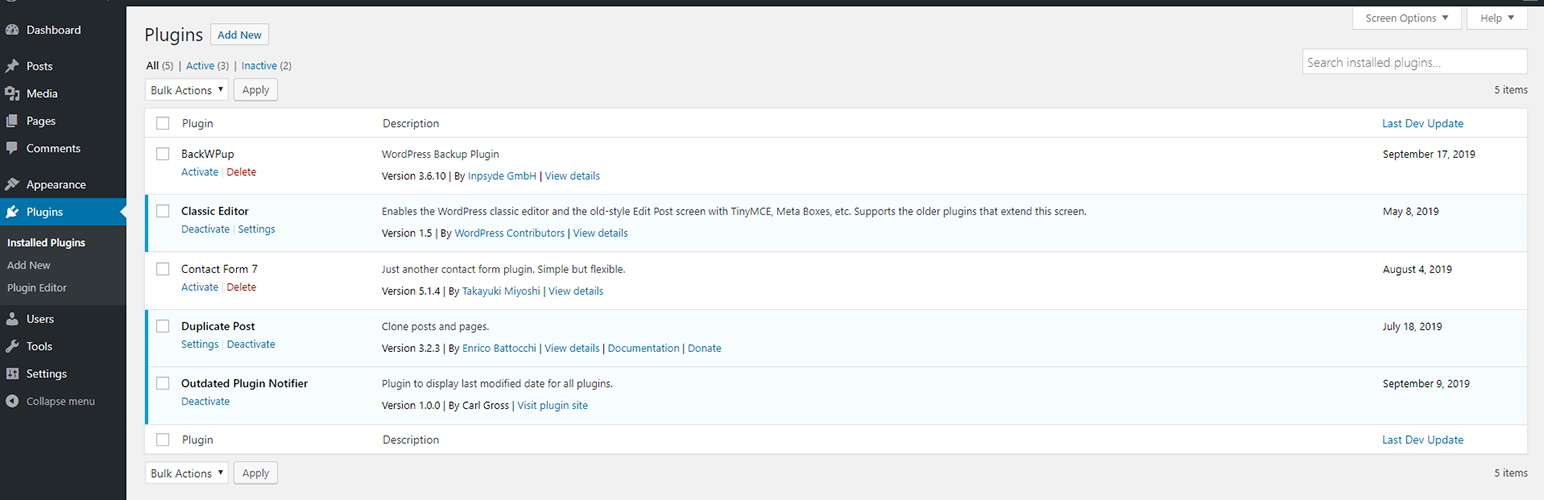
To the plugins admin table, adds a new column indicating the last time the plugin developer released an update.
The facts
- Rating
- 5★ from 9
- Active installs
- 400+
- Price
- Free
- Last updated
- 18 Aug 2026
- Added
- Oct 2019
- Requires WP
- 4.9.0
- Tested up to
- WP 7.1
- Requires PHP
- 7.0
- Downloads
- 4,728
Our analysis
AI-assistedOutdated Plugin Notifier is a WordPress plugin designed to help you monitor the status of other plugins on your site. It alerts you to plugins that have not been updated by their developers for an extended period, which can indicate potential security vulnerabilities. The plugin adds a column to your plugins admin page, showing the last update date for each installed plugin.
This tool is suitable for WordPress site owners and developers who want to maintain the security and functionality of their site by keeping track of plugin updates. It requires no additional configuration after installation, making it straightforward to use.
Best for: WordPress site owners and developers concerned about plugin security and maintenance.
What it does well
- ✓Monitors installed plugins for update status
- ✓Displays last update date for each plugin
- ✓Indicates if a plugin has been removed from the repository
- ✓No additional configuration required after installation
- ✓Lightweight and unobtrusive
Where it falls short
- •Limited information on specific features or settings
Verdict
Outdated Plugin Notifier provides a simple way to track the update status of your plugins, helping you maintain site security. It is a useful tool for those who want to ensure their plugins are actively maintained.
From the developer
Carl Gross's own description of Outdated Plugin Notifier, lightly tidied.
WordPress plugins frequently become abandoned by their developers, and in-turn, develop security vulnerabilities. If one of these plugins is installed on your site, it will put your site at risk, without any warning or indication. Outdated Plugin Notifier is a lightweight and unobtrusive plugin that helps you stay aware of these situations. Outdated Plugin Notifier monitors your plugins and tells you exactly when each plugin was last updated by its developer. If a plugin has been expelled from the WordPress plugin repository, Outdated Plugin Notifier will display that information as well.
To use, simply install and activate the plugin. There is no additional configuration required. After, open the plugin admin page from your WordPress dashboard and you will see a new column displayed in the table: Last Dev Update. This column will indicate the last date the plugin was updated by its developer. If it has been several months–or years–since the developer last updated the plugin, you may want to contact the developer to confirm the plugin is still maintained. If the plugin is no longer in the WordPress plugin repository, Outdated Plugin Notifier will indicate so on the plugins admin page, and suggest you remove and/or replace the plugin.