
Elementor addons with 18+ free widgets, Header & Footer Builder, WooCommerce widgets & templates. Trus...
Free
2M+ installs 4.9★ (2,525)
Pearl Header Builder gives you complete freedom to compose a header that perfectly suits your site.
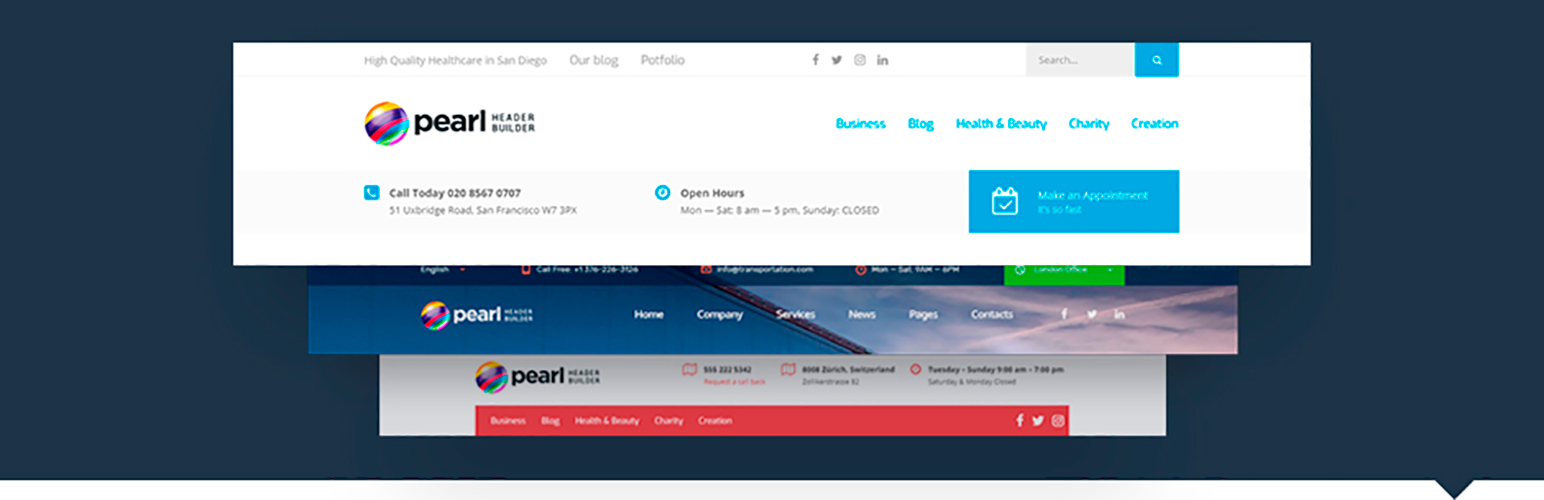
Pearl – Header Builder is a WordPress plugin that enables users to create and customise website headers. It features a drag-and-drop editor, allowing for easy design adjustments, including text, images, animations, and colours. Users can choose header positions and create sticky headers for improved navigation.
This plugin is suitable for any WordPress business user looking to enhance their website's appearance and functionality. It provides a range of pre-made headers and the flexibility to build custom headers from scratch, making it a versatile tool for those wanting to improve their site's first impression and user experience.
Best for: This plugin suits WordPress business users seeking to create professional and customised website headers.
What it does well
Where it falls short
Pearl – Header Builder offers a free solution for customising website headers, though user satisfaction appears to vary. It may be worth exploring if you need a flexible header design tool.
Stylemix's own description of Pearl, lightly tidied.
Headers play an essential role in a website’s overall appearance and functionality. In most cases, this is where potential customers immediately look to find out what the site has to offer. You have just a few seconds to make the crucial first impression; if the person doesn’t like what they see, they will move on to the next site.
The header should answer the website user’s basic questions immediately on them arriving at the site’s main page. These include:
* Who are you?
* What do you do?
* Why should I buy from you/ use your service?
Headers are additionally used to allow site users to quickly and easily navigate through the contents of a website It is very important that they are clear and match the requirements of the service that you are offering.
The Pearl Header Builder is an effective business WordPress plugin created by StylemixThemes. It allows you to easily build any header layout for your website. This handy plugin, which is available completely free of charge, is suitable for use with WordPress version 4.6 and above.
The plugin itself comes equipped with a range of ready-made headers that you can alter and apply to your website if they match the style you are looking for. If not, then just create your own from scratch.
The intuitive drag and drop editor makes it easy to build a customized header which will provide website users with a great experience on any device or platform that they are using to access the website. Alongside including the text and various images, animations, and logos, you can also alter the size and the colors of the design and the text.
Additionally, you can choose where you wish to position the header on the page. Selecting the top, left, or right can alter the overall appearance of the entire page. This level of detail allows for maximum creativity for you in making your website look exactly as you would want it to look.
Sticky header is another helpful feature provided by this plugin. Sticky headers move on the page and allow the users to easily navigate through the website without having to keep scrolling back up to the top of the page. These can be altered for use on different devices.
This flexible WordPress heading builder is designed for use by any WordPress business user. It is essential for those looking for a professional-looking website design that will help promote their business to potential customers using a computer, tablet, or cellphone.
As you can build virtually any type of header with the header builder, this plugin is an extremely versatile tool. It will benefit those looking to be able to customize their website fully, allowing for a website that can really help potential customers to get a feel for the products and services on offer.
To successfully install the plugin, you need to first go to the plugin tab on the WordPress main screen. From there, you need to search for Pearl Header Builder. Once you have found it, you need to click on the button to download the relevant files.
When they have finished downloading to your computer, you need to then either upload the plugin files to the /wp-content/plugins/ directory or install the plugin through the WordPress plugins screen directly.
Once completed, you will need to activate the plugin through the Plugins screen in WordPress. After you have done this, you can use the Header Builder to configure the plugin. Ensure you include a header builder shortcode into your theme header.
Other plugins for building templates.
Elementor addons with 18+ free widgets, Header & Footer Builder, WooCommerce widgets & templates. Trus...

Easy Drag & Drop Page Builder. A complete solution to create a WordPress Website, Custom Themes, Landing P...

Elementor templates, Header footer builder, Elementor Post Grid, Woocommerce Grid builder, Slider, Forms, Gall...

HappyAddons packs Header Footer Builder, Megamenu, Single Post, Archive Page, & 500+ Ready Templates into...
Create responsive image galleries with drag-and-drop grid builder. Custom layouts, video support, AI optimizat...

Seven free modules for Elementor: dark mode, container layouts, mobile menu, editorial text, style presets, JS...