
WPThumbs
Themes Plugins By purpose By industry Best-of lists Fix it guides
Free Plugin by InfornWeb v3.4.3

Post List Designer

Display WordPress Post on your website in a List or Archive list view. Display category post, archive post, recent post and post list with category.
Post List Designer

The facts

Rating
4.5★ from 8
Active installs
1k+
Price
Free
Last updated
4 Apr 2026
Added
Apr 2018
Requires WP
4.7
Tested up to
WP 7.0.4
Requires PHP
5.4
Downloads
44,936

Our analysis

AI-assisted

Post List Designer is a WordPress plugin that allows you to display lists of posts in various designs. You can use shortcodes to customise the display by category, limit the number of posts, and choose between different design styles. It is suitable for users who want to showcase their posts attractively on their site, such as bloggers and content creators.

The plugin supports features like displaying post authors, dates, excerpts, and pagination. You can choose between a simple list or a more designed layout, making it flexible for different site aesthetics. However, advanced features are available in a premium version.

Best for: This plugin suits bloggers and content creators looking to display posts in a visually appealing manner.

What it does well

  • Offers two design styles for post lists
  • Allows categorisation of posts using shortcodes
  • Supports pagination and custom display options

Where it falls short

  • Limited to basic features in the free version
  • More advanced options require a premium upgrade

Verdict

Post List Designer provides a straightforward way to showcase posts, though its free version may lack some advanced features found in the premium version.

From the developer

InfornWeb's own description of Post List Designer, lightly tidied.

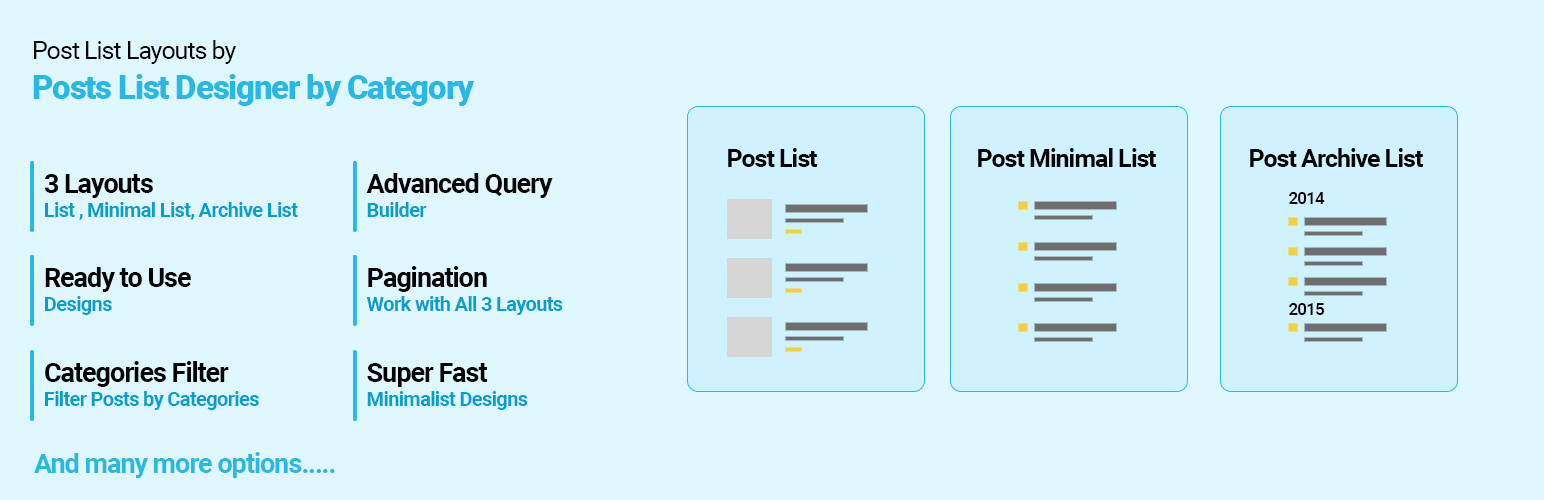
✅ Post List Designer by Category is best for:

  • Display post list with beautiful designs (2 designs).
  • Display post list with simple/minimal design.
  • Display post list with archive design.
  • Display post list by category.

Post List Designer by Category is used to display WordPress post with list designs. You can display the latest post on your homepage/frontpage as well as in inner pages.

Post List Designer allows you to list post by category in a post or page using the shortcode.

The shortcode accepts a category id, the order in which you want the post to display, and the number of posts to display. You can also display the post author, date, excerpt, even the content!

Checkout Premium Version Demo | Buy Premium Version for more designs and options.

Premium Version supports custom post type, custom taxonomy, custom tags, featured post, trending post as well as many cool features.
You can get Post List Designer Premium here!

This WordPress plugin contains 1 shortcode

[pld_post_list]

Following are Post shortcode Parameters:

  • Limit : [pld_post_list limit=”10″] (Display latest 10 post and then pagination).
  • Category : [pld_post_list category=”category_id OR category_slug”] (Display post categories wise).
  • Design: [pld_post_list design=”design-1″] (Select the grid design. Right now there are 2 designs. design-1 and design-2).
  • Display Author : [pld_post_list show_author=”true”] (Display Post author OR not. By default value is “true”. Values are “true” and “false”)
  • Display Content : [pld_post_list show_content=”true” ] (Display post Short content OR not. By default value is “true”. Options are “true” and “false”).
  • Display Date : [pld_post_list show_date=”false”] (Display Post date OR not. By default value is “true”. Options are “true” and “false”)
  • Display Category Name : [pld_post_list show_category_name=”true” ] (Display post category name OR not. By default value is “true”. Options are “true” and “false”).
  • Display Tags : [pld_post_list show_tags=”true”] (show post tags or not.)
  • Content Words Limit : [pld_post_list content_words_limit=”30″ ] (Control post short content Words limit. By default limit is 20 words).
  • Display Comments : [pld_post_list show_comments=”true”] (Show post comments or not.)
  • Post Order : [pld_post_list order=”DESC”] (Designates the ascending or descending order of the ‘orderby’ parameter. Defaults to ‘DESC’. Values are “DESC” and “ASC”)
  • Post Order by : [pld_post_list orderby=”post_date”] (Sort retrieved posts by parameter. Defaults to ‘date’ (post_date). One or more options can be passed. ‘none’,ID’,’author’,’title’,’name’,rand’,date’)
  • Pagination : [pld_post_list pagination=”true”] (show post pagination or not.)
  • Pagination Type : [pld_post_list pagination_type=”prev-next”] (pagination type. values are “numeric” OR “prev-next”. By default is numeric)
[pld_simple_list]

Following are Post shortcode Parameters:

  • Limit : [pld_simple_list limit=”10″] (Display latest 10 post and then pagination).
  • Category : [pld_simple_list category=”category_id OR category_slug”] (Display post categories wise).
  • List Style : [pld_simple_list list_style=”ul”] (Select list type. By default value is “ul” You can use ‘ul’ OR ‘ol’).
  • Title Tag : [pld_simple_list title_tag=”div”] (Select title tag. By default value is “div”. You can use ‘h2’ OR ‘h3’ etc).
  • Display Author : [pld_simple_list show_author=”true”] (Display Post author OR not. By default value is “false”. Values are “true” and “false”)
  • Display Content : [pld_simple_list show_content=”true” ] (Display post Short content OR not. By default value is “false”. Options are “true” and “false”).
  • Show Read More : [pld_simple_list show_read_more=”true” ] (Display read more link OR not. By default value is “false”. Options are “true” and “false”).
  • Display Date : [pld_simple_list show_date=”false”] (Display Post date OR not. By default value is “false”. Options are “true” and “false”)
  • Display Category Name : [pld_simple_list show_category_name=”true” ] (Display post category name OR not. By default value is “false”. Options are “true” and “false”).
  • Display Comments : [pld_simple_list show_comments=”true”] (Show post comments or not.)
  • Content Words Limit : [pld_simple_list content_words_limit=”30″ ] (Control post short content Words limit. By default limit is 20 words).
  • Post Order : [pld_simple_list order=”DESC”] (Designates the ascending or descending order of the ‘orderby’ parameter. Defaults to ‘DESC’. Values are “DESC” and “ASC”)
  • Post Order by : [pld_simple_list orderby=”post_date”] (Sort retrieved posts by parameter. Defaults to ‘date’ (post_date). One or more options can be passed. ‘none’,ID’,’author’,’title’,’name’,rand’,date’)
  • Display Image : [pld_simple_list show_image=”false”] (Display Post image OR not. By default value is “false”. Options are “true” and “false”)
  • Pagination : [pld_simple_list pagination=”true”] (show post pagination or not.)
  • Pagination Type : [pld_simple_list pagination_type=”prev-next”] (pagination type. values are “numeric” OR “prev-next”. By default is numeric)
[pld_archive_list]

Following are Post shortcode Parameters:

Read the full description on the official page →

Tagged as

Alternatives

Other plugins for libraries and archives.

Starter Templates

The growing library of 300+ ready-to-use templates that work with all WordPress themes including Astra, Hello,...

Free 1M+ installs 4.9★ (4,745)
SVG Support

Securely upload SVG files to your media library, with built-in sanitization and advanced features for styling...

Free 1M+ installs 4.8★ (355)
Enable Media Replace

Easily replace any attached image/file by simply uploading a new file in the Media Library edit view - a real...

Free 600k+ installs 4.4★ (302)
Happy Addons for Elementor

HappyAddons packs Header Footer Builder, Megamenu, Single Post, Archive Page, & 500+ Ready Templates into...

Free 400k+ installs 4.8★ (487)
CMB2

CMB2

91

CMB2 is a metabox, custom fields, and forms library for WordPress that will blow your mind.

Free 300k+ installs 5★ (91)
Extendify

The best WordPress templates, pattern, and layout library with 1,000+ designs built for the Gutenberg block ed...

Free 500k+ installs 4.7★ (10)