Post Navigator
Adds simple navigation tools to the admin area when editing or creating posts, allowing for quick and time saving navigation
The facts
- Rating
- 4.5★ from 11
- Active installs
- 100+
- Price
- Free
- Last updated
- 18 Apr 2014
- Added
- Jul 2013
- Requires WP
- 2.9
- Tested up to
- WP 3.7.41
- Downloads
- 8,426
Our analysis
AI-assistedPost Navigator is a WordPress plugin that enhances the post editing experience by adding navigation options within the admin area. It provides a dropdown menu in the publish box for selecting actions upon saving or publishing posts, and includes 'Previous' and 'Next' buttons for quick navigation between posts.
This plugin is particularly useful for users who manage multiple posts or custom post types, as it allows for immediate access to related posts or the option to add new ones without unnecessary page loads. It is aimed at content creators looking to streamline their workflow.
Best for: This plugin suits content creators and editors managing multiple posts or custom post types in WordPress.
What it does well
- ✓Adds a dropdown menu for quick actions upon saving posts
- ✓Includes 'Previous' and 'Next' buttons for easy navigation
- ✓Supports custom post types
- ✓Allows navigation to parent, child, or sibling posts upon saving
Where it falls short
- •Last updated in April 2014, may not be compatible with newer WordPress versions
- •Limited information on support and updates
- •Directory score of 46/100 indicates potential issues
Verdict
Post Navigator offers useful navigation features for post management, but its age and directory score suggest caution for users on newer WordPress versions.
From the developer
lukerollans's own description of Post Navigator, lightly tidied.
Have a feature request?
Sweet! Feature requests on Github: https://github.com/plugify/post-navigator/issues?labels=enhancement
Want to contribute?
Post Navigator on Github: http://github.com/plugify/post-navigator
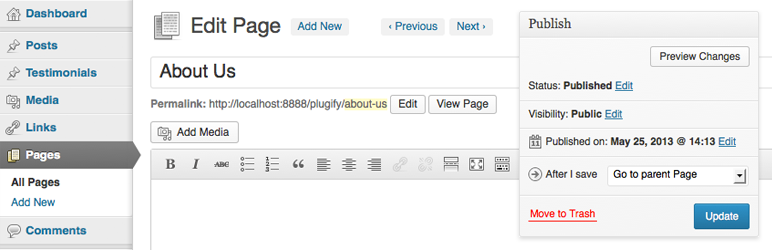
Adds a simple dropdown menu to the publish box which allows a user to select a useful action immediately upon saving or publishing any post. The plugin also adds two new buttons to the edit post page, “Previous” and “Next”. These buttons allow you to immediately navigate to the previous or next post of any type in the admin area.
Features
- All features of Post Navigator support custom post types
- Upon save, navigate directly to the “Add New” page of the current post type
- Navigate to parent post upon save
- Navigate to child post upon save. When selected, a second dropdown will automatically populate with the children of the current post
- Navigate to a sibling post upon save. When selected, a second dropdown will automatically populate with the siblings of the current post
- Navigate to next or previous post upon save
- Instantly navigate to next or previous post by using the “Previous” and “Next” buttons. These will be displayed, if available, in the header of the current
This plugin was created mainly as a tool to speed up content entry given it allows you to bypass multiple page loads. For example, when adding several new pages, simply choose the “Add a new Page” option and upon saving the current page you will immediately be taken to the “Add a New Page” screen.
If you have found this plugin useful, consider taking a moment to rate it.