Post Tiles
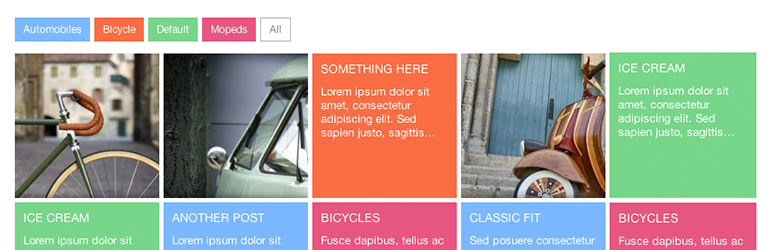
Post Tiles gives the ability to display posts as tiles. The tiles are color coded by category. The appearance is similar to windows 8 (Windows Metro).
The facts
- Rating
- 4.5★ from 23
- Active installs
- 400+
- Price
- Free
- Last updated
- 23 Nov 2014
- Added
- Dec 2011
- Requires WP
- 3.0
- Tested up to
- WP 4.0.0
- Downloads
- 36,849
Our analysis
AI-assistedPost Tiles is a WordPress plugin that enables you to display a grid of posts in a tile format using the shortcode [post-tiles]. You can customize the number of posts shown, the categories included, and the length of the excerpts displayed. This functionality allows for a more visually appealing presentation of your content.
The plugin is suitable for users who want to enhance the layout of their posts on pages or posts. It is particularly useful for those looking to showcase multiple posts in an organised and attractive manner.
Best for: This plugin is best suited for WordPress users looking to improve post presentation on their sites.
What it does well
- ✓Displays posts in a tile format
- ✓Customizable number of posts displayed
- ✓Allows category selection for posts
- ✓Excerpt length can be adjusted
- ✓Free to use from the WordPress.org directory
Where it falls short
- •Last updated in November 2014
- •Tested only up to WordPress 4.0.0
- •Directory score indicates potential issues
Verdict
Post Tiles offers a straightforward way to display posts in a grid format, but its outdated status may affect compatibility with newer WordPress versions.
From the developer
ethanhackett's own description of Post Tiles, lightly tidied.
Post tiles allows you to use the shortcode [post-tiles] on any page or post and displays a grid of posts in a tile format. (Live Preview)
By default 8 posts are displayed. To change the amount of posts to display on the page, use the posts=’ ‘ attribute in the shortcode. Example: [post-tiles posts=’10’]
By default all post categories are called for the tiles. To specify the categories use the categories=’ ‘ attribute separating them by commas. Example: [post-tiles categories=’1,2,4′]
By default the tiles use the excerpt trimmed to 20. You can specify your excerpt length with the excerpt=’ ‘ attribute. Example: [post-tiles excerpt=’18’]
NOTE: The category id numbers are listed below, next to the category names. You can use both the categories and posts attributes Example: [post-tiles categories=’1,2,4′ posts=’8′ excerpt=’18’]
Version 1.4.6
Arbitrary section
Enjoy it 😀