Simple Pull Quote
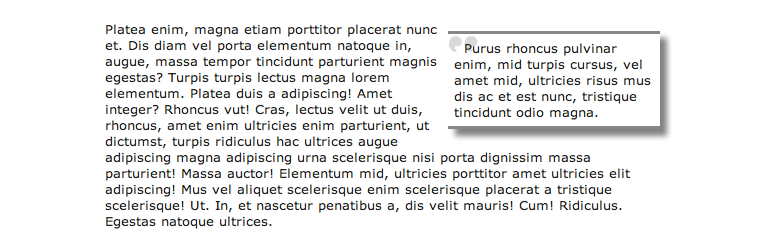
The Simple Pull Quote WordPress Plugin provides an easy way for you to insert pull quotes into your posts and pages.
The facts
- Rating
- 4.2★ from 10
- Active installs
- 1k+
- Price
- Free
- Last updated
- 24 Nov 2025
- Added
- Apr 2009
- Requires WP
- 2.5
- Tested up to
- WP 6.6.7
- Requires PHP
- 7.2.5
- Downloads
- 84,063
Our analysis
AI-assistedSimple Pull Quote is a WordPress plugin that allows you to easily insert pull quotes into your posts and pages. It adds a 'Pullquote' button to both the HTML and TinyMCE editors for straightforward usage. You can also use shortcodes in the Gutenberg editor for added flexibility.
This plugin is suitable for users who want to enhance their content with quotes, making it visually appealing and easier to read. You can customize the appearance of the pull quotes by editing your theme's CSS file.
Best for: This plugin is best for bloggers and content creators looking to highlight quotes in their articles.
What it does well
- ✓Easy to insert pull quotes using a button
- ✓Compatible with both HTML and TinyMCE editors
- ✓Supports shortcodes for Gutenberg editor
- ✓Customisable appearance through CSS
Where it falls short
- •Limited information on advanced features
- •Requires some knowledge of CSS for customisation
Verdict
Simple Pull Quote offers a straightforward solution for adding pull quotes to your WordPress content. It is useful for those who want to enhance their posts without complex setups.
From the developer
llamaman's own description of Simple Pull Quote, lightly tidied.
Simple Pull Quote WordPress Plugin provides an easy way for you to insert pull quotes into your posts and pages. It adds an easy-to-use “Pullquote” button to both the HTML and TinyMCE editors.
IMPORTANT: To use in the new WordPress (Gutenberg) editor, you can either:
1. use the “Classic” block.
2. Use shortcodes such as [pullquote class="left”]TEXT HERE[/pullquote]
See the plugin in action as well as how to use it:
http://youtu.be/JGudI9gr9iE
Usage
- Select the text that you want to use as your pull quote.
- Click on the “Pullquote” button in either the Visual or HTML editor.
For more help on usage, visit the Simple Pull Quote Homepage for a visual guide.
How do I update the look of the pull quotes?
To change the look of your pull quotes, open your theme’s “style.css” file and create a CSS class called “simplePullQuotes”. Edit this class according to your tastes. IMPORTANT: Make sure your theme’s “wp_head()” function comes before your theme’s stylesheet or else this won’t work.
How do I use more than one pull quote in a single post or page?
Simply select the text that you want to use as a pull quote and click the “Pullquote” button in either the visual or html editor.