
WPCode
93Easily add code snippets in WordPress. Insert header & footer scripts, add PHP code snippets with conditio...
Free
3M+ installs 4.9★ (1,873)
WordPress Code Snippets Plugin
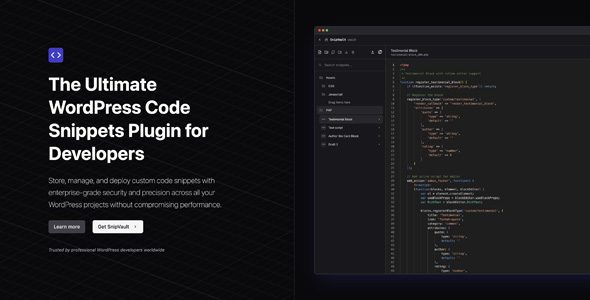
SnipVault is a WordPress plugin designed for developers and site administrators to store, manage, and deploy custom code snippets securely. It features a secure code repository with cryptographic signing, intelligent organization tools, and comprehensive version control, making it suitable for handling code across multiple WordPress projects.
The plugin includes various functionalities such as syntax highlighting, error protection during code execution, and an integrated PHP error log. It also supports multi-site compatibility and offers tools for snippet sharing and collaboration, making it a practical choice for those managing complex WordPress environments.
Best for: This plugin is best suited for developers and site administrators managing multiple WordPress projects.
What it does well
Where it falls short
SnipVault offers a robust set of features for code management in WordPress, although details on its adoption and user feedback are currently unavailable.
Secure Code Repository
Store snippets with HMAC-SHA256 cryptographic signing for integrity.
Intelligent Snippet Organization
Categorize, search, and manage code using custom folders.
Comprehensive Version Control
Track changes via the WordPress native revision system.
Integrated Diff Viewer
Compare code revisions side-by-side to spot changes easily.
Syntax Highlighting
Full support for PHP, CSS, JavaScript, HTML, and SCSS.
WordPress File Browser
Browse and edit plugin, theme, and core files directly.
Error-Protected Code Execution
Execute snippets safely with advanced error handling.
Performance-Optimized Storage
Store code in the filesystem to reduce database load.
SQL Database Editor
Securely query your database with audit logging.
Integrated PHP Error Log
Monitor and analyze PHP errors from the dashboard.
Code Validation
Validate PHP syntax before saving to prevent issues.
Conditional Execution
Run snippets based on specific contexts or conditions.
AI-Powered Code Checks
Get assistance analyzing code quality and security.
One-Click Plugin Export
Turn snippets into standalone WordPress plugins.
WP-CLI Interface
Execute WP-CLI commands directly from the dashboard.
Secure Snippet Sharing
Share code between installations with integrity validation.
SnipVault 1.0.20 is a powerful WordPress plugin that allows you to store, manage, and deploy custom code snippets securely and efficiently. Designed for developers and site administrators, it ensures enterprise-grade security, performance optimization, and advanced tools to handle code across all your WordPress projects.
Secure Code Repository – Store snippets with HMAC-SHA256 cryptographic signing for integrity.
Intelligent Snippet Organization – Categorize, search, and manage code using custom folders.
Comprehensive Version Control – Track changes via the WordPress native revision system.
Integrated Diff Viewer – Compare code revisions side-by-side to spot changes easily.
Syntax Highlighting – Full support for PHP, CSS, JavaScript, HTML, and SCSS.
WordPress File Browser – Browse and edit plugin, theme, and core files directly.
Error-Protected Code Execution – Execute snippets safely with advanced error handling.
Performance-Optimized Storage – Store code in the filesystem to reduce database load.
SQL Database Editor – Securely query your database with audit logging.
Integrated PHP Error Log – Monitor and analyze PHP errors from the dashboard.
Code Validation – Validate PHP syntax before saving to prevent issues.
Conditional Execution – Run snippets based on specific contexts or conditions.
AI-Powered Code Checks – Get assistance analyzing code quality and security.
One-Click Plugin Export – Turn snippets into standalone WordPress plugins.
WP-CLI Interface – Execute WP-CLI commands directly from the dashboard.
Secure Snippet Sharing – Share code between installations with integrity validation.
Snippet Templates – Reusable templates for common code patterns.
Multi-site Compatibility – Deploy snippets across WordPress multisite networks.
Remote Snippet Storage – Cloud storage for access across multiple environments.
Change Tracking – Monitor who modified snippets and when.
Code Comments – Add inline documentation for clarity.
Snippet Dependencies – Organize snippets with defined relationships.
AI Chat Assistant – Get help with snippet creation and troubleshooting via AI.
Note: If you have trouble with SnipVault WordPress Plugin Latest Version, try disabling AdBlock or switching browsers. If issues persist, contact support for assistance.
Other plugins for developer tooling.
Easily add code snippets in WordPress. Insert header & footer scripts, add PHP code snippets with conditio...

Easily add tracking code snippets, conversion pixels, or other scripts required by third party services for an...

Duplicate post, post order, image resize, email via SMTP, admin menu editor, custom css / code, disable gutenb...

Create custom "Shortcodes" easily for HTML, JavaScript, CSS code snippets and use the shortcodes wit...

Add PHP code to your pages and posts easily using shortcodes.

An easy, clean, and simple way to enhance your site with code snippets.