Spam Filter For Elementor Form
A simple yet powerful plugin that adds advanced spam and content filtration to your Elementor Pro forms.
The facts
- Active installs
- 100+
- Price
- Free
- Last updated
- 24 Jul 2025
- Added
- Jul 2025
- Requires WP
- 6.6
- Tested up to
- WP 6.8.8
- Requires PHP
- 7.8
- Downloads
- 763
Our analysis
AI-assistedSpam Filter For Elementor Form is a WordPress plugin designed to reduce spam submissions in Elementor Pro forms. It filters the message field to block unwanted content, such as suspicious URLs and emails from unauthorized domains, allowing you to maintain the integrity of your forms.
The plugin provides options to enable or disable filtering for specific forms, block messages with certain words, and control which domains can submit links or emails. It operates entirely within your WordPress site without relying on external services, making it a straightforward solution for site owners looking to combat spam effectively.
Best for: This plugin is suitable for any site owner using Elementor Pro who wants to reduce spam in their forms.
What it does well
- ✓Blocks spam submissions from bots and unwanted sources
- ✓Allows filtering of specific words and patterns
- ✓Controls which URLs and email domains can submit forms
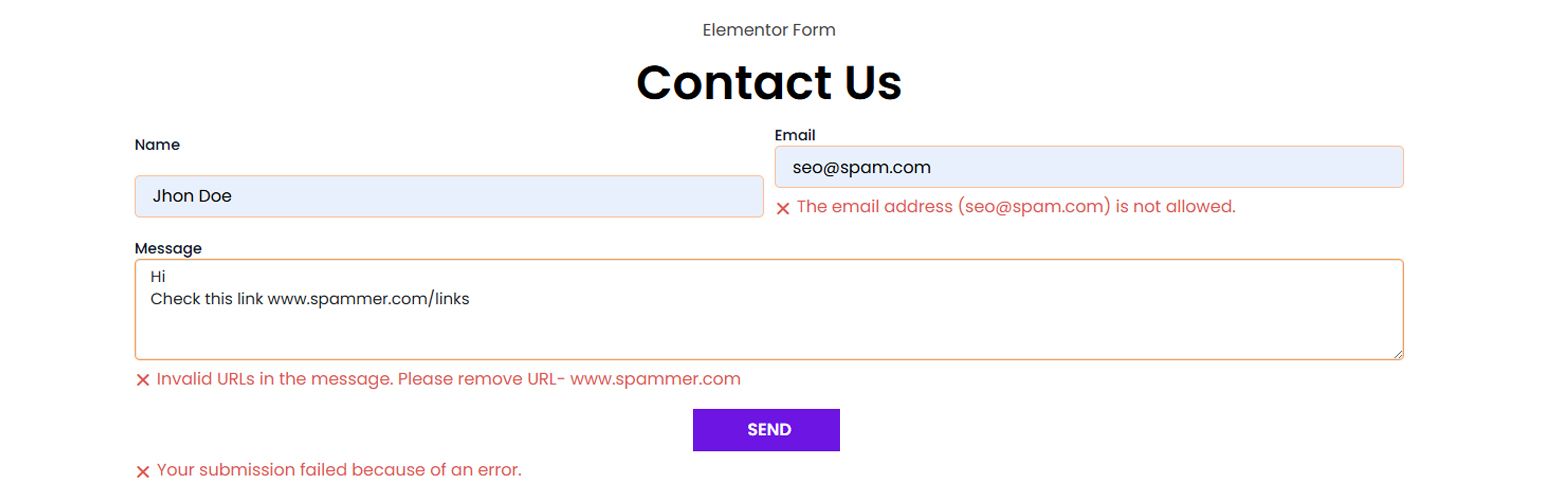
- ✓Custom error messages for users attempting to submit disallowed content
- ✓Fully local and lightweight, with no third-party dependencies
Where it falls short
- •Limited information on user ratings and feedback
- •No details on compatibility with other plugins or themes
Verdict
Spam Filter For Elementor Form offers a focused approach to managing spam in Elementor Pro forms. It provides essential filtering features that can help maintain form quality, though further user feedback would be beneficial.
From the developer
wizbee IT's own description of Spam Filter For Elementor Form, lightly tidied.
Tired of spammy SEO pitches, fake marketing offers, and bot submissions flooding your Elementor Pro forms? By filtering only the message field, you can eliminate up to 95% spam submissions.
Spam Filter For Elementor Form do that and gives you the control you need to stop them, without relying on external services.
This plugin filters the input field of your forms to block submissions containing unwanted words, suspicious URLs, or emails from unauthorized domains. You can block all URLs except those from your domain or specific domains you allow. If someone tries to submit a form with a disallowed link, they’ll see a clear error message asking them to remove it.
Here’s the beauty of it: real visitors who want to share something useful will usually say, “I have a link to share, can you contact me so I can send it?” Spam bots, on the other hand, just drop links and hit submit. That’s where this filter stops them.
Whether you want to block certain phrases, links, or reject emails from shady domains, this plugin lets you do it easily, right from the WordPress dashboard.
Features:
-
Enable or disable filtering for specific or all Elementor Pro forms.
-
Block messages that contain specific words or patterns.
-
Reject any submission containing links—except those from allowed domains.
-
Block or allow email addresses based on domain (whitelist or blocklist mode).
-
Custom error messages shown directly inside the form.
-
No third-party services or APIs—fully local and lightweight.
-
Built exclusively for Elementor Pro forms.
Perfect for any site owner who’s fed up with form spam and wants a simple, effective way to stop it.
How to Use:
Enable Filtering:
Go to Elementor → Settings → Contact Form Filter and check the “Enable Spam Filter” option.
Target the Right Form:
Enter the name of the form you want to filter in the “Form Name” setting. This must match the “Form Name” from your Elementor Pro form settings.
Set Blocked Words:
Add a list of blocked words (one per line). Any form submission containing these words will be rejected.
Filter URLs:
Only allow URLs from specific domains. Other links will trigger a validation error.
Control Email Domains:
Enable email filtering and choose between whitelist or blocklist mode. Add domains or full email addresses to control who can submit the form.
Enjoying the Plugin?
If you find Spam Filter For Elementor Form helpful, please consider leaving a review on WordPress.org. Your feedback helps us improve and reach more users.