Category Order and Taxonomy Terms Order
Drag-and-drop ordering for Categories & any taxonomy (hierarchically) using a Drag and Drop Sortable JavaScript capability.
The facts
- Rating
- 4.5★ from 162
- Active installs
- 500k+
- Price
- Free
- Last updated
- 17 Aug 2026
- Added
- Sep 2011
- Requires WP
- 2.8
- Tested up to
- WP 7.1
- Downloads
- 10,966,313
Our analysis
AI-assistedCategory Order and Taxonomy Terms Order is a WordPress plugin that allows you to control the order of categories and hierarchical taxonomies using a drag-and-drop interface. After activation, you can reorder terms visually in the admin area and choose to apply this order to front-end queries automatically.
This plugin is suitable for users who need to manage the display order of categories and terms without editing theme or plugin code. It supports multiple taxonomies per post type and is compatible with multisite installations.
Best for: This plugin suits WordPress users who want to manage taxonomy order easily without coding.
What it does well
- ✓Intuitive drag-and-drop interface for reordering terms
- ✓Option to auto-apply custom order to front-end queries
- ✓Maintains new order in admin for consistent management
- ✓Supports multiple taxonomies per post type
- ✓Regularly updated for modern WordPress and PHP versions
Where it falls short
- •Limited information on advanced features compared to similar plugins
Verdict
Category Order and Taxonomy Terms Order provides a straightforward solution for reordering categories and taxonomies, making it a practical choice for site administrators.
From the developer
nsp-code's own description of Category Order and Taxonomy Terms Order, lightly tidied.
Easily control the order of Categories and any hierarchical taxonomy with a simple drag-and-drop interface. Reorder parent and child terms visually in the admin and choose whether the plugin automatically applies your custom term order to front-end queries.
Key features
- Intuitive drag-and-drop reordering for Categories and all hierarchical taxonomies.
- Option to auto-apply the custom term order to front-end queries (no theme/plugin edits required).
- Keep the admin term lists in your new order (makes management and editorial workflows consistent).
- Works with multiple taxonomies per post type — switch between taxonomies from the same interface.
- Multisite aware and regularly updated for modern WordPress and PHP versions (see changelog for compatibility notes).
How it works
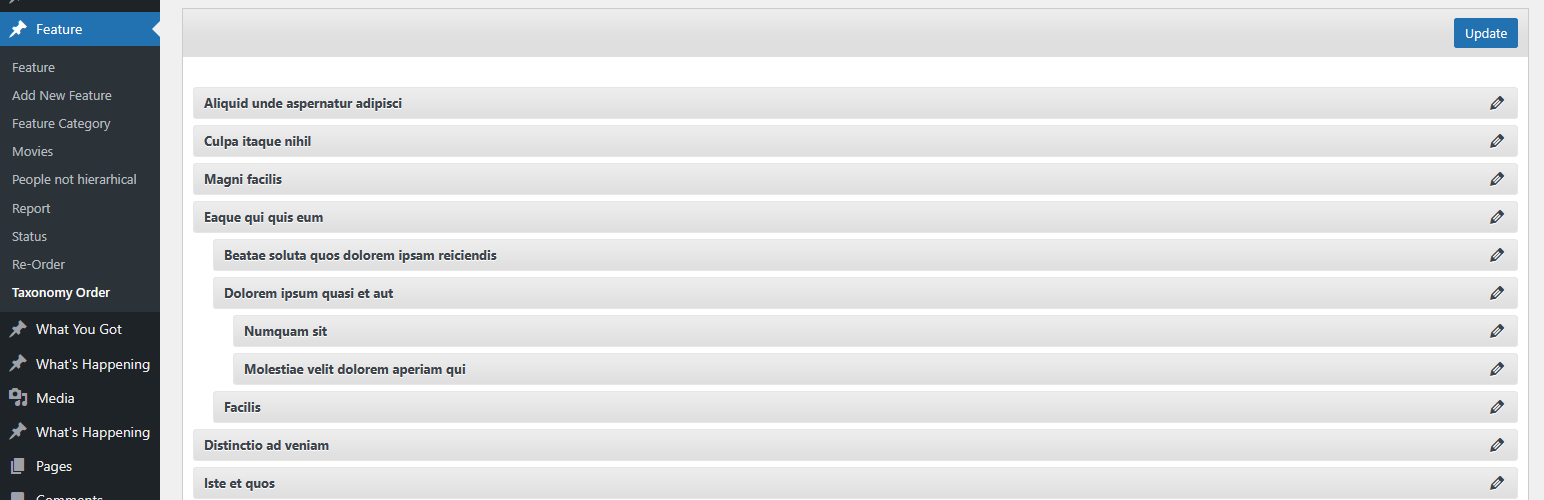
After activating the plugin, a new Taxonomy Order page becomes available under the custom post type menu. Simply open it and drag terms into the exact order you want — including parent/child hierarchy.
Use the plugin’s Taxonomy Order screen to drag terms into the order you want. To apply the custom order automatically across your site, enable the Autosort option — the plugin will adjust term queries on the fly so your chosen order shows without template changes. If you prefer to control ordering in code, include orderby => ‘term_order’ when calling get_terms() to use the plugin’s order programmatically.
This plugin is developed by Nsp-Code
See the Advanced Taxonomy Terms Order for advanced features.
Localization
Available in Catalan, Chinese (China), Chinese (Taiwan), Czech, Dutch, Dutch (Belgium), English (Australia), English (Canada), English (New Zealand), English (UK), English (US), French (France), Galician, German, Italian, Japanese, Norwegian (Bokmål), Polish, Portuguese (Portugal), Russian, Spanish (Chile), Spanish (Spain), Spanish (Venezuela), Swedish, and Turkish.
Whant to contribute with a translation to your language? Please check at https://translate.wordpress.org/projects/wp-plugins/taxonomy-terms-order
There isn’t any Editors for your native language on plugin Contributors? You can help to moderate! https://translate.wordpress.org/projects/wp-plugins/taxonomy-terms-order/contributors