Text Domain Inspector
Text Domain Inspector is a plugin that helps to inspect text domains of translatable strings
The facts
- Rating
- 4★ from 4
- Active installs
- 400+
- Price
- Free
- Last updated
- 14 Jun 2024
- Added
- Jul 2018
- Requires WP
- 4.6
- Tested up to
- WP 6.5.10
- Downloads
- 6,908
Our analysis
AI-assistedText Domain Inspector is a WordPress plugin designed to help website administrators identify the text domains of translatable strings. It provides a straightforward way to inspect these domains directly in the browser, saving time and effort, especially for those with coding skills.
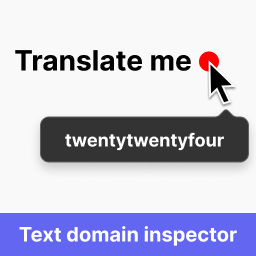
To use the plugin, you simply press the 'Inspect Text Domains' button in the admin menu bar. Red dots will appear next to translatable strings, and hovering over these dots reveals the corresponding text domain. The plugin works with various content types, including HTML documents, attributes, and dynamically loaded content.
Best for: Website administrators who need to manage translations effectively.
What it does well
- ✓Free to use from the WordPress.org directory
- ✓Allows inspection of text domains directly in the browser
- ✓Works with multiple content types, including AJAX and JSON
- ✓User-friendly interface with a simple button to activate
Where it falls short
- •Limited to identifying text domains; does not provide translation features
- •No additional features or settings mentioned
Verdict
Text Domain Inspector is a practical tool for those looking to streamline the process of identifying text domains in their WordPress sites. While it focuses solely on inspection, it can be quite useful for managing multilingual content.
From the developer
laugei's own description of Text Domain Inspector, lightly tidied.
Have you ever been frustrated when trying to find the text domain of translatable string you want to translate? This task can be challenging and it can take a lot of your time even if you have code reading skills.
This plugin aims to solve this problem by allowing website administrator to inspect text domains of translatable strings directly in the browser.
How to use:
* Press “Inspect Text Domains” button in admin menu bar;
* Red dots will appear next to translatable strings;
* Hover the red dot to view the text domain;
* Open source code in the browser to view text domains in HTML attributes (ctrl+u (Windows) / cmd+opt+u (Mac));
Works in:
* HTML documents;
* HTML fragments;
* HTML attributes;
* Plain text;
* Dynamically loaded content (through AJAX);
* JSON;