
WPCode
93Easily add code snippets in WordPress. Insert header & footer scripts, add PHP code snippets with conditio...
Free
3M+ installs 4.9★ (1,873)
Inspect PHP variables on a central dashboard in wp-admin for convenient debugging.
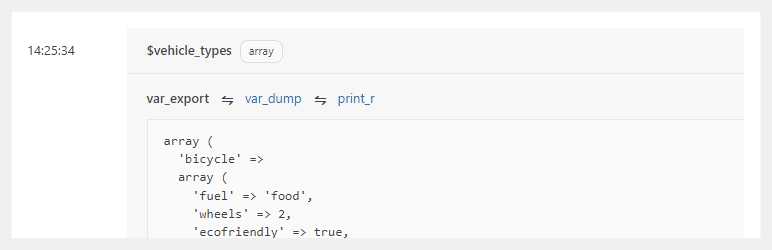
Variable Inspector is a WordPress plugin designed for developers to inspect PHP variables easily within the wp-admin dashboard. It provides a central location to view variable content formatted with functions like var_dump(), var_export(), and print_r(), making it a straightforward tool for debugging without affecting the frontend of the site.
The plugin is particularly useful in non-local environments where traditional debugging tools may be excessive. By inserting a simple line of code, developers can quickly review variable states, which can save time during development and debugging processes.
Best for: This plugin is suited for developers looking for a simple debugging tool for PHP variables in WordPress.
What it does well
Where it falls short
Variable Inspector offers a practical solution for developers needing to inspect variables without complex setups. It is a useful addition to the toolkit of anyone working with PHP in WordPress.
Bowo's own description of Variable Inspector, lightly tidied.
Variable Inspector allows you to easily inspect your PHP $variables in a visually clean manner at a central dashboard in wp-admin. It aims to be an easy and useful enough dev and debug tool.
It provides a single-line code to inspect your variable (see “How to Use” below). Nothing is shown to site visitors nor being output on the frontend, and the $variable content is nicely formatted for review using var_dump(), var_export() and print_r() on the inspector dashboard in wp-admin.
It’s a real time-saver for scenarios where Xdebug or even something like Ray is not ideal or simply an overkill. For example, when coding on a non-local environment via tools like Code Snippets, WPCodeBox, Scripts Organizer or Advanced Scripts. Additionally, because it is a regular WordPress plugin, you simply install, activate and use without the need for complicated configuration.
“Huge time-saver when working with PHP variables.” ~Jeff Starr
“Works great! Love this thing.” ~Josh
“Every developer need it. You can debug easily every variable.” ~Pexle Chris
“All I need. Enough to test the function of snippets. Works flawless.” ~@tesig
“It does what it does very well, and doesn’t try to do everything.” ~@swb1
Simply place the following line anywhere in your code after the $variable_name you’d like to inspect:
do_action( 'inspect', [ 'variable_name', $variable_name ] );
If you’d like to record the originating PHP file and line number, append the PHP magic constants __FILE__ and __LINE__ as follows.
do_action( 'inspect', [ 'variable_name', $variable_name, __FILE__, __LINE__ ] );
This would help you locate and clean up the inspector lines once you’re done debugging.
Other plugins for developer tooling.
Easily add code snippets in WordPress. Insert header & footer scripts, add PHP code snippets with conditio...

Easily add tracking code snippets, conversion pixels, or other scripts required by third party services for an...

Duplicate post, post order, image resize, email via SMTP, admin menu editor, custom css / code, disable gutenb...

Create custom "Shortcodes" easily for HTML, JavaScript, CSS code snippets and use the shortcodes wit...

Add PHP code to your pages and posts easily using shortcodes.

An easy, clean, and simple way to enhance your site with code snippets.