Remove XML-RPC Methods
Remove all WordPress methods from the XML-RPC API to increase security.
The facts
- Rating
- 5★ from 2
- Active installs
- 1k+
- Price
- Free
- Last updated
- 18 Aug 2026
- Added
- Feb 2020
- Requires WP
- 4.6
- Tested up to
- WP 7.1
- Requires PHP
- 5.4.0
- Downloads
- 14,299
Our analysis
AI-assistedRemove XML-RPC Methods is a WordPress plugin designed to enhance security by disabling all methods from the XML-RPC API. This includes the deactivation of pingbacks, trackbacks, and Really Simple Discovery (RSD), as these features rely on XML-RPC functionality.
The plugin is compatible with any web server and does not modify the .htaccess file. It is suitable for users looking to improve the security of their WordPress site by removing potentially vulnerable XML-RPC methods.
Best for: This plugin is best for WordPress site owners prioritising security and looking to disable XML-RPC methods.
What it does well
- ✓Increases security by removing XML-RPC methods
- ✓Disables pingbacks, trackbacks, and RSD
- ✓Works with any web server without .htaccess modifications
- ✓Free to use from the WordPress.org directory
- ✓Has a high directory score of 80/100
Where it falls short
- •Limited information on additional features or configurations
- •May not suit users who rely on XML-RPC functionality
Verdict
Remove XML-RPC Methods provides a straightforward solution for enhancing WordPress security by disabling XML-RPC features. It is particularly useful for those who do not require XML-RPC functionality.
From the developer
Walter Ebert's own description of Remove XML-RPC Methods, lightly tidied.
Removes all WordPress methods from the XML-RPC API to increase security. It does more than just using the xmlrpc_enabled hook, because that is only used “To disable XML-RPC methods that require authentication”.
Activating this plugin will also disable pingbacks, trackbacks, and Really Simple Discovery (RSD), because these rely on XML-RPC.
It works with any webserver, because it does not use the .htaccess file.
Testing the plugin
From the command line you can test if the plugin is working correctly using curl. Replace the example.com link to match your website:
curl -d '<?xml version="1.0"?><methodCall><methodName>system.listMethods</methodName><params><param><value><string/></value></param></params></methodCall>' https://example.com/xmlrpc.php
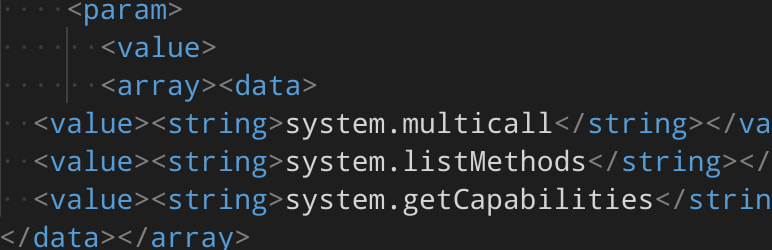
This should only return the following methods:
– system.multicall
– system.listMethods
– system.getCapabilities