
GetGenie
91AI powered SEO assistant & content writer with 40+ templates, chatbot, NLP keyword research, AEO, GEO, SEO...
Free
80k+ installs 4.8★ (118)
This makes it easy to change the author assigned to a WooCommerce product post type.
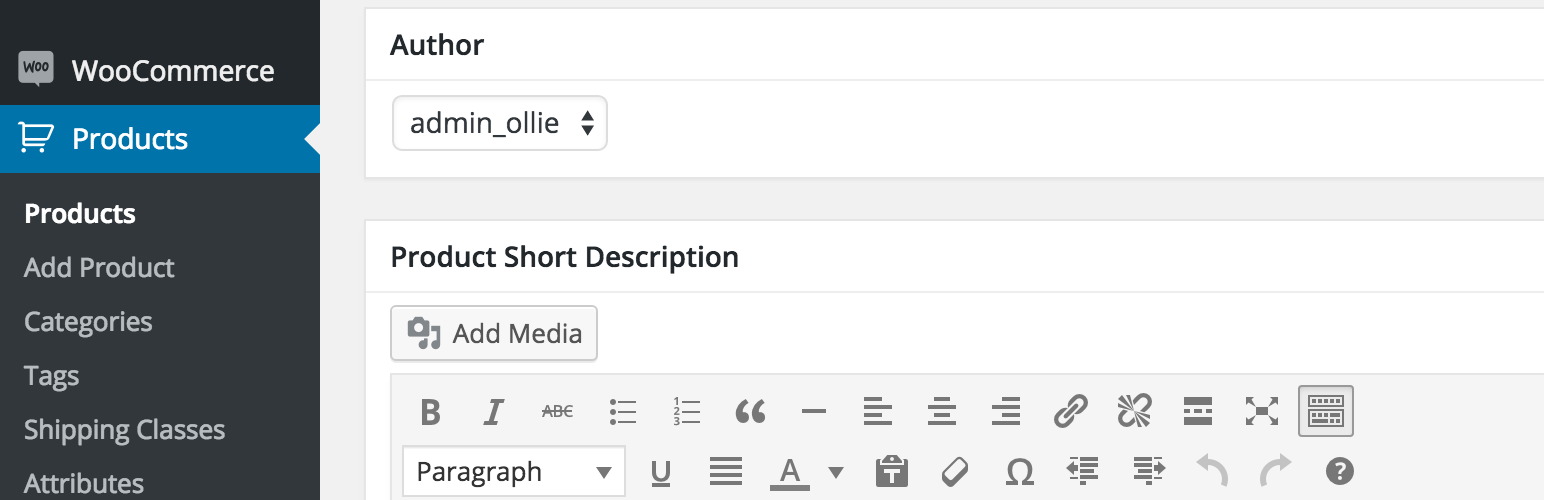
Change Product Author for WooCommerce is a WordPress plugin that allows you to change the author of WooCommerce products. By activating this plugin, you can manage product authors directly from the WordPress dashboard, similar to how you would for standard posts or pages.
This plugin is designed for users who need to reassign product authors without modifying theme files. It is particularly useful for those who want to manage notifications related to product reviews more effectively.
Best for: This plugin suits WooCommerce store owners who need to manage product authors easily.
What it does well
Where it falls short
Change Product Author for WooCommerce provides a straightforward solution for managing product authors, but it is limited to this specific functionality.
Ollie Murphy's own description of Change Product Author for WooCommerce, lightly tidied.
WooCommerce requires at least: 2.2
WooCommerce tested up to: 2.4.12
While working on a project there was a situation where I needed to change the author assigned to a WooCommerce product. The product author was receiving unwanted notifications when reviews for the product were being left. We did not want to turn the notifications off; we just wanted them to go to a different author or user. Changing the author is easily possible with posts and pages, but the option isn’t available by default for WooCommerce products.
Adding the functionality is very simple – it involves adding author support to the product post type which can be accomplished by adding the following to your theme’s functions.php file:
if ( post_type_exists( 'product' ) ) {
    add_post_type_support( 'product', 'author' );
}
However, for users who don’t want to touch the functions.php file, or would prefer a solution that is not restricted to a theme, I created this simple plugin. Just activate the plugin with WooCommerce also installed and you will be able to change the author of a product as if it were a standard post or page.
After activating the plugin you will be able to change the author assigned to a WooCommerce product by editing the product in the WP dashboard. See screenshot for details.
If you do not see a place to change the author, check the screen options and make sure that ‘Author’ is checked. See screenshot for details.
Other plugins for bookstores and publishers.
AI powered SEO assistant & content writer with 40+ templates, chatbot, NLP keyword research, AEO, GEO, SEO...

List the most recent posts with post titles, thumbnails, excerpts, authors, categories, dates and more!

Very customizable plugin to list posts by category (or tag, author and more) in a post, page or widget. Uses t...

A Customizable Testimonial plugin to Automate Collecting, Filtering, and Publishing Customer Reviews. Testimon...

PublishPress Authors is the best plugin for adding authors, co-authors, multiple authors and guest authors to...

Import your demo content, widgets and theme settings with one click. Theme authors! Enable simple theme demo i...