Quick View For WooCommerce
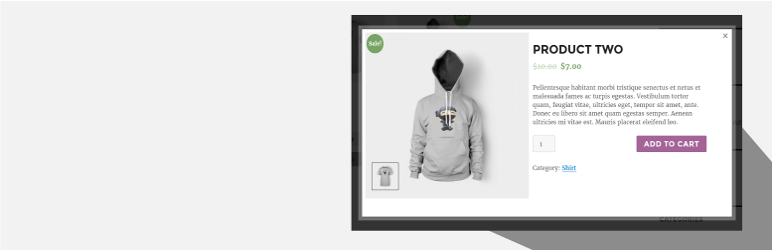
Quick View For WooCommerce plugin allows the customers to have a brief overview of every product in a light box.
The facts
- Rating
- 4.8★ from 99
- Active installs
- 1k+
- Price
- Free
- Last updated
- 6 Jun 2026
- Added
- Jul 2016
- Requires WP
- 4.8
- Tested up to
- WP 7.0.4
- Downloads
- 99,827
Our analysis
AI-assistedQuick View For WooCommerce is a WordPress plugin designed to enhance the shopping experience by allowing users to view product details in a modal window without leaving the current page. It provides a quick summary of the product, including the image, title, price, quantity, and an add to cart button, facilitating easier navigation between products with next and previous buttons.
This plugin is suitable for WooCommerce store owners who want to improve customer engagement by enabling a quick view option for their products. It is developer-friendly and offers customization options for the modal's style and button labels.
Best for: WooCommerce store owners looking to enhance product visibility and customer experience.
What it does well
- ✓Allows quick product viewing without page navigation
- ✓Displays product image, title, price, and add to cart button
- ✓Includes next and previous product navigation
- ✓Customizable modal style and button labels
- ✓Easy to use and developer-friendly
Where it falls short
- •No information on specific customization options
- •Limited details on compatibility with themes or other plugins
Verdict
Quick View For WooCommerce is a straightforward plugin that can help improve the shopping experience on WooCommerce sites. However, the lack of detailed information on customization may limit its appeal for some users.
From the developer
Arshid's own description of Quick View For WooCommerce, lightly tidied.
Quick View For WooCommerce (Woo Quick View) allows users to get a quick look of products without opening the product page.Customers can navigate from one product to another using next and previous product button.
Go to Settings > Quick View.
Demo : https://woo.ciphercoin.com/
Features of Quick View For WooCommerce
- Add a button in product loop to open a modal window with the product summary using ajax
- Product image , title, price, quantity and add to cart button will be shown on popup.
- Disable “Quick View” on mobile.
- Set a label for the “Quick view” button.
- Easy to use
- Developer friendly & easy to customize
- Customize style of modal
Other WooCommerce Plugin
WooCommerce Abandoned Cart Recovery
Support : http://www.ciphercoin.com/contact/