WP 3D Thingviewer Lite
This plugin provide a 3D model files viewer to embed your 3d models on your Wordpress pages or posts.
The facts
- Rating
- 3.2★ from 5
- Active installs
- 100+
- Price
- Free
- Last updated
- 8 Apr 2025
- Added
- Jan 2019
- Requires WP
- 4.8
- Tested up to
- WP 6.7.7
- Downloads
- 7,551
Our analysis
AI-assistedWP 3D Thingviewer Lite is a WordPress plugin that allows you to embed 3D model files into your posts or pages. It supports multiple file formats, including STL, OBJ, FBX, and GLB, and includes a shortcode generator for ease of use.
The plugin provides interactive features such as moving, rotating, and zooming the 3D models. It also includes options for displaying model information and a fullscreen mode. This plugin is suitable for users who want to showcase 3D models on their WordPress sites.
Best for: This plugin is best for users looking to integrate 3D models into their WordPress content.
What it does well
- ✓Supports multiple 3D model file types (STL, OBJ, FBX, GLB)
- ✓Includes a shortcode generator for easy embedding
- ✓Provides interactive viewing options like zoom and rotation
- ✓Displays useful model information such as surface area and volume
- ✓Fully translatable via .PO files
Where it falls short
- •Limited to the features provided in the free version
- •No information on additional features in the paid version
Verdict
WP 3D Thingviewer Lite offers basic functionality for embedding 3D models but may lack advanced features found in the paid version.
From the developer
Accolore's own description of WP 3D Thingviewer Lite, lightly tidied.
This plugin provide a 3D model files viewer to embed your 3d models on your WordPress pages or posts.
You can load models into WordPress media into multiple format (STL, OBJ, FBX, GLB) and then, by using the plugin shortcode generator, you can embed the thingviewer into you pages or posts.
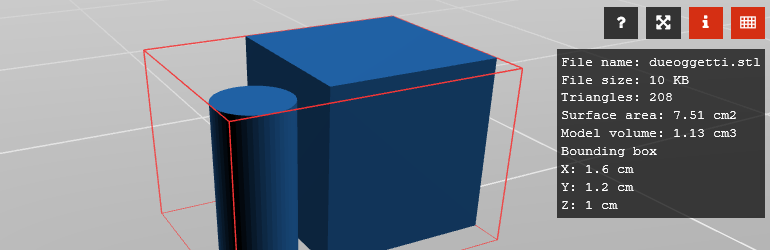
In the thingviewer you can move, rotate and zoom the camera (with mouse or with keyboard). A set of option buttons are provided to let you access some useful information.
– Help window button to display the mouse and keyboard commands to operate the thingviewer.
– Info window button display some useful information about the loaded model, like surface are, volume, bounding box.
– Fullscreen button let you switch to fullscreen mode. You can go back to the “windowed” mode by clicking on the “close” button.
– Bounding box button display around the loaded model a wireframe bounding box.
Theese are the features of the plugin:
- Gutenberg block editor support
- Ease of use via shortcode button generator
- Display a preview image for the 3d model
- Support multiple 3d model file types (STL, FBX, OBJ, GLB)
- Support textured model in GLB file format
- Multiple thingviewers per page or post
- Info window information visilibity
- model filename
- model size in KBytes
- model triangles number
- model surface area in cm2
- model volume in cm3
- model bounding box size in cm
- Fully translatable via .PO files
- Built on WordPress Plugin Boilerplate by Tom McFarlin.
- Uses Three.js library to render the viewer.
There is available a paid version of the plugin that have more customization options here:
https://codecanyon.net/item/wp-3d-thingviewer/23631168