
WPThumbs
Themes Plugins By purpose By industry Best-of lists Fix it guides
Free Plugin by Syed Balkhi v3.0.7

WP Lightbox 2

WP Lightbox 2 adds stunning lightbox effects to images and galleries on your WordPress site.
WP Lightbox 2

The facts

Rating
4.4★ from 89
Active installs
20k+
Price
Free
Last updated
31 Jan 2026
Added
Nov 2011
Requires WP
3.0
Tested up to
WP 6.9.7
Downloads
1,286,099

Our analysis

AI-assisted

WP Lightbox 2 is a WordPress plugin that adds a responsive lightbox effect to images on your website. It allows you to create lightbox effects for individual images as well as for album or gallery photos. The plugin offers a range of settings to configure the lightbox display according to your preferences.

The plugin is designed for ease of use and works with all modern browsers. It includes features such as the ability to enable lightbox effects in comments, display download links for images, and adjust overlay settings. This plugin is suitable for WordPress users looking to enhance their image galleries or photo displays.

Best for: This plugin suits WordPress users who want to improve their image presentation on blogs or websites.

What it does well

  • Fully responsive lightbox effect
  • Easy installation and user-friendly interface
  • Configurable lightbox settings
  • Supports lightbox in comments
  • Tested with popular WordPress themes

Where it falls short

  • No specific pricing information provided
  • Limited information on performance or user experience

Verdict

WP Lightbox 2 offers a straightforward solution for adding lightbox effects to images, making it a practical choice for enhancing visual content on WordPress sites.

From the developer

Syed Balkhi's own description of WP Lightbox 2, lightly tidied.

WP Lightbox 2 is an WordPress lightbox tool for adding responsive lightbox effect for your website images and also create lightbox effect for album/gallery photos on your WordPress blog.
Just install and sit back. This plugin enable image overlay Lightbox effect for all the images in your WordPress website.
Also our WP Lightbox 2 plugin allow you to configure the lightbox settings.
There are a lot of useful setting for this lightbox, that will help you to display lightbox effect in different ways.

This plugin used to add the lightbox (overlay) effect to the current page images on your WordPress blog.

WP Lightbox 2 have a lot of useful features. WP Lightbox 2 features:

Features of WP Lightbox 2 plugin

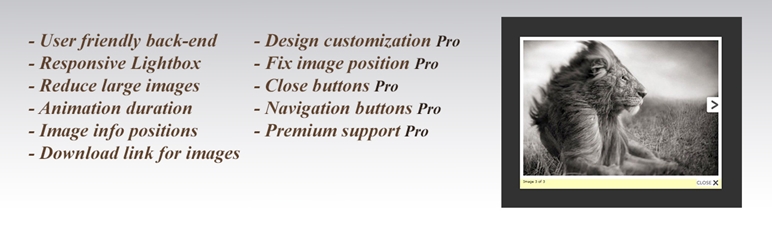
  • Fully Responsive WordPress Lightbox
  • Easy install and use
  • Works on all modern browsers
  • WP Lightbox 2 works perfectly with all versions of WordPress
  • Group related images in post and navigate through them with ease
  • Ability to use lightbox in comments
  • Ability to display download link for images
  • Ability to change image info position
  • Ability to reduce large images to fit smaller screens
  • Ability to set Animation duration
  • Ability to to type additional text below image info
  • Ability to change Lightbox Overlay opacity
  • Lightbox effect for WordPress Galleries
  • User friendly back-end for WP Lightbox 2 plugin
  • Tested on popular WordPress themes

This plugin was created by Syed Balkhi and Thomas Griffin. Check out some of our other products, including Soliloquy – the best responsive WordPress slider plugin, Envira Gallery – the best responsive WordPress gallery plugin and OptinMonster.

WP Lightbox 2 General Settings

  • Use Lightbox for all image links – Enable or disable the lightbox.
  • Enable lightbox in comments – This feature will enable lightbox for your comments.
  • Show download link – You can display download link.
  • Show image info on top – Choose image info position.
  • Reduce large images to fit smaller screens – We recommend to enable this option, it will reduce large images to fit smaller screens.
  • Minimum margin from top – You can change image position from top.
  • Lightbox Animation duration – Type here animation duration for lightbox.
  • Additional text below image info – Type here text, and it will appear below images.

WP Lightbox 2 Design Settings

  • Overlay opacity – Set overlay opacity for lightbox.
  • Overlay color – Choose overlay opacity for lightbox.
  • Overlay close function – This function will close the lightbox when you click on overlay.
  • Lightbox image Border width – Type here Lightbox image Border width.
  • Lightbox image Border color – Choose Border color for Lightbox image.
  • Lightbox image Border radius – Type here Lightbox image Border radius.
  • Show/Hide image numbers(ex. Image 1 of 3) – Choose to show or hide numbers for images.
  • Image info and close button background opacity – Set image info and close button background.
  • Image info and close button background color – Set Image info and close button background color
  • Image info text color(includ download link and other text) – Set Image info text color.
  • Image info text font-size (include download link and other text) – Type Image info text font-size (include download link and other text)
  • Next image title tag – Type here next image title tag.
  • Previous image title tag – Type here previous image title tag.
  • Choose Next/Previous button image – Choose Next/Previous button for lightbox.
  • Maximum Width – Type maximum width for lightbox images.
  • Maximum Height – Type maximum height for lightbox images.
  • Show/Hide close button – Choose to show or hide close buttons for WordPress Lightbox.
  • Close button max height – Type here close button max height for Wp Lightbox 2.
  • Close button image title tag – Type here close button image title tag for Wp Lightbox 2.
  • Lightbox close button image – Choose one, or upload your own image for close button for Wp Lightbox 2.
  • Keyboard navigation – With this feature users also can change images with keyboard.
  • Fix position for lightbox – That’s mean your lightbox shouldn’t change position when users scroll up or down.

This plugin was created by Syed Balkhi and Thomas Griffin. Check out some of our other products, including Soliloquy – the best responsive WordPress slider plugin, Envira Gallery – the best responsive WordPress gallery plugin and OptinMonster.

Read the full description on the official page →

Tagged as

Alternatives

Other plugins for photo galleries.

Smart Slider 3

Responsive slider plugin to create sliders in visual editor easily. Build beautiful image slider, layer slider...

Free 800k+ installs 4.9★ (1,123)
Gallery

Gallery

91

FooGallery is a fast, responsive photo gallery and image gallery plugin with 7 gallery layouts, built-in light...

Free 100k+ installs 4.8★ (986)
Firelight Lightbox

Formerly Easy Fancybox. The most popular WordPress lightbox plugin. Simple, fast, and responsive. Opens images...

Free 200k+ installs 4.8★ (355)
Feeds for YouTube

The Feeds for YouTube plugin allows you to display customizable YouTube feeds from any YouTube channel.

Free 100k+ installs 4.9★ (200)
