Twenty Ten
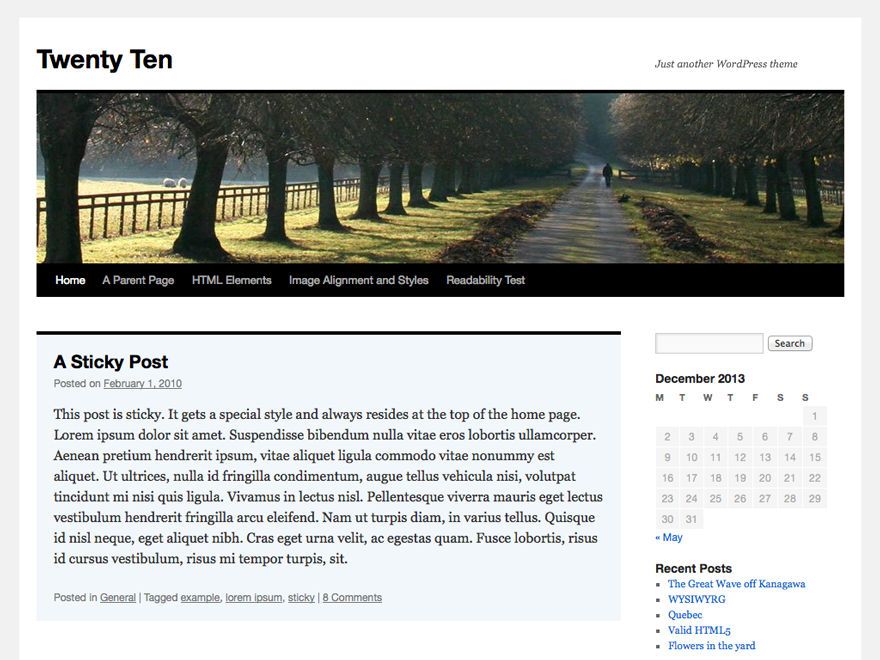
The 2010 theme for WordPress is stylish, customizable, simple, and readable -- make it yours with a custom menu, header image, and background. Twenty Ten supports six widgetized areas (two in the side
The facts
- Rating
- 4.7★ from 54
- Active installs
- 50k+
- Price
- Free
- Last updated
- 19 Aug 2026
- Requires WP
- 3.0
- Requires PHP
- 5.2.4
- Downloads
- 6,866,344
Our analysis
AI-assistedTwenty Ten is a free WordPress theme designed for simplicity and readability. It allows for customization through a custom menu, header image, and background, making it suitable for personal blogs or small websites.
The theme supports six widgetized areas, including two in the sidebar and four in the footer, along with featured images for gallery posts and custom headers. It also includes stylesheets for print and the admin Visual Editor, as well as special styles for specific post categories.
Best for: This theme suits personal blogs or small websites looking for a simple and customizable design.
What it does well
- ✓Free to use from the WordPress.org directory
- ✓Customizable with menus, header images, and backgrounds
- ✓Supports six widgetized areas
- ✓Includes styles for print and the admin Visual Editor
- ✓Optional one-column page template available
Where it falls short
- •Limited information on advanced features
- •No recent updates beyond August 2026
Verdict
Twenty Ten offers a straightforward solution for users seeking a clean and customizable theme. It is suitable for those who prefer a minimalist approach to website design.
From the developer
WordPress.org's own description of Twenty Ten, lightly tidied.
The 2010 theme for WordPress is stylish, customizable, simple, and readable -- make it yours with a custom menu, header image, and background. Twenty Ten supports six widgetized areas (two in the sidebar, four in the footer) and featured images (thumbnails for gallery posts and custom header images for posts and pages). It includes stylesheets for print and the admin Visual Editor, special styles for posts in the "Asides" and "Gallery" categories, and has an optional one-column page template that removes the sidebar.