WP Accessibility fixes common accessibility issues in your WordPress site.
Free
60k+ installs 4.8★ (68)
Find and fix accessibility issues with confidence. Real-time reports, automated fixes, and guidance. Reduce compliance risk and reach more users.
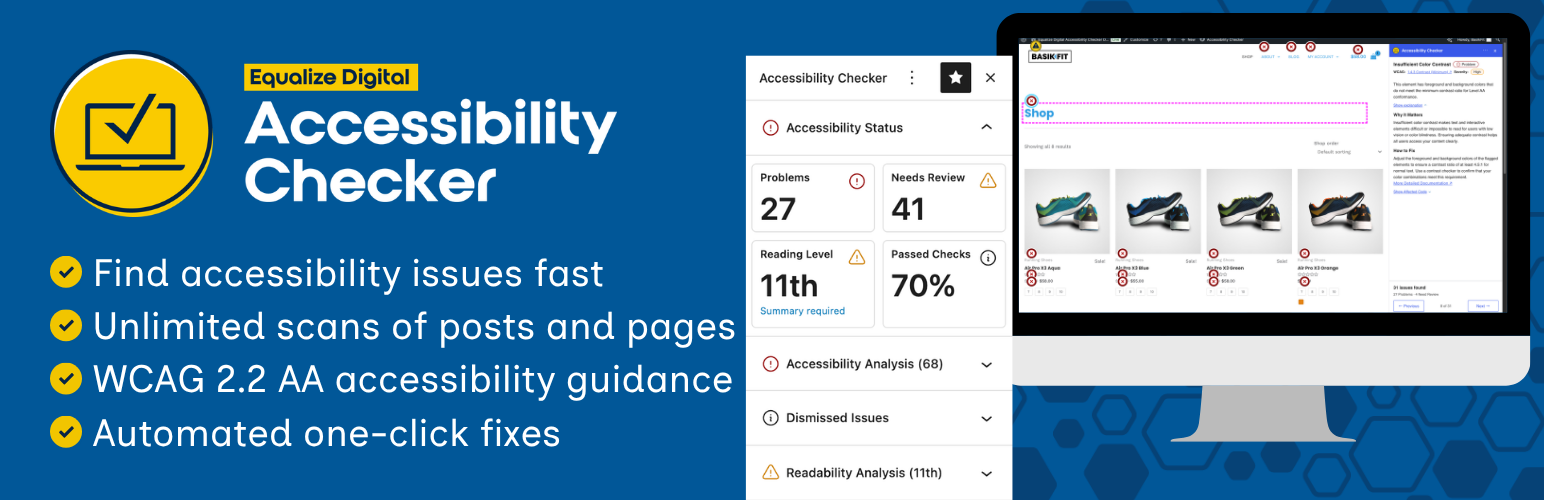
Equalize Digital Accessibility Checker is a WordPress plugin designed to identify and resolve accessibility issues in your website content. It scans posts and pages in real-time as you edit, providing feedback on compliance with accessibility standards such as WCAG, ADA, EAA, and Section 508.
The plugin offers automated fixes for common barriers and generates an accessibility statement to assist with compliance. It is suitable for website owners, content creators, and developers looking to enhance accessibility and usability for all users.
Best for: This plugin is best for website owners and developers focused on improving accessibility compliance and usability.
What it does well
Where it falls short
Equalize Digital Accessibility Checker offers practical tools for enhancing website accessibility. It is a useful resource for those committed to meeting legal standards and improving user experience.
Equalize Digital's own description of Equalize Digital Accessibility Checker, lightly tidied.
Equalize Digital Accessibility Checker helps you find and fix accessibility issues in WordPress. Scan posts and pages as you edit, review WCAG-based issues inside WordPress, apply automated fixes for common barriers, and generate an accessibility statement to support your compliance efforts.
Whether you’re improving compliance with accessibility laws, working toward Web Content Accessibility Guidelines (WCAG) conformance, or making your website easier for everyone to use, Accessibility Checker gives your team a practical workflow for ongoing accessibility testing and remediation.
Plugin Website | Live Demo | Documentation | Compare Free to Pro | Get Pro | WP Accessibility Meetup | WP Accessibility Facebook Group
Laws around the world, such as the European Accessibility Act (EAA), Americans with Disabilities Act (ADA), and Section 508, among others, require websites to be accessible and usable by people with disabilities. Accessibility may be required for your website to be legally compliant.
Accessibility fixes on websites often translate to better overall usability on the site and can improve search engine ranking and conversions.
Including Accessibility Checker on your website and fixing identified problems can help you to:
Accessibility Checker scans your content each time you save or publish and shows accessibility problems directly in the WordPress editor. You can review issues without leaving the edit screen, or switch to a front-end view to see exactly which elements need attention.
Accessibility Checker runs over 40 automated checks based on Web Content Accessibility Guidelines (WCAG) 2.2 and provides documentation for every issue so content creators, site owners, and developers can fix problems faster.
Need help resolving accessibility issues on your website? Accessibility Checker includes one-click fixes for common accessibility barriers in themes and plugins.
lang & dir attributesOther plugins for accessible sites.
WP Accessibility fixes common accessibility issues in your WordPress site.

OneTap is a multilingual WordPress plugin designed for seamless website accessibility.

Free WordPress accessibility widget to improve accessibility for your website visitors. Supports efforts towar...
Add, edit, and bulk-generate alt text for every WordPress image, manually or automatically using AI. Fix image...
Free text to speech with browser voices + premium AI voices from Google, OpenAI & ElevenLabs. Add an audio...

Serious Slider is a free highly efficient SEO friendly fully translatable accessibility ready image slider for...