
WPCode
93Easily add code snippets in WordPress. Insert header & footer scripts, add PHP code snippets with conditio...
Free
3M+ installs 4.9★ (1,873)
Adds quick links in the WordPress admin bar for users of Bricks theme.
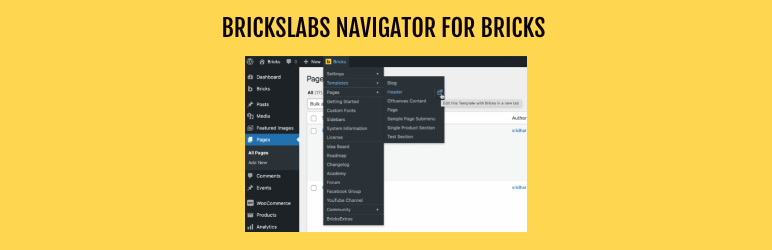
Bricks Navigator is a WordPress plugin designed for users of the Bricks theme. It adds a menu item to the WordPress admin bar, allowing quick access to edit Pages and Templates directly with Bricks, as well as navigate to relevant areas and external sites.
The plugin also features a settings page where users can enable links to Bricks-specific plugins, community sites, and configure whether links open in new tabs. It is particularly useful for those managing smaller sites, as the free version is optimized for a limited number of templates and pages.
Best for: This plugin suits users of the Bricks theme, particularly those managing smaller sites.
What it does well
Where it falls short
Bricks Navigator provides practical navigation tools for Bricks theme users, especially beneficial for smaller sites. However, larger sites may face performance issues.
Sridhar Katakam's own description of Bricks Navigator, lightly tidied.
Adds quick links in the WordPress admin bar for users of Bricks theme.
This plugin adds a handy “Bricks” menu item in the WP admin bar for directly editing Pages and Templates with Bricks, as well as quickly navigating to various areas within the site and external sites relevant for the users of Bricks Builder theme.
A very useful feature is being able to directly view the list of all Templates and Pages and edit any of them with Bricks directly with a single click without going to Templates and Pages list screens first.
The admin bar can also be enabled in Bricks editor pages via the plugin’s settings page at Bricks → Bricks Navigator.
Links to Bricks-specific plugins’ settings page are also provided.
Links to community sites, internal and external Bricks links can be enabled in the plugin’s settings page.
A “new tab” icon is provided for site-specific menu items added by the plugin to open that menu item in a new tab.
All external links open in a new tab.
Built for the Bricks community by Sridhar Katakam of BricksLabs.
Performance Notice: The free version loads all templates and pages in the menu and works best for smaller sites (up to ~20 templates and ~50 pages). For larger sites with extensive content, consider upgrading to our upcoming Pro version for better performance. Note that this only applies for admins and other logged-in users for whom the WP toolbar shows.
Provides a checkbox so that when an element with a CSS class is selected in the editor, the first unlocked class in the classes panel is automatically activated.
An inline collapsible CSS editor panel in the Bricks element panel with two-way binding between CSS and controls. Editable CSS maps back to layout controls; unmappable properties are stored in the element’s Custom CSS field.
Other plugins for developer tooling.
Easily add code snippets in WordPress. Insert header & footer scripts, add PHP code snippets with conditio...

Easily add tracking code snippets, conversion pixels, or other scripts required by third party services for an...

Duplicate post, post order, image resize, email via SMTP, admin menu editor, custom css / code, disable gutenb...

Create custom "Shortcodes" easily for HTML, JavaScript, CSS code snippets and use the shortcodes wit...

Add PHP code to your pages and posts easily using shortcodes.

An easy, clean, and simple way to enhance your site with code snippets.